
-
 Hello Guest! We're hosting a challenge to welcome vintage Intel macs to the MLA during the month of July! See this thread for more information.
 -
We've made some quality of life improvements to the Trading Post. More info here.
You are using an out of date browser. It may not display this or other websites correctly.
You should upgrade or use an alternative browser.
You should upgrade or use an alternative browser.
SE/30: RAM configuration with 16MB SIMMs
- Thread starter JDW
- Start date



Download: Wish I Were
Yes, I have the best of all the compatible systems on the same 1GB HDD partition:
What I really wish is that there was a SCSI drive that was similar to the FloppyEMU -- something I could easily connect and disconnect EXTERNALLY to move software faster and easier than even the FloppyEMU (which is slow because it connects to the floppy port). Of course, the FloppyEMU is powered from the floppy port which is nice. And a similar SCSI drive (with SD card) connected externally would need its own separate power source. Even so, it would be nice to have. SCSI2SD is for internal installations, not external.
Yes, I have the best of all the compatible systems on the same 1GB HDD partition:
- System 6.0.8
- System 7.1 (the best System 7 in terms of speed)
- System 7.5.5 (for software that won't run in 7.1 or below)
- System 7.6.1
- OS 8.1
What I really wish is that there was a SCSI drive that was similar to the FloppyEMU -- something I could easily connect and disconnect EXTERNALLY to move software faster and easier than even the FloppyEMU (which is slow because it connects to the floppy port). Of course, the FloppyEMU is powered from the floppy port which is nice. And a similar SCSI drive (with SD card) connected externally would need its own separate power source. Even so, it would be nice to have. SCSI2SD is for internal installations, not external.
Blimey you have your system setup sweet, I didn’t think you could even run 7.6.1 or 8.1 without accelerators and hacks.
i’d like to be able to run multiple OS on mine although only considered 6.06, 7.1 & 7.5.5.
how did you install all of those? how do format your hard drives into the correct sizes for each os?
i have 1gb internal hd & scsi avid external 2gb hd, zip drive and have it networked to my PowerPc and g3 imac.
i’d like to be able to run multiple OS on mine although only considered 6.06, 7.1 & 7.5.5.
how did you install all of those? how do format your hard drives into the correct sizes for each os?
i have 1gb internal hd & scsi avid external 2gb hd, zip drive and have it networked to my PowerPc and g3 imac.
The SE/30 has a stock 16MHz 68030 CPU. Even 7.5.5 is a bit slow on the stock CPU. 7.6.1 isn't really slower than 7.5.5, but it has a longer boot time. OS 8.1 even with a 50MHz 030 accelerator is a bit sluggish due to all the eye-candy Apple added. An 68040 is nice for 8.1, but a lot of older software, especially System 6 apps, crash under the 040. A 50MHz 030 is really the best acceleration option for the SE/30, I think. But you also need a lot of RAM if you want to run 7.6.1 or 8.1. I would recommend at least 16MB. 32MB is ideal. 128MB will let you do anything you want, but 16MB SIMMs are not always that easy to come by.
Currently, I have a 4.5GB IBM DGHS-04Z spinning platter hard drive inside an Apple external HD20SC enclosure, which I can switch between each SE/30 I use. I also have internal drives for those machines as well, but those are all less than 1GB in size. I've long been considering the purchase of a SCSI2SD but I've never got around to it. Anyway, I keep all partitions to 2GB or smaller on my 4.5GB HDD to ensure System 6 can see all the partitions. I have a 1GB boot partition on that same drive which contains all my operating systems, and System Picker allows me to switch between the operating systems.
I tend to use System 7.1 more than the other operating systems because its fast and compatible with a lot of software. I need System 6 to use some older apps. And let's be honest, System 6 flies even on a stock SE/30. I love the speed. My System 7.5.5 folder is currently not hacked in case I need System 7.5 on an SE/30 with a stock ROM. If I want System 7.5.5 features on a non-stock ROM, I can use 7.6.1 because it's largely the same as 7.5.5. OS 8.1 is there mostly for fun. Seriously, if you need an OS that new you're probably best served with OS 9, but that won't run on 68k Macs.
There are times when I want to run much older software -- games like MacAttack and the like. For that I would need a Mac Plus or older. And I just happened to have a couple 512k Macs, one with a GCC HyperDrive inside, both with the original 64k ROMs (which mean they use 400k floppy drives).
Currently, I have a 4.5GB IBM DGHS-04Z spinning platter hard drive inside an Apple external HD20SC enclosure, which I can switch between each SE/30 I use. I also have internal drives for those machines as well, but those are all less than 1GB in size. I've long been considering the purchase of a SCSI2SD but I've never got around to it. Anyway, I keep all partitions to 2GB or smaller on my 4.5GB HDD to ensure System 6 can see all the partitions. I have a 1GB boot partition on that same drive which contains all my operating systems, and System Picker allows me to switch between the operating systems.
I tend to use System 7.1 more than the other operating systems because its fast and compatible with a lot of software. I need System 6 to use some older apps. And let's be honest, System 6 flies even on a stock SE/30. I love the speed. My System 7.5.5 folder is currently not hacked in case I need System 7.5 on an SE/30 with a stock ROM. If I want System 7.5.5 features on a non-stock ROM, I can use 7.6.1 because it's largely the same as 7.5.5. OS 8.1 is there mostly for fun. Seriously, if you need an OS that new you're probably best served with OS 9, but that won't run on 68k Macs.
There are times when I want to run much older software -- games like MacAttack and the like. For that I would need a Mac Plus or older. And I just happened to have a couple 512k Macs, one with a GCC HyperDrive inside, both with the original 64k ROMs (which mean they use 400k floppy drives).

What I really wish is that there was a SCSI drive that was similar to the FloppyEMU
There is - check the SCSI2SD V5.5, which is a bus powered external SCSI device you can plug directly into the DB25 SCSI port much like a USB thumb drive (only not hot swappable!). You might have the contact the designer to see if he has any for sale - mine looks a little like a prototype but I'm delighted with it - 128GB fast external SCSI drive I can switch around to all my Macs, with a backup of all my 68K/PPC software and MP3s on it.
Last edited by a moderator:
The WIKI still says V5.5 is "coming soon."There is - check the SCSI2SD V5.5, which is a bus powered external SCSI device you can plug directly into the DB25 SCSI port much like a USB thumb drive (only not hot swappable!). You might have the contact the designer to see if he has any for sale...
I'd love to see a photo of yours!

@JDW you don’t need an external power source to run SCSI2SD on an SE/30 ... it takes power from the SCSI bus. I run a SCSI2SD 5.0 in a gutted HD-20SC enclosure for exactly the purpose you mentioned (easily move between machines externally) and it works great. (I happen to use a PSU in mine because I use it with an accelerated Plus, but it’s not needed for the SE/30.)
Wow i like the sound of your setup I would definitely like several os’s as there’s some games I want that won’t work on 7.5.5 that i want. I’ve just brought an analogue board and power supply which I’m looking to re cap soon and change over as I’m getting a bit of screen wobble/flicker so after that i’ll look at hhd and fresh installs, also scsi2sd at the same time but both the later options may not be until next year after house move. I already have 128mb ram but no accelerator.
ah well i have a few pics already
View attachment 26060View attachment 26160View attachment 26223
ah well i have a few pics already
View attachment 26060View attachment 26160View attachment 26223
Last edited by a moderator:
You have a few other compacts, a plus? What do you do with those? Nice idea the scsi in the sc20 case@JDW you don’t need an external power source to run SCSI2SD on an SE/30 ... it takes power from the SCSI bus. I run a SCSI2SD 5.0 in a gutted HD-20SC enclosure for exactly the purpose you mentioned (easily move between machines externally) and it works great. (I happen to use a PSU in mine because I use it with an accelerated Plus, but it’s not needed for the SE/30.)
I have recapping walk-through videos cover the Analog Board and SONY PSU. I also have a video on how to use the SEASONIC power supply as a replacement PSU, for those who don't have a SONY PSU or who want something more powerful. I don't yet have a motherboard recapping video because all my motherboards are already recapped. You should also open your keyboard to check if that needs recapping (they often do). About the only thing I've not recapped yet is my Micron Xceed Grayscale adapter, which uses electrolytic caps. (The stock SE/30 Yoke board doesn't, so you need not worry about that.)I’ve just brought an analogue board and power supply which I’m looking to re cap soon and change over as I’m getting a bit of screen wobble/flicker so after that i’ll look at hhd and fresh installs, also scsi2sd at the same time but both the later options may not be until next year after house move...
Great thank you JDW thats just what i needed. Ive only just ordered a soldering iron so a complete novice. Would you also have a component list with the values to hand as well so i know I’m ordering the right caps and diodes?I have recapping walk-through videos cover the Analog Board and SONY PSU. I also have a video on how to use the SEASONIC power supply as a replacement PSU, for those who don't have a SONY PSU or who want something more powerful. I don't yet have a motherboard recapping video because all my motherboards are already recapped. You should also open your keyboard to check if that needs recapping (they often do). About the only thing I've not recapped yet is my Micron Xceed Grayscale adapter, which uses electrolytic caps. (The stock SE/30 Yoke board doesn't, so you need not worry about that.)
Yes. I include all the nitty gritty details in the text description under all my YouTube videos. Simple click SHOW MORE to expand that text on YouTube. And be sure to read all the descriptions under all my videos because they are all different. That text in combination with the video tells you pretty much everything you need to know. But after reading and watching if you do have a question, please post it under the video as it may be helpful for others. I read and reply to every single comment.
Fabulous us novices would be lost without good folks like yourself! I’ve saved it to my home screen for now as I’ll be looking to perform the surgery in 4-5 weeks time (several commitments over the next 3 weekends thanks to the wife). Luckily i paid to have the motherboard done so just the analogue board and Sony PSU like your vid which i want to do myselfYes. I include all the nitty gritty details in the text description under all my YouTube videos. Simple click SHOW MORE to expand that text on YouTube. And be sure to read all the descriptions under all my videos because they are all different. That text in combination with the video tells you pretty much everything you need to know. But after reading and watching if you do have a question, please post it under the video as it may be helpful for others. I read and reply to every single comment.
Last edited by a moderator:
Brilliant just watched it well 1hr 7 so far but its 12 midnight here so was good to see it even if i’m not going to do it just yetYes. I include all the nitty gritty details in the text description under all my YouTube videos. Simple click SHOW MORE to expand that text on YouTube. And be sure to read all the descriptions under all my videos because they are all different. That text in combination with the video tells you pretty much everything you need to know. But after reading and watching if you do have a question, please post it under the video as it may be helpful for others. I read and reply to every single comment.
Thank you for watching. I would say you are doing better than most. YouTube Analytics as of today shows the average view duration to be a mere 9 minutes on my 1 hour videos, and none of them currently have more than 410 even though they've been out a few months. It's somewhat disappointing. I guess our vintage Mac community is smaller than I thought, or even fewer people have an SE or SE/30 to care. (Perhaps I'm a bit spoiled on the 210,000+ views on my 2009 iMac Video Card Bake video.) But no matter, I don't make videos to make money. I've never made a cent off YouTube. I do it for the enjoyment of helping others who share my hobby. Glad to hear these videos could be of help to you, Neal!
Watched it all. Great job it gives me the heads up before i go ahead and try it myself and what tools i may need, I’m still a bit worried as I’ve not done this before but you have to start somewhere and having 30 yr old electronics as a hobby i need to try. I have a rev 1 board from an SE I figure i try it on there then repay my original board afterwards once i get my confidenceThank you for watching. I would say you are doing better than most. YouTube Analytics as of today shows the average view duration to be a mere 9 minutes on my 1 hour videos, and none of them currently have more than 410 even though they've been out a few months. It's somewhat disappointing. I guess our vintage Mac community is smaller than I thought, or even fewer people have an SE or SE/30 to care. (Perhaps I'm a bit spoiled on the 210,000+ views on my 2009 iMac Video Card Bake video.) But no matter, I don't make videos to make money. I've never made a cent off YouTube. I do it for the enjoyment of helping others who share my hobby. Glad to hear these videos could be of help to you, Neal!


you need to have Bank B filled with something for Bank A to use 16x4 (64mb)
Thank you for this thread and specifically this tip.
I just tried installing 16 MB SIMMs into my fully recapped Mac SE/30 with stock ROM, to replace the working sticks of 1 MB RAM. I figured 64 MB of memory was enough, so to reduce heating I left Bank B empty. On power up, I got the sad mac chimes and garbled screen.
I tried various 16 MB SIMMs because other threads suggest that the SE/30 is finicky (which it may be). I tried reheating the solder joints on the transceivers and other memory interface chips. The whole experience was nerve-racking because every time I removed and installed a stick of memory, I feared snapping off a plastic retention tab from the memory slot.
The Apple memory guide doesn't cover 16 MB SIMM configuration, and the Apple Family Hardware guide has the banks reversed.
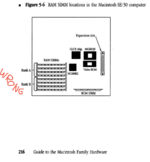
So, thank you for the tip that filling bank B will allow 16 MB SIMMs in bank A. In my case, I used 4 MB SIMMs for a total of 16MB*4 (A) + 4MB*4 (B) = 80 MB. I meant to use 1 MB SIMMs, but I'm not tempting fate by touching those retention tabs again.
- David

I just ran into this issue of testing a machine with 4x16 MB SIMMs / stock ROM and getting sad Mac chimes with the VRAM herringbone screen pattern. I didn't realize they were 16MB SIMMs but I also don't remember all the nuances of SE/30 RAM configs. But one thing I found in my troubleshooting is a 32-bit clean ROM will somehow patch the issue and and boot normally. This was throwing me off for a while thinking there was something wrong with the hardware.
@nickpunt 's earlier link for reference: https://web.archive.org/web/20070531174817/http://www.biwa.ne.jp/~shamada/fullmac/repairEng.html
@nickpunt 's earlier link for reference: https://web.archive.org/web/20070531174817/http://www.biwa.ne.jp/~shamada/fullmac/repairEng.html
Similar threads
- Replies
- 1
- Views
- 253
- Replies
- 11
- Views
- 432


- Replies
- 7
- Views
- 717


