
Neat, I like to see what someone was up to 30 or so years ago. it's very cool and entertaining. Do you know what the drive was previously used with?I don't know yet. I got side tracked today on helping someone so I just now got finished recapping the Classic II. Hey sound works again. bwI will try to hook it up tomorrow. I only know that it powers up and the drive spins up. I don't know if anything is on it or not. I will for sure check for treasures. The Classic II I got still has the original owners files on it, even some custom recorded alert sounds with him talking about an error. funny stuff.
I'll let you know what I find.

You are using an out of date browser. It may not display this or other websites correctly.
You should upgrade or use an alternative browser.
You should upgrade or use an alternative browser.
System Saver And Hard Drive Enclosure
- Thread starter MacintoshMan1999
- Start date

I just hooked it up to the Classic II and low and behold it popped up on the desktop, after system software 7.5 updated the driver and rebuilt the database. It didn't have very much on it. Best I can tell it was used with something that had System 6.05 on it as there is a system folder. It is the 170MB model and it has 150MB free so it only had a little over 10MB used. There was a copy of Write Now 4.0 and about 10 personal documents with someones list of stocks and assets and other stuff. Looks like it was last used in 1997. Since the docs have BOB in the names I assume it is Bob's old docs. :lol: I am going to browse the system folder to see if there is anything good in there but personal docs will get deleted. I haven't browsed all the folders yet but since it was a boot drive and the system software is pretty small in size I would say it was used with some model of a Compact Mac.Neat, I like to see what someone was up to 30 or so years ago. it's very cool and entertaining. Do you know what the drive was previously used with?
Last edited by a moderator:
Neat! Do you have any other hard drives? Or is this your first one?I just hooked it up to the Classic II and low and behold it popped up on the desktop, after system software 7.5 updated the driver and rebuilt the database. It didn't have very much on it. Best I can tell it was used with something that had System 6.05 on it as there is a system folder. It is the 170MB model and it has 150MB free so it only had a little over 10MB used. There was a copy of Write Now 4.0 and about 10 personal documents with someones list of stocks and assets and other stuff. Looks like it was last used in 1997. Since the docs have BOB in the names I assume it is Bob's old docs. :lol: I am going to browse the system folder to see if there is anything good in there but personal docs will get deleted. I haven't browsed all the folders yet but since it was a boot drive and the system software is pretty small in size I would say it was used with some model of a Compact Mac.
I have found several old HDs over the years and found all sorts of interesting things on them. This is the first SCSI HD I have found that was in this form factor for the compact Macs as I was never really a compact Mac user. I didn't like B&W computers at all in those days. I will image it as is though before I format it.Neat! Do you have any other hard drives? Or is this your first one?
CoolI have found several old HDs over the years and found all sorts of interesting things on them. This is the first SCSI HD I have found that was in this form factor for the compact Macs as I was never really a compact Mac user. I didn't like B&W computers at all in those days. I will image it as is though before I format it.
My ImageWriter II has been broken for about the same time as my Mac.
The main problem is that on a lot of the older dot matrix printers there is a string that goes across under the carriage, it seems to advance the ribbon so it stays inked.
The string on mine has broke and I cannot find it sadly, so I’ve been contemplating on where to find it and I’ve come to the conclusion that I will have to buy a parts machine and take it out of it.
Heres what the print looks like:

Any thoughts?
The main problem is that on a lot of the older dot matrix printers there is a string that goes across under the carriage, it seems to advance the ribbon so it stays inked.
The string on mine has broke and I cannot find it sadly, so I’ve been contemplating on where to find it and I’ve come to the conclusion that I will have to buy a parts machine and take it out of it.
Heres what the print looks like:
Any thoughts?
Last edited by a moderator:
Does my drive need a terminator? I don’t know too much about SCSI, but I have a general idea. Is there some sort of guide I could read?
Thanks,
Jack
Thanks,
Jack
And what kind of termInation does the Mac use? Passive or Active?

The Mac has fixed passive termination on the internal end. Active termination can be described as a sensing, variable resistance electronics setup at the end of the external chain for all practical purposes. Can be within a SCSI peripheral, but all mine are built into terminators, but one cable harness I pulled from the enclosure of my first 1GB HDD.
Why I ask is because I believe there is no built in terminator on my HD enclosure and the drive itself. So I'd buy passive, correct?The Mac has fixed passive termination on the internal end. Active termination can be described as a sensing, variable resistance electronics setup at the end of the external chain for all practical purposes. Can be within a SCSI peripheral, but all mine are built into terminators, but one cable harness I pulled from the enclosure of my first 1GB HDD.
by internal end do you mean the computer itself?
heres what the manual says:
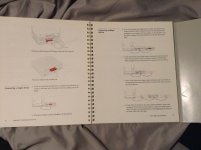
Yep, internal means the devices on the ribbon cable connected to the logic board.
That manual is for what? It makes my head hurt. Page 72 is fine, ignore everything on page 73. The only time I've ever seen termination required between the computer and the last device at the end of an external chain would be a passthru terminator on a PowerBook HDI-30(?) cable where you plug in a peripheral cable to connect the first device. But I've not seen everything. :lol:
Active termination is an advertised "feature," not a requirement outside of edge cases. Passive terminators are fine for all practical purposes.
That manual is for what? It makes my head hurt. Page 72 is fine, ignore everything on page 73. The only time I've ever seen termination required between the computer and the last device at the end of an external chain would be a passthru terminator on a PowerBook HDI-30(?) cable where you plug in a peripheral cable to connect the first device. But I've not seen everything. :lol:
Active termination is an advertised "feature," not a requirement outside of edge cases. Passive terminators are fine for all practical purposes.
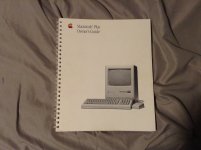
Interesting, that might explain much about why that page made my head hurt. I wonder what's in the SE manual? SCSI was new to the Mac in the Plus so I wonder if the SE manual has similar info in it? I'm betting not as the Plus isn't set up for an internal HDD and so not terminated correctly at the controller for the non-existent "internal bus?" IIRC termination for the Macintosh Plus internal SCSI hack requires termination at the controller? Apple implemented proper termination on all Macs released after the Plus because all had HDDs as stock equipment or provision for adding them. So the above Mac Plus Manual recommendations would have been contraindicated /outdated.
@360alaska is what I recall about the Plus hack and wildly guess about later Mac implementations correct?
Mac Plus termination might make an interesting addition to @trag's SCSI Voodoo HowTo.?
No time to nail any of this down ATM, little help from the boffins?
@360alaska is what I recall about the Plus hack and wildly guess about later Mac implementations correct?
Mac Plus termination might make an interesting addition to @trag's SCSI Voodoo HowTo.?
No time to nail any of this down ATM, little help from the boffins?
Last edited by a moderator:
So, like this?
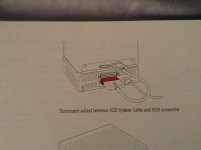
Yes, assuming your HDD isn't terminated.
To re-complicate matters: that's a passthru terminator, it could also be positioned on the top (outlet) connector of the enclosure as in the next illustration. That's where you'd install it or a terminator block at the very end of the chain for highest efficiency. That's how internal UltraSCSI cables are set up. A fixed terminator is located a few inches past the last connector on the ribbon cable. I prefer the closed ended block terminator type because they look like they're plugging up the end of the chain.
To re-complicate matters: that's a passthru terminator, it could also be positioned on the top (outlet) connector of the enclosure as in the next illustration. That's where you'd install it or a terminator block at the very end of the chain for highest efficiency. That's how internal UltraSCSI cables are set up. A fixed terminator is located a few inches past the last connector on the ribbon cable. I prefer the closed ended block terminator type because they look like they're plugging up the end of the chain.


When installing my SCSI mod, it is only terminated by the SCSI2SD. I'd imagine that if one had other external scsi devices to connect one might need to remove the scsi2sd's termination.Interesting, that might explain much about why that page made my head hurt. I wonder what's in the SE manual? SCSI was new to the Mac in the Plus so I wonder if the SE manual has similar info in it? I'm betting not as the Plus isn't set up for an internal HDD and so not terminated correctly at the controller for the non-existent "internal bus?" IIRC termination for the Macintosh Plus internal SCSI hack requires termination at the controller? Apple implemented proper termination on all Macs released after the Plus because all had HDDs as stock equipment or provision for adding them. So the above Mac Plus Manual recommendations would have been contraindicated /outdated.
@360alaska is what I recall about the Plus hack and wildly guess about later Mac implementations correct?
Mac Plus termination might make an interesting addition to @trag's SCSI Voodoo HowTo.?
No time to nail any of this down ATM, little help from the boffins?
I don't think it is, not sure. How would I check?Yes, assuming your HDD isn't terminated.
Does a pass through act like a normal terminator as well?that's a passthru terminator, it could also be positioned on the top (outlet) connector of the enclosure as in the next illustration.
Classic Macintoshs use UltraSCSI?That's how internal UltraSCSI cables are set up.
And, going on a slight tangent. I'm working on re-soldering the yoke connection on the analog board.
My board uses that adhesive tape stuff and I'm not sure how to replaces it. I'm going to check if I've got any adhesive double sided tape.
Wish me luck!
HAH! Classic Macintoshes don't even use "real" SCSI. The controller is a sub-standard speed IC for slower peripherals and the DB-25 connector is a SCSI abomination.. Apple really should have upgraded the controller limitation LONG before they did so at the tail end of the Quadra era. UltraSCSI came after Fast/Wide SCSI 2 and the Mac had finally transitioned to the economies of scale enabled cost/performance benefits of IDE/ATA before UltraSCSI came into vogue IIRC.
@360alaska thanks for chiming in!
@trag What's the scoop on internal/external chains for the internal SCSI2SD hacked Plus? I just pulled a Plus board and there are no termination resistor packs. That might explain the funky two terminator setup for a multiple device Mac Plus SCSI chain in the instruction manual? If so, the voodoo enabled internal SCSI2SD HDD chain might need to be corrected by addition of an external terminator for kosher implementation/signal reliability? Time for a Voodoo HowTo update? :huh:
@360alaska thanks for chiming in!
@trag What's the scoop on internal/external chains for the internal SCSI2SD hacked Plus? I just pulled a Plus board and there are no termination resistor packs. That might explain the funky two terminator setup for a multiple device Mac Plus SCSI chain in the instruction manual? If so, the voodoo enabled internal SCSI2SD HDD chain might need to be corrected by addition of an external terminator for kosher implementation/signal reliability? Time for a Voodoo HowTo update? :huh:
Last edited by a moderator:
Id assume it's closest to SCSI-1HAH! Classic Macintoshes don't even use "real" SCSI.
It is the original SCSI standard with sub-standard (non-standard but good enough if you will) connector and cablie on the Macintosh end of the external bus.
Similar threads


- Replies
- 4
- Views
- 2K

- Replies
- 10
- Views
- 3K
- Replies
- 11
- Views
- 6K
