• Hello MLAers! We've re-enabled auto-approval for accounts. If you are still waiting on account approval, please check this thread for more information.

System Saver And Hard Drive Enclosure

I re-soldered the yoke connector and the flyback and still no picture, not sure we're to go.

The flyback can be bad also, had the issue once.

If the screen is black without any picture, and hitting the analog board doesn't show anything, but you have the chime and some activity, you can have this issue.

The cable from the logic board can also be faulty.

Have you turned the knob under the screen up ?

 
The flyback can be bad also, had the issue once.

If the screen is black without any picture, and hitting the analog board doesn't show anything, but you have the chime and some activity, you can have this issue.

The cable from the logic board can also be faulty.

Have you turned the knob under the screen up ?
I figured it out, I did what this says:

D4F9E330-6B4F-4C7D-B01A-853F4CD63B13.png

 
I’ve been messing around with the Apple HDSC Initializing program and my non-Apple HD. When I open the program it automatically starts searching for a hard disk, while that is happening the activity light on the HD case flashes one time. Then a text box appears saying “Could not find a suitable HD”. I’m a noob with SCSI, so I’m gonna guess that the open-ended SCSI bus needs to be terminated? Man, I’m such a noob.  :D

 
Last edited by a moderator:
I’m not sure, how would I check?
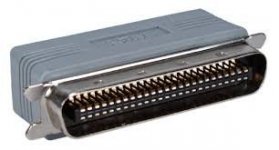
Probably 80% of external SCSI devices require a terminator (similar to below) to be physically installed on the last device. The remaining 20% had a switch (either by itself or in a bank of switches) on the back of the device that could be turned ON or OFF to enable or disable termination as required. So you need either a physical terminator or to turn the switch ON.

terminator.jpg

 
Search the Garden or Repository for LaCie Silverlining, FWB Hard Disk Toolkit. APS PowerTools, or CharisMac Anubis. All four of these will detect and format non-Apple hard drives, though I would recommend Silverlining 5.31 for this application.

 
I've always used that patched version of Apple HD SC Setup that I think originally came from Gamba's site, it works without complaints for 68k machines. I started using it for A/UX and have used it for everything from System 6.0.8 to 8.1 on CF card media and reused SCSI hard drives.

 
Last edited by a moderator:
Search the Garden or Repository for LaCie Silverlining, FWB Hard Disk Toolkit. APS PowerTools, or CharisMac Anubis. All four of these will detect and format non-Apple hard drives, though I would recommend Silverlining 5.31 for this application.


I've always used that patched version of Apple HD SC Setup that I think originally came from Gamba's site, it works without complaints for 68k machines. I started using it for A/UX and have used it for everything from System 6.0.8 to 8.1 on CF card media and reused SCSI hard drives.
The only problem is I have no way to get them on a disk, I’m gonna have to invest in the FloppyEmu. Or maybe a different way, not sure.

 
I'm not sure what my HD's SCSI ID# is, I read it goes from 7 - 0. And 7 is the computer itself. I think it's #0 but then it's the least prioritized number. Just for reference, Macintosh's cannot dasychain floppy drives? I'm' also on the lookout for the "Inside Macintosh" books, were they common? Or will I have trouble looking for a copy?

Thanks,

Jack

 
Back
Top