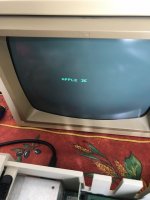
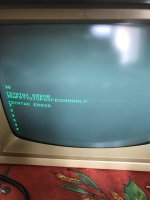
I have an Apple II at home, working (most of) but with a weird display problem.
Image is on the bottom of the screen, not on top, even games are displayed in the bottom part of the screen (screen is not the problem, tested with another, same problem)
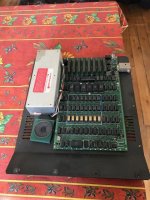
If the "modification" you're referring to is the little silver box that's probably an RF modulator. It would be expected behavior that you wouldn't get anything on your monitor when you connect to it, the output from it is meant for a television tuned to the proper channel. (In the US that would most likely be VHF 2-4, although UHF modulators did exist as well. Your location says you're in France, is it an NTSC Apple II or a PAL modified model?) The monitor is designed to accept plain composite signals, which is what the jack on the board itself produces.
Checking C13 against the Apple II Circuit Description book it says that IC is what produces the video sync based on the outputs from the vertical and horizontal timing chains. If you want to try just shotgunning it I might start with replacing that IC (or reseating it looks like everything is socketed on your board.) and working backwards from there. (The chain is described on page 35 of the book above.)
This site uses cookies to help personalise content, tailor your experience and to keep you logged in if you register.
By continuing to use this site, you are consenting to our use of cookies.