• Hello MLAers! We've re-enabled auto-approval for accounts. If you are still waiting on account approval, please check this thread for more information.

Apple IIe card

bibilit

68030
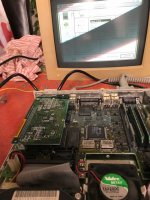
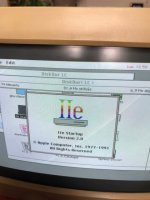
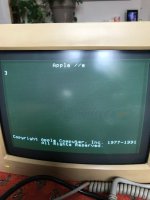
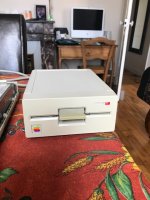
Just collected an Apple IIe card.

Complete including the drive and Y cable.

I am not an Apple II guy, can i use the LC floppy drive to load Aplle II games (so using the LC to fill the gap) ?

Thanks.

IMG_0580.jpg

IMG_0583.jpg

IMG_0579.jpg

IMG_0578.jpg

 
Nice catch Luis!

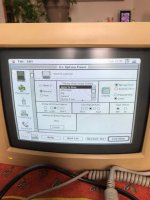
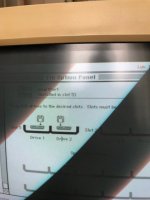
Yes, but you need to set up SmartPort as the startup slot in the "Slot Configuration" Panel. It just really needs to be in one of the seven emulated slots and you should be good to go.

From page 71 of the Owner's guide:

The IIe Startup program uses the startup setting in the Slot Configuration panel to locate a program disk. If a specific slot is designated as the startup slot, IIe Startup goes directly to the first drive assigned to that slot. If the startup option is set to Scan, the program scans the slots,
in descending order from 7 to 1. The first startup disk it encounters is loaded into the computer’s main memory, and you see the opening display for the program on that disk.

SmartPort enables the use of the internal drive (I don't know if it uses the IWM on the IIe card or the SWIM on the Mac, so there's a chance 1.44meg disks won't be properly recognised...)

Be careful with the external floppy port though, as only a handful of 5.25 and 3.5 inch disk drives are compatible with the IIe card...

Only two types of Apple II disk drives—the gray Apple 5.25 Drive and the white UniDisk 3.5 Drive—are compatible with the Macintosh LC. Do not try to use any other type of Apple II disk drive with the Macintosh LC. Doing so may damage the disk drive or the computer, and may destroy the contents of your Apple II disks.


And IIRC, System 7.5 has support for ProDos formatted disks, so you can edit your disks or even create them from images using the Mac OS.

 
Hi Lambert,

As said before, not really an Apple II guy.

I tried to download some games, but all i can get are images (.dsk) Disk Copy is not able to manage those files, so i am in the chicken-egg situation.

Any idea ?

 
The FloppyEmu should work with the IIe card's DB-19 disk port in both 5.25" mode and Smartport mass storage mode. For 3.5" images, There are tools for more modern macs that can convert the DSK and 2MG formats to Disk Copy 4.2.

Getting 5.25" images to disk is tricky though, it might actually be easier to run ADTPro on the IIe card and have a modern machine hooked up via serial to transfer the images to actual disks.

http://adtpro.com/lc.html

 
It works with Floppy Emu : https://www.journaldulapin.com/2018/02/24/apple-iie-card/

Actually, it works too with the internal floppy disk, without problems.

The size of the disk image is a little problem : if the disk image is not the exact size (800 KB or 140 KB), the Floppy Emu will not see it.

If you connect the Floppy Emu to the Mac internal or external floppy connector, you must use 800 KB disk image and the Mac firmware.

And if you try the Floppy Emu with the external cable on the Apple II card, it's important to use the right firmware. You must connect the card with the Mac firmware on the card and change the firmware to the Apple II firmware after that. And if you want to connect the Floppy Emu to the Mac after that, you must change before. The documentation say that you cannot try to connect the Floppy Emu to a Mac with an Apple II firmware, it's dangerous for the hardware.

 
Disk Copy is not able to manage those files
Odd. Do you have PC exchange installed? It provides support for prodos disks as well as MS-DOS ones. 

If Disk Copy doesn't work, then I suggest trying DiskDup+ from the Mac Garden. It is compatible with both Prodos and .dsk images. There are a couple of versions available (2.7, 2.9.2 or "Pro"), every version has its pros and cons and I'm afraid you'll have to try all three to find the most reliable one when it comes to Prodos images.

 
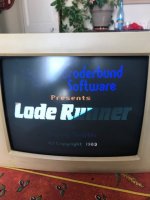
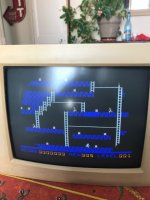
Job done, with some help from a friend, i was able to use it the Apple II way.

this friend supplied to me a 800k ProDos image with the DSK2File utility.

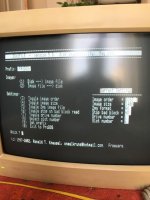
using Ciderpress to generate another Prodos disk with the appropriate .SDK files, i was able to copy and paste files from one disk to another (the LC is provided with two drives and a hard drive)

once in the Apple II side, i was able to convert the .sdk file to the real disk and boot from it.

Only drawback, my Keyboard is french, so the layout is different and i had to guess some keys.

Works pretty well.

IMG_0605.jpg

IMG_0602.jpg

IMG_0604.jpg

IMG_0610.jpg

IMG_0609.jpg

 
Brent Rambo definitely approves your setup! Congrats on getting it to work. 

post-19715-Brent-Rambo-gif-thumbs-up-imgu-L3yP.gif.e8488a2980965d823da3c3222bbaca57.gif


Nice! I just got a boxed Apple IIe card with all the manuals, software, cables etc so this will be useful when I try it out (I'm also not an Apple II guy but curious)

 
Back
Top