• Hello MLAers! We've re-enabled auto-approval for accounts. If you are still waiting on account approval, please check this thread for more information.

Yahoo Japan/Buyee major score- SE/30 with extras

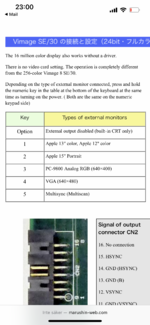
I found this, seems you hold down a number on the keyboard according to this table upon boot to change card settings. This table only refers to the ”non cad” version of the card, so perhaps simply try numbers above 5 if the multisync setting doesn’t give you extra resolutions in the monitor control panel.
 

Attachments

  • 811C3F8D-07BF-4600-A3D9-24972C2D655C.png
    811C3F8D-07BF-4600-A3D9-24972C2D655C.png
    2.1 MB · Views: 60
I found this, seems you hold down a number on the keyboard according to this table upon boot to change card settings. This table only refers to the ”non cad” version of the card, so perhaps simply try numbers above 5 if the multisync setting doesn’t give you extra resolutions in the monitor control panel.
Nice find. This was useful for me as I found the Option key to disable works on GrandVimage too.
 
The Supermac I used to have had a nifty feature where you hold down the spacebar, then it cycles through different resolutions and timings. Once you get a clear picture, you just let go of the spacebar and it boots with those settings. Pretty darn useful.
 
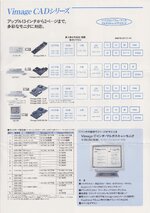
I've also come across a VDR-2L, exactly same hardware as the VDR-2A except all the oscillator slots are filled (and the rom of course) - leading me to believe that is the "Vimage CAD SE/30" and the VDR-2A simply is the standard Vimage SE/30.
I found this, seems you hold down a number on the keyboard according to this table upon boot to change card settings. This table only refers to the ”non cad” version of the card, so perhaps simply try numbers above 5 if the multisync setting doesn’t give you extra resolutions in the monitor control panel.
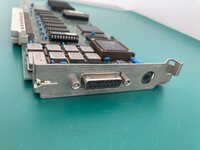
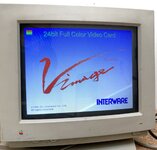
Necropost. Found an Interware VDR-2L Nubus card, posting here for posterity. Check out that splash image!

It has a selector dial, likely to manage resolutions, but now I’m curious if holding 1-9 on boot has the same effect.
 

Attachments

  • IMG_7841.jpeg
    IMG_7841.jpeg
    362.7 KB · Views: 27
  • IMG_7840.jpeg
    IMG_7840.jpeg
    191.4 KB · Views: 22
  • IMG_7839.jpeg
    IMG_7839.jpeg
    281.3 KB · Views: 34
  • IMG_7852.jpeg
    IMG_7852.jpeg
    348.3 KB · Views: 44
Necropost. Found an Interware VDR-2L Nubus card, posting here for posterity. Check out that splash image!

It has a selector dial, likely to manage resolutions, but now I’m curious if holding 1-9 on boot has the same effect.
Thank’s for sharing! Yhea cool splash huh, love having my SE/30 brag about being 24bit 😂
 
The trick is holding the number key/letter key down at power-on AND not having these keystrokes intercepted by the SIMM driver.
 

Attachments

  • Interware Vimage Catalog_0002.jpg
    Interware Vimage Catalog_0002.jpg
    273.9 KB · Views: 13
Back
Top