• Hello MLAers! We've re-enabled auto-approval for accounts. If you are still waiting on account approval, please check this thread for more information.

Video died on a working Macintosh IIx

d3jsp

6502
Video died on a working Macintosh IIx after leaving it on for a while. Turned it off, waited an hour or so, turned it back on and now no video.

It still chimes and boots fine, just no video, completely black screen. Tried the same video card on another machine and the card works. Tried another card on the IIx and still no video.

Could the nubus chip be dead, is that common? Don't think it's caps since I've already recapped most of the electrolytics on the board except for a few that looked fine
 
Chips dying is pretty uncommon. I'd be suspicious of the non-replaced electrolytics that look fine, especially if they're anywhere near the NuBus chip or the slots. Could also be damage from previously replaced caps that didn't surface until now.
 
Check your PSU. It's not uncommon for video cards to depend on one of the non-5V rails for an on-board regulator to run the analog section. If that rail (often +12) stops working, no video output, typically syncs work still so you get a signal detected by monitor but a black screen.
 
I have yet to swap and try another psu since all voltages seem correct. 12V on yellow, 5V on reds and -12V

I haven't recapped any of the radial caps and a few 47 16v but don't think those can affect nubus right?
 
Cap goo eating into a trace can be a problem.

On a Nubus slot you have 32 pins x 3 rows (A B and C) for 96 pins.

A1, A2 are -12V
A32 B32 are +12V
and there are 11 +5V lines plus a ton of grounds.
 
The voltages on those pins all seem correct.
Does anyone know if C9, C10, C12, C13, C21 should beep when testing on both ends of those caps? Seems strange that it would even though the voltages are correct
 
Yeah, about the same (showing 13-14 for me). So that seems correct to me! Recapped the rest of the board except for the radials and still no video as expected.
I feel it's really unlikely that corrosion can eat through traces within an hour so that really makes me suspect it's one of the chips surrounding the nuchip or the nuchip itself :(

Maybe C7,C8,D7,D8,E7,E8,F7,F8 or G1, H1?

Confirmed that VRAMs on the card are getting 5V and (probably) have sync as well
 
My C32 is 2.2V, is that normal? A32 and B32 are +12V which is correct
A1 and B1 are -12V and C1 is 5V

seems to me that A2, B2, C2 aren't voltage lines on mine
 
I feel it's really unlikely that corrosion can eat through traces within an hour so that really makes me suspect it's one of the chips surrounding the nuchip or the nuchip itself :(
If it did eat through a trace, maybe it was nearly eaten through and that last bit (a few microns?) was eaten away, shook apart, etc.

I'm assuming when you tested the video card in the other machine that you used the same monitor (confirming both the video card and the monitor). I recently had an LC 475 that suddenly showed no video and after checking out the PSU and other items, I finally realized that it was the 15" LCD monitor that I use to test everything, that had suddenly stopped displaying video - power lights work, so it appears to be working, but doesn't. Just a thought.
 
Yeah, Unfortunately I don't think it's the monitor 🥲. It's an 12 inch Apple RGB and still works with my other iifx.
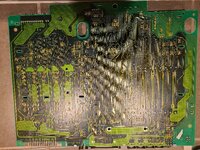
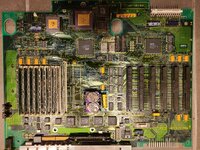
I know there are 2 breaks around ub15 for the serial port but that shouldnt affect video and have been there for a while even before when it was working.

20250530_225904.jpg
20250530_225941.jpg
 
Back
Top