• Hello MLAers! We've re-enabled auto-approval for accounts. If you are still waiting on account approval, please check this thread for more information.

valkyrie (52XX/53XX/62XX/63XX) max vram bandwidth?

If you click the functions list below it’ll point to the entry and approximate length for each driver call in the file listing based on the offsets.

Don’t depend on the length though, it’s just a guess based on most ROMs putting that code sequentially. In reality from that entry point it could jump all over the ROM so it’s best to just chase the disassembly from there.

But it can be convenient to grab the approximately relevant section out of the file.
Nice! Thanks! Great template you have created! :)

OK interesting! Ghidra's analyze was not that helpful as it gets confused with the line-a traps. But after hitting D and skipping the a-line traps, I got a first initial disasm of "control".

I've not done this kind of thing before, and not done any 68k coding. If anyone has some suggestions for next steps I would love to hear it.

Is it typical for the display drivers to have specifically "open/close/control/status" routines? Is it documented/known how these should behave? (input/output/side-effects)?
 

Attachments

I believe "Driver Data" is the data that exists in a DRVR resource (a 68K driver). You can look in the System file for examples of other DRVR resources.

This is a Resorcerer TMPL that you can use to view a DRVR:
Code:
HWRD drvrFlags
HWRD drvrDelay
HWRD drvrEMask
HWRD drvrMenu
HWRD drvrOpen
HWRD drvrPrime
HWRD drvrCtl
HWRD drvrStatus
HWRD drvrClose
PSTR drvrName
CODE drvrCode
but you may need to remove "DRVR Driver" from the CODE Synonyms in the Resorcerer Preferences to use the TMPL.

drvrOpen, drvrPrime, drvrCtl, drvrStatus, drvrClose are offsets in the drvrCode item (where offset 0 is the offset of drvrFlags).

Can't Hex Fiend use Physical Block Size to dump the hex for the DRVR code? I think Resorcerer can do that.

I suppose the SlotsDump code could be changed to dump all the DRVR code (I did include the CodeWarrior Pro 4 project and source for SlotsDump).

A PowerPC driver is similar to a 68K driver except that it's a shared library/code fragment with an exported function that is used to do Open, Control, Status, Close etc. Inside Mac should have info about how to create drivers
- Designing Cards and Drivers for Macintosh Family
- Designing PCI Cards and Drivers for Power Macintosh Computers

The Mac OS 9 System file has a ndrv (PowerPC driver) for .Display_Video_Apple_ValkyrieAR but not .Display_Video_Apple_Valkyrie.

I'm not sure why Slot Manager contains all that info about video modes when you can get the same info from the DRVR.
Thanks! I'll have to digest this a bit :D
 
You'll want to find the list of control and status codes used by video drivers.

Maybe search the Apple Developer CDs for DDKs containing graphics drivers. Different years will have different sets of samples or different versions.

GDX 950717 is a sample for PowerPC in the PCI Driver Development Kit 2.0. It doesn't exist in the PCI DDK 3.0 for some reason.

Video.h has the codes.
Compare with SuperMario source code and the GDX sample code.

Code:
enum {
/* Control Codes */
    cscReset                    = 0,
    cscKillIO                    = 1,
    cscSetMode                    = 2,
    cscSetEntries                = 3,
    cscSetGamma                    = 4,
    cscGrayPage                    = 5,
    cscGrayScreen                = 5,
    cscSetGray                    = 6,
    cscSetInterrupt                = 7,
    cscDirectSetEntries            = 8,
    cscSetDefaultMode            = 9,
    cscSwitchMode                = 10,
    cscSetSync                    = 11,
    cscSavePreferredConfiguration = 16,
    cscSetHardwareCursor        = 22,
    cscDrawHardwareCursor        = 23,
    cscSetConvolution            = 24,
    cscSetPowerState            = 25,
    cscUnusedCall                = 127                            /* This call used to expend the scrn resource.  Its imbedded data contains more control info */
};

enum {
/* Status Codes */
    cscGetMode                    = 2,
    cscGetEntries                = 3,
    cscGetPageCnt                = 4,
    cscGetPages                    = 4,                            /* This is what C&D 2 calls it. */
    cscGetPageBase                = 5,
    cscGetBaseAddr                = 5,                            /* This is what C&D 2 calls it. */
    cscGetGray                    = 6,
    cscGetInterrupt                = 7,
    cscGetGamma                    = 8,
    cscGetDefaultMode            = 9,
    cscGetCurMode                = 10,
    cscGetSync                    = 11,
    cscGetConnection            = 12,                            /* Return information about the connection to the display */
    cscGetModeTiming            = 13,                            /* Return timing info for a mode */
    cscGetModeBaseAddress        = 14,                            /* Return base address information about a particular mode */
    cscGetScanProc                = 15,                            /* QuickTime scan chasing routine */
    cscGetPreferredConfiguration = 16,
    cscGetNextResolution        = 17,
    cscGetVideoParameters        = 18,
    cscGetGammaInfoList            = 20,
    cscRetrieveGammaTable        = 21,
    cscSupportsHardwareCursor    = 22,
    cscGetHardwareCursorDrawState = 23,
    cscGetConvolution            = 24,
    cscGetPowerState            = 25
};
 
I'll update here with what I found out today, my main objective is to see if I can learn something that would help make blitting faster.

Basically, any of these two things would help a lot:
1. make writes from cpu to vram faster
2. make vram read fast enough that read-modify-write operations could be done instead of using a backbuffer and then blit for these cases.

My most promising path was:
- DMA8-0 in the Valkyrie chip in the developer notes, + mentioning of direct memory access in the Valkyrie AV2. However, when reading the ERS more closely, this DMA is for getting video-in stored in system ram, and the way it works is that it takes a FIFO buffer that is also filled on video-in. So even if I would be able to get the driver decompiled, this would not help much (I'm not interested in the video-in data)
- if there was a way to reduce display ram bandwidth, I tried setting a 640x480x4bit@60hz mode vs 640x480x16bit@60hz but it does not impact much which video mode one is in (somewhat surprisingly). I did find that resetting valkyrie (so no video is read etc), made vram writes a bit faster.
- I've also tried writing with stfd, vs stw and also stmw, stfd is slightly faster than stw, stmw is significantly slower.

One path I have not yet fully explored was to see if there is any point in time that vram writes are faster, or if any pattern of writing them is faster. In brief, it does not seem so. There are some spikes where a write can take several hundred cycles, but they seem to come arbitrary. Might revisit that and do a few more experiments.

But in total, I think 17.8MB/s is about max you can get for cpu registers -> vram.
 
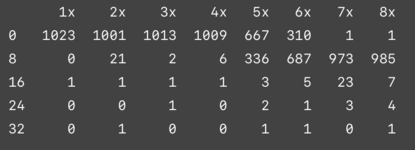
For vram stw writes, I do N in a row and measure tb delta. Here is the frequency distribution (in number of cycles, tb ticks once every 8 cpu cycles on Performa 5200).

We can see here the 4 element cpu-write buffer that @Snial referred to from the 52xx/62xx developer notes.

When just transferring blob of data to vram, it is still best to just hit it with as many as possible and using stfd. When doing any rendering, it is good to know that 4 stw can be somewhat close to each other, and that between 4 stw, some longer cycle work can be done. In my measurement I do measure tb, do 4 stw, measure tb, and calculate tb delta (including checking wrap around) and loop, so outside of those 4 stw I have about 8 cpu cycles, and that is enough for the next iteration to still do well.

Conclusion: there is not much to do here. Any interesting render code will certainly spend more than 16 cycles to generate 8 pixels.
 

Attachments

  • Screenshot 2024-12-27 at 11.52.07.png
    Screenshot 2024-12-27 at 11.52.07.png
    35.7 KB · Views: 6
Back
Top