• Hello MLAers! We've re-enabled auto-approval for accounts. If you are still waiting on account approval, please check this thread for more information.

valkyrie (52XX/53XX/62XX/63XX) max vram bandwidth?

noglin

6502
VRAM on performa 5200 is DRAM, 60ns, 1mb, on a 32 bit bus.

I get about 21.8MB/s when I write 320x240x2 bytes (takes about 0.5M cycles, 0.5M/75 MHZ = 0.0067 => 320*240*2/0.0067/1024/102)
(this is with ideal scenario of unrolled 64-bit writes of constant data).

Two estimates for how much vram is being read for the display (640x480 8bpp, 60hz + one video buffer of 320x240 16bpp, scaled):
- 58.6MB/s: (640*480 + 320*240*2*2)*60/1024/1024 - where it would read the video buffer on next scanline again hence x2, as @snail hypothesized
- 43.9MB/s: (640*480 + 320*240*2)*60/1024/1024 - where *if* Valkyrie has a cache for last video line read, it does not need to read from vram

Hypothetically, could get:
- 66.7MB/s: 60ns, 32bit: 1/60ns*32bit/8
- 106.7MB/s: with FPM, assume 1 initial and 3 fast at 30ns. That it has FPM is probably most likely.

Three cases it seems:
1. I get 80MB/s (no cached video line) and theoretical max is about 107MB/s
2. I get 65MB/s (cached video line) and theoretical max is 107MB/s
3. I get 65MB/s (cached video line) and theoretical max is 67MB/s

Does this seem about right? I suppose there is not much one can do to improve on this?
 

Attachments

  • 1734805658729.png
    1734805658729.png
    43.2 KB · Views: 12
Two paths that might work but I don't think they are possible to achieve
- a way to set a 30hz refresh rate
- a way to turn off the 640x480x8 scan out mode since I anyway only care about the video
 
You have the Valkyrie AV2 ERS? You can find it in a forum post. #20
Minimum dot clock for Valkyrie is maybe 15.67 MHz which allows 30Hz for 768x576 or greater. But you would have to modify the driver to create custom timings.
Code:
for ((x=512;x<=1920;x+=16)); do
    edid-decode -S --gtf w=$x,h=$((y=x*3/4)),pixclk=15.6672
done

Have you tried to verify if display pixel clock & bit depth changes VRAM write speed from CPU?
 
You have the Valkyrie AV2 ERS? You can find it in a forum post. #20
From page 158:
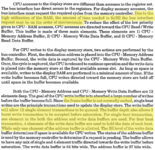
1734873404697.png
Burst transfers are more optimal, but because CPU writes to Valkyrie might take in the order of µs, it would make sense to interleave writes and computation IMHO. Alternatively (but I haven't read this in detail), could Valkyrie's DMA engine be used? If it's possible to get the Valkyrie DMA to transfer from System RAM (not L2 cache) to video and for the application to blit to system ram instead of L2 cache then the system's bandwidth could be maximised: 68040 bus transfers being used by video while the CPU<->L2 bus dominates CPU accesses. I haven't tried to guess at the relative efficiency of writing to L2 and then forcing it to do a burst transfer to system RAM.

@joevt , is there also a link to the Puck 3D engine ERS?
 
You have the Valkyrie AV2 ERS? You can find it in a forum post. #20
The AV2 is for 54XX/55XX/64XX/65XX, and starts of with "This device is totally new design". I have not read it word for word but it has still been useful.
Minimum dot clock for Valkyrie is maybe 15.67 MHz which allows 30Hz for 768x576 or greater. But you would have to modify the driver to create custom timings.
Code:
for ((x=512;x<=1920;x+=16)); do
    edid-decode -S --gtf w=$x,h=$((y=x*3/4)),pixclk=15.6672
done

Have you tried to verify if display pixel clock & bit depth changes VRAM write speed from CPU?
Good point. Comparing the most demanding with the least demanding available resolution, I only get about 5% diff on the test that writes to vram.

Making a new table as my first one had mistakes:

modecycles write vram doublesvram write speedbandwidth
640x480x8bpp 60hz51572817.8MB/s26.4MB/s
(or 35.2MB/s if valkyrie reads video line twice)
A)(640*480*1+320*240*2)*60
B)
(640*480*1+320*240*2*2)*60
640x480*16bpp 67hz54222516.9MB/s39.3MB/s640*480*2*67 (does not support video in this mode)
800x600x8bpp 60hz55550716.5MB/s36.3MB/s
(or 45.0MB/s if valkyrie reads video line twice)
A)(800*600*1+320*240*2)*60
B)
(800*600*1+320*240*2*2)*60
832x624x8bpp 75hz56093716.3MB/s37.1MB/s832x624*1*75 (does not support video in this mode)

In my test I'm actually writing 320x200*2 and the cycles is the average per one frame. So I calculate 17.8MB/s as: (320*200*2)/(515728/(75*1e6))).

It does not seem to have a huge impact. Maybe something else is the bottleneck.
 
Last edited:
From page 158:

Burst transfers are more optimal, but because CPU writes to Valkyrie might take in the order of µs, it would make sense to interleave writes and computation IMHO. Alternatively (but I haven't read this in detail), could Valkyrie's DMA engine be used? If it's possible to get the Valkyrie DMA to transfer from System RAM (not L2 cache) to video and for the application to blit to system ram instead of L2 cache then the system's bandwidth could be maximised: 68040 bus transfers being used by video while the CPU<->L2 bus dominates CPU accesses. I haven't tried to guess at the relative efficiency of writing to L2 and then forcing it to do a burst transfer to system RAM.

@joevt , is there also a link to the Puck 3D engine ERS?
Afaik, there is no way to do burst writes to vram. I can only do that with ram and indirectly (e.g. cache miss to load in cacheable ram) or directly by issuing dcbf which flushes a cacheable address. But vram is marked as non-cacheable.

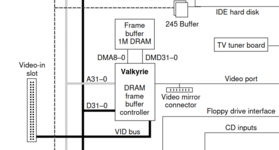
If there was a way for Valkyrie to dma transfer that would be interesting. In the 5200/6200, the figure I had in my post, there is a 1 byte DMA between Valkyrie chip and the vram, not sure what that is for.

The video-in is very likely writing directly to vram without going via the 68040 bus, but that is probably irrelevant for this.
 
Afaik, there is no way to do burst writes to vram. I can only do that with ram and indirectly (e.g. cache miss to load in cacheable ram) or directly by issuing dcbf which flushes a cacheable address. But vram is marked as non-cacheable.

If there was a way for Valkyrie to dma transfer that would be interesting. In the 5200/6200, the figure I had in my post, there is a 1 byte DMA between Valkyrie chip and the vram, not sure what that is for.

The video-in is very likely writing directly to vram without going via the 68040 bus, but that is probably irrelevant for this.
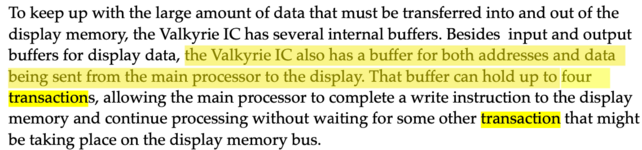
It turns out that because it's not the newer Valkyrie chip, the burst write option isn't available. However, we still know that the earlier Valkyrie supports a 4-entry transaction buffer.
 
You have the Valkyrie AV2 ERS? You can find it in a forum post. #20
Minimum dot clock for Valkyrie is maybe 15.67 MHz which allows 30Hz for 768x576 or greater. But you would have to modify the driver to create custom timings.
Code:
for ((x=512;x<=1920;x+=16)); do
    edid-decode -S --gtf w=$x,h=$((y=x*3/4)),pixclk=15.6672
done

Have you tried to verify if display pixel clock & bit depth changes VRAM write speed from CPU?
So, it turns out the P5200 Valkyrie chip is the older one.

Going back to an old theme, has anyone emulated a P5200 on Dingus PPC?
 
@joevt , is there also a link to the Puck 3D engine ERS?
I haven't heard of that one. I'm not really the ERS guy.

Going back to an old theme, has anyone emulated a P5200 on Dingus PPC?
I suppose that would require info about the original Valkyrie. Also, Power Mac & Performa 5200,5300,6200,6300 (Cordyceps) are pre-Open Firmware. Dingus PPC currently only supports PDM (6100, 7100, 8100) for pre-Open Firmware machines.
 
MAME emulates original Valkyrie for the Q630 and LC580, but its pure reverse engineering aside from what’s in the Marathon source.
 
I haven't heard of that one. I'm not really the ERS guy.


I suppose that would require info about the original Valkyrie. Also, Power Mac & Performa 5200,5300,6200,6300 (Cordyceps) are pre-Open Firmware. Dingus PPC currently only supports PDM (6100, 7100, 8100) for pre-Open Firmware machines.

I know the 5200 is supported by mklinux (a friend ran it on his 5200). For emulation the linux source for basic framebuffer, + emulating the behavior of a few control registers would be enough to get Marathon 2 and Valkyrie specific demos running.
MAME emulates original Valkyrie for the Q630 and LC580, but its pure reverse engineering aside from what’s in the Marathon source.
Had a quick peek at the source, emulation of the video 2x upscale is not implemented, if that would be of interest, this might help: https://macintoshgarden.org/apps/valkyrie-example-code-5x006x00
 
It turns out that because it's not the newer Valkyrie chip, the burst write option isn't available. However, we still know that the earlier Valkyrie supports a 4-entry transaction buffer.
Thanks for finding this nugget!!

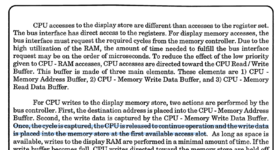
Summarizing what I found that is relevant in the Valkyrie AV2 spec (pg158, and pg215):
- cpu-writes goes into a 12-entry buffer [in contrast to Valkyrie that has 4-entry as Snial found - in the developer notes of 5200/6200]
- when there is "free time available" the cpu-write buffer gets access to display ram
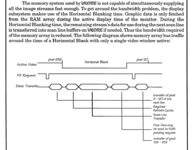
- during active scan, when Graphic Out FIFO is less than half-full, it will issue requests from display ram, other times there is "free time available"
- during horizontal blank, next scanline prefetch starts for Graphic Out FIFO, once completed remaining time is "free time available".

If the behavior is similar for Valkyrie IC, I would have expected different resolutions to have a larger impact?


References:
1734964620760.png


On page 215:
1734965866090.png
And:

1734966064019.png
 

Attachments

  • 1734964641522.png
    1734964641522.png
    102 KB · Views: 6
Thanks, that's useful. I don't suppose you have a binary of it compiled for 68K?
I'm afraid I don't. I hope to one day get a 630 motherboard so I can use 68k as well. Feel free to shoot any questions should there be any. Would be great if we had an emulator that could emulate the Valkyrie more fully.
 
MAME emulates original Valkyrie for the Q630 and LC580, but its pure reverse engineering aside from what’s in the Marathon source.
I am very interested in how you got the drvr for valkyrie and reverse engineered it.

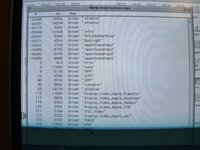
In the attached photo, this is what I see on MacOS 8.5 ”system” in DRVR in resedit.

Would you know perhaps which one of these would have code interacting with the Valkyrie IC? Would you have any disasm to recommend?

IMG_7761.jpeg
 
Does ResEdit have an option to view ROM resources? Resorcerer has a "File Open Preferences" item to "Make ROM resources look like an openable file". The file "System ROM Resources" is created in the System Folder.

However, using tbxi to dump the various parts of the 4 MB Old World ROM reveals that the Valkyrie driver is not a ROM resource.
tbxi dump "1995-04 - 63ABFD3F - Power Mac & Performa 5200,5300,6200,6300.ROM"

Using grep, you can see that the driver is part of the DeclData of the ROM. I believe the DeclData refers to Slot Manager data for NuBus Macs. I suppose DeclData of the Old World ROM is Slot 00 data?
Code:
grep -R "Display_Video_Apple_Valkyrie" "1995-04 - 63ABFD3F - Power Mac & Performa 5200,5300,6200,6300.ROM.src"
Binary file 1995-04 - 63ABFD3F - Power Mac & Performa 5200,5300,6200,6300.ROM.src/Mac68KROM matches
Binary file 1995-04 - 63ABFD3F - Power Mac & Performa 5200,5300,6200,6300.ROM.src/Mac68KROM.src/DeclData matches

To dump Slot ROM data, have a look at the thread at
https://68kmla.org/bb/index.php?threads/calling-all-roms-collecting-declrom-data.46056/
And maybe these:
https://68kmla.org/bb/index.php?thr...extended-declrom-and-system-rom-parser.46053/
#12
#6
#11

You should be able to use one of those tools to get the binary of the driver (may need to manually convert hex to a binary file).

As for 68K and PPC disassembly, I used Jasik's MacNosy a long time ago.
https://www.jasik.com/nosy.html
I don't know which modern tools can do Mac OS 68K and PPC disassembly. Ghidra, IDA, Hopper, Binary Ninja, etc. At least Ghidra is open source but classic Mac OS support is a work in progress:
https://github.com/NationalSecurityAgency/ghidra/pull/7126
 
I use IDA for offline disassembly - it automatically inserts Toolbox trap names and things of that nature, but there's far more that could be done.

As far as reverse-engineering Valkyrie, I didn't disassemble the driver, I simply watch the reads and writes to the documented register area. MAME has a very powerful debugger where you can do things like "breakpoint on a write to this location if the value has these bits set and it's the 7th time" which helps a great deal.
 
Great pointers! Thanks!

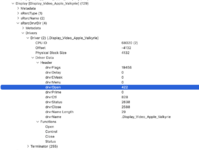
I used Hex Fiend with @eharmon template:
Screenshot 2024-12-25 at 11.16.57.png

As far as I can tell, this is essentially configuration data that MacOS would use for the different video modes?

I suppose the sRsrcDrvDir then points to where the driver routines are. And the driver seems to have: open/control/close/status. I suppose the values, e.g. drvrOpen (422 / 0x1a6), are some offset into where code actually resides?

The tbxi generated also MainCode (which also gets a grep hit for Valkyrie at 000cedd0 but this is just a string and nothing else interesting). I tried to use Ghidra for 68020 and some sections is 68k code, then tried for ppc and it seems to have nothing.

On the 68k disasm, in Ghidra I tried to search for scalar, using the valkyrie register addresses that I know of, range: 0x50f2a00c to 0x50f2400c, nothing, then searched for 0xa000 to 0xb000, again nothing.

I don't really know what I'm doing tbh :D but I assumed that the valkyrie driver would wrap writes/changes to the registers that the chip is mapped to, i.e. that the driver code would have asm instructions that writes/reads to those register values. Maybe that assumption is wrong?
 
If you click the functions list below it’ll point to the entry and approximate length for each driver call in the file listing based on the offsets.

Don’t depend on the length though, it’s just a guess based on most ROMs putting that code sequentially. In reality from that entry point it could jump all over the ROM so it’s best to just chase the disassembly from there.

But it can be convenient to grab the approximately relevant section out of the file.
 
I believe "Driver Data" is the data that exists in a DRVR resource (a 68K driver). You can look in the System file for examples of other DRVR resources.

This is a Resorcerer TMPL that you can use to view a DRVR:
Code:
HWRD drvrFlags
HWRD drvrDelay
HWRD drvrEMask
HWRD drvrMenu
HWRD drvrOpen
HWRD drvrPrime
HWRD drvrCtl
HWRD drvrStatus
HWRD drvrClose
PSTR drvrName
CODE drvrCode
but you may need to remove "DRVR Driver" from the CODE Synonyms in the Resorcerer Preferences to use the TMPL.

drvrOpen, drvrPrime, drvrCtl, drvrStatus, drvrClose are offsets in the drvrCode item (where offset 0 is the offset of drvrFlags).

Can't Hex Fiend use Physical Block Size to dump the hex for the DRVR code? I think Resorcerer can do that.

I suppose the SlotsDump code could be changed to dump all the DRVR code (I did include the CodeWarrior Pro 4 project and source for SlotsDump).

A PowerPC driver is similar to a 68K driver except that it's a shared library/code fragment with an exported function that is used to do Open, Control, Status, Close etc. Inside Mac should have info about how to create drivers
- Designing Cards and Drivers for Macintosh Family
- Designing PCI Cards and Drivers for Power Macintosh Computers

The Mac OS 9 System file has a ndrv (PowerPC driver) for .Display_Video_Apple_ValkyrieAR but not .Display_Video_Apple_Valkyrie.

I'm not sure why Slot Manager contains all that info about video modes when you can get the same info from the DRVR.
 
Back
Top