• Hello MLAers! We've re-enabled auto-approval for accounts. If you are still waiting on account approval, please check this thread for more information.

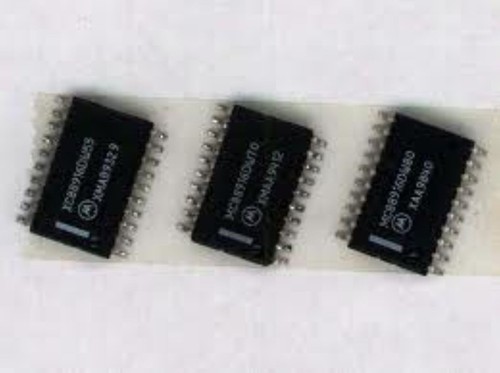
Upgrade MC88920 to MC88916 for LC475/P475/Q605 (advanced soldering)

There is a known limitation(to increase clock frequency by software):

MC88920 is involved into clock generation as well. Each MC88920 has an individual maximum frequency. This is usually around 36-40MHz.

No matter what you set in Soft Overclock extension this frequency cannot be exceeded.
System does not fail but frequency does not rise above the limit.

Only way out is replacing the MC88920 by a MC88916DW80 (require advanced soldering).
 
I found two kind of sources for MC88916DW16:
- E-Bay (there are many similar offers like the one Joopmac linked.
- Aliexpress

Both are from China and both are questionable.
I ordered one part from one of the E-Bay suppliers and one from Aliexpress.

Part from Aliexpress look new and work fine at my device at the moment.
Part from E-Bay was not new as stated but desoldered from somewhere and had a little bit of corrosion, so it is expected the part has been taken from an old device. It took me some time to clean the pads and is probable that the part is not faked but I was not able to test it yet.
 
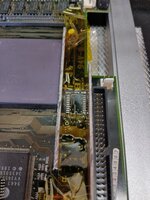
Replacing the part is advanced soldering, as is is SMD and some temprature sensitive parts near by:
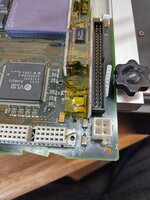
SCSI plug, PRAM battery, processor socket, speaker connector.

What I did was:
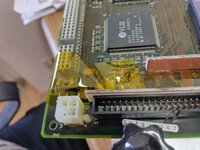
- De-solder PRAM battery holder and speaker connector
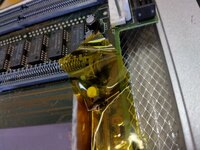
- Build a heat shield for SCSI and processor from old PCBs
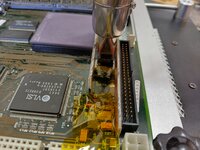
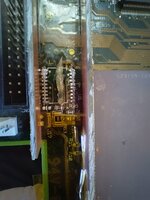
- Covered other parts nearby with capton tape
- De-soldered old chip with hot air
- Cleaned up pads with iron, de-solder wire and a lot of flux
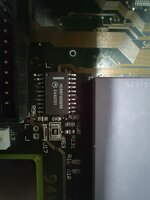
- Added solder paste, flux and new chip
- Soldered with hot air
- cleaned everything with a lot of IPA
- Brought battery back in place and connected speaker with some additional cable.
 
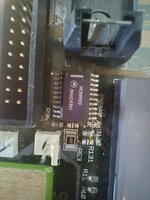
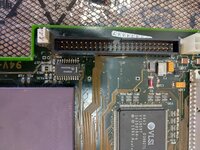
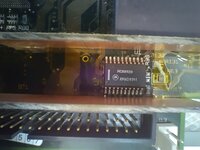
Some pictures about changing MC89920.
Yes there is to much flux under the chip.
I forgot to thake a photo with battery and speaker connector back in place.
 

Attachments

  • Many things nearby.jpg
    Many things nearby.jpg
    185.4 KB · Views: 69
  • Desoldered battery and speaker connector.jpg
    Desoldered battery and speaker connector.jpg
    2.1 MB · Views: 43
  • Build heat shields.jpg
    Build heat shields.jpg
    207.4 KB · Views: 43
  • Kapton.jpg
    Kapton.jpg
    1.8 MB · Views: 41
  • Kapton 1.jpg
    Kapton 1.jpg
    1.5 MB · Views: 39
  • Kapton 2.jpg
    Kapton 2.jpg
    3.2 MB · Views: 39
  • Hot air desoldering.jpg
    Hot air desoldering.jpg
    3.5 MB · Views: 40
  • Cleaning.jpg
    Cleaning.jpg
    2.3 MB · Views: 39
  • Preparation.jpg
    Preparation.jpg
    270.2 KB · Views: 45
  • Soldered.jpg
    Soldered.jpg
    193.2 KB · Views: 63
Using
- 68040RC40
- MC88916DW80 and moved SCSI resistor
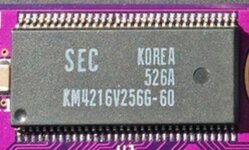
- 1MB 60ns VRAM
- 128MB 60ns RAM
- Heatsink

I am able to run stable at 50MHz.
At 53MHz I get video glitches
and at 54MHz the system crashes.


Are there 64pin 50ns VRAM for LC475 existing?
I know for Powermacs with 112pin they are.

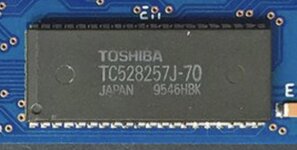
Also I need to get rid of the 70ns onboard RAM.

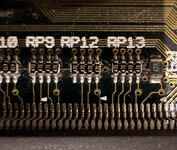
Either desolder or disable by changing resistor in RAS line or changing RAM detection in ROM to start with bank 1 instead of 0.
 

Attachments

  • 50MHz.jpg
    50MHz.jpg
    6.3 MB · Views: 44
  • Video glitches.jpg
    Video glitches.jpg
    524.2 KB · Views: 45
I put together another system from spare parts, replaced the 88920 and scsi resistor, and was able to boot at 42MHz. Any higher would show graphic issues and lock after showing the OC extension loading.
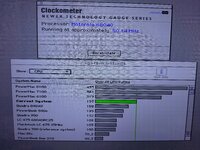
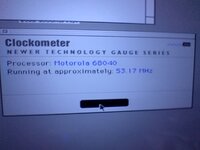
Clockometer verified 42.1Mhz and speedometer showed appropriate improvements. Midway through graphics tests saw display corruption.

Everything else is stock- 25mhz LC040, oem vram. I’ll swap in 70ns vram and 40MHz full 040 and see how it goes.
 
MEMCjr datasheet is asking for 80ns VRAM for 20MHz and 25MHz and 33MHz with and additional wait state.
40MHz require 70ns VRAM and additional wait state.

In my understanding VRAM can either use 2 cycles or with additional wait state 3 cycles.

25MHz -> 40ns/cycle -> 80ns ok without additional wait 2x40ns = 80ns
33MHz -> 30ns/cycle -> 80ns ok with additional wait 3x30 = 90ns
40MHz -> 25ms/cycle -> 70ns required with additional wait 3*25 = 75ns

70ns VRAM will work up to 42,8MHz as this gives 23,3ns per cycle and 3*23,3 = 70ns
60ns VRAM will work up to 50MHz as this gives 20ns per cycle and 3*20 = 60ns

50ns VRAM may work up to 59MHz as this gives 17ns per cycle and 3*17 = 51ns but in this case RAM might be the limiting factor.

There are 512k 60ns VRAM out there for 475 but I have not ever seen a 50ns VRAM made for those.
I know for Powermacs with 112pin there are 50ns VRAM so chips may exist.

You are quite lucky if 80ns VRAM work up to 42MHz

If you wanna go to the top you may investigate if 50ns VRAM can be build.
 
IMG_0593.jpegIMG_0592.jpeg
I have 60ns incoming from SiliconInsider. He has 112-pin powermac vram but the package size is different- not sure if it’s electrically compatible? At least requires a new layout.
 
I replaced vram, and tried two 40MHz rated cpus. In both cases, 42MHz was the highest speed that was stable. What is likely holding it back?
 
fill me in... how the heck did you people get 128MB of RAM on the LC475?? also i am curious about other upgrades i can do. i have one of these computers with a full 68040 running at 25mhz.
 
I replaced vram, and tried two 40MHz rated cpus. In both cases, 42MHz was the highest speed that was stable. What is likely holding it back?
This is exactly what I'm seeing too. I can get my lc475 to boot up to 46 (didnt go any higher), but after 42 I don't see any significant gains. Actually, I noticed a little drop on some of the tests (speedometer). Running a full 33, 512 vram, and 128meg.
 
fill me in... how the heck did you people get 128MB of RAM on the LC475?? also i am curious about other upgrades i can do. i have one of these computers with a full 68040 running at 25mhz.
Phipli released a extension (based on ZigZagJoes's original driver) that allows you to change the clock speed of your lc475 via an application. As you can see in this thread people are trying to maximize their gains via hardware mods, but my lc475 runs quite happily at 42mhz stock (so far 😁).
You can upgrade your lc475 up to 128meg with a single 128meg stick. It works perfectly. I can send you a link to the one I purchased off ebay if you'd like. I think it was around $15.
 
Regarding the onboard ram that is slow… if I remove it will the system start from the simm? Or do I have to also solder jump RAS/signal lines between banks?
 
The 475 will work without any onboard RAM just fine.
Bolle said: Will work without onboard RAM in https://68kmla.org/bb/index.php?threads/faulty-performa-475-mainboard.48880/

As a RAM cycle seems to have either 2,5 or 3,5 CPU cycles
80ns RAM will work up to 43MHz
70ns RAM will work up to 50MHz
60ns RAM will work up to 58MHz
with 3,5 cycle

My board has 60ns SIMM + 70ns onboard and work up to 53MHz
If there is 80ns RAM onboard its probable that only 42MHz will work.

There are multiple ways to get rid of the onboard RAM

- Desolder the onboard RAM but be VERY care full not to run in the trouble described here: https://68kmla.org/bb/index.php?threads/faulty-performa-475-mainboard.48880/
- Desolder RP12, replace 3-6, 2-7, 1-8 with 47R and connect 5 with 300R to 5V If you are very lucky, RP12 are already 4 separate resistors
- If you have programmable ROM SIM in place, you may change code in ROM to not initialize/use onboard RAM (thats the way I'd like to go)

At least the second and third solution can be reverted easily.
 
Back
Top