
I have lucked out and got a PB170 off eBay in excellent condition- no tunnel vision, virtually looks new, boots off a floppy or external HDD. I'm hoping the fact I keep my humidity comparatively low prolongs the screen's health. I'm going to be replacing the PRAM battery, installing a ZuluSCSI, and am considering a battery rebuild. Any recommendations on what else I ought to do while I've got it cracked open or or utilities worth installing? I work with a lot of MIDI equipment so I'm hoping to use it to interface with that.

-
 Hello Guest! The forum software will be upgraded weekend of 06/26. See this announcement thread for more information.
You are using an out of date browser. It may not display this or other websites correctly.
You should upgrade or use an alternative browser.
You should upgrade or use an alternative browser.
Upcoming PB170 repairs
- Thread starter applesos
- Start date
Congratulations! While you have it open, you may want to check the "Spindler plastic" posts. They're often broken. I use hot glue to fix.
Check the capacitors on the inverter board, they might have leaked and spread their juices. Remove with a bit of alcohol and a Q-Tip or similar. If you're up for it, replace them.
Oh, and gently blow any dust off the mother- and daughter boards.
And - most importantly - have fun!
Check the capacitors on the inverter board, they might have leaked and spread their juices. Remove with a bit of alcohol and a Q-Tip or similar. If you're up for it, replace them.
Oh, and gently blow any dust off the mother- and daughter boards.
And - most importantly - have fun!
Be careful of the main flex cable between the two halves of the machine when you’re taking it a paper and reassembling it, and try not to take it apart more than necessary. There have been a few folks here who have damaged the flex cable during repeated disassembly/reassembly cycles while trying to debug issues. Good luck with it!
I'll keep that in mind! Looks like I'll aim for this time to be the only time I disassemble it- hoping to throw a 2Gb volume on the zuluscsi, put in a new PRAM cell, install system7, and call it a day. With that in mind, does anyone have recommendations for current coin cell batteries on the market to replace the PRAM? I had thought it's just a CR2032 in a funny case they soldered to the board but want to make sure I'm not wrong.


You will probably have to repair the screwposts for the hinges, and the ones for the drive cage in the base. The plastics on these aren't really brittle, but they've shrunk a bit with time which causes cracks around screw posts (which have brass inserts that can't shrink with the plastics). You can get 3D printed replacements for all the broken mounts.
So funnily enough those screwposts actually look completely perfect in all the images I saw. So I'm hoping that can wait...You will probably have to repair the screwposts for the hinges, and the ones for the drive cage in the base. The plastics on these aren't really brittle, but they've shrunk a bit with time which causes cracks around screw posts (which have brass inserts that can't shrink with the plastics). You can get 3D printed replacements for all the broken mounts.
You got internal photos? The hinge mounts may be fine for now, but the base ones always seem to break. You'll just have to wait and see when it arrives.
I do think that the hinge mounts *should* be fine if they aren't stress cracking yet - my 180c has original hinge mounts and no stress cracks yet, and it's held for the past 2 years. Every other 100 series machine I've owned has needed them replaced though.
I do think that the hinge mounts *should* be fine if they aren't stress cracking yet - my 180c has original hinge mounts and no stress cracks yet, and it's held for the past 2 years. Every other 100 series machine I've owned has needed them replaced though.
I've yet to see the internals but based on the exterior condition of the hinges and case being utterly flawless the odds are better than normal. The description listed the lid as opening and closing smoothly too. I don't have a 3d printer myself but I live near a couple computer shops that have provided similar services involving 3d printed replacement parts, so I'm not too worried.
Jumping back to the PRAM battery for a moment- does anyone have documentation handy on compatible replacements? The seller said that it keeps time when booted from a floppy and the settings seem to persist between reboots, so it's not all the way dead, but recommended I switch it out anyway during the drive replacement due to it being factory original and therefore imminently about to fail due to it being a 30 year old battery.

The Panasonic cell has tabs pre-welded. I just soldered it through-hole on the interconnect boardsweet! Should I solder a fresh battery holder to the board as well? I think they shipped in the weird plastic peel apart housing right?
Sounds doable!The Panasonic cell has tabs pre-welded. I just soldered it through-hole on the interconnect board
Excellent news! The laptop is inexplicably in FLAWLESS condition. Standoffs look great, no corrosion on the board caps ok, plastics look extremely fresh. Replaced the hard drive with a ZuluSCSI and swapped the PRAM with no problems, booted to 7.5.3 and was able to pull some photos from 1993 off my QuickTake, not that I could see them too well on its display.
The only problem apart from the battery obviously being degraded is that the exterior case screws are just COMPLETELY scuffed. Stripped to absolute hell. I was surprised I could even get them out of the thing the way they are. So I'll have to replace them. The smaller screw holding the modem in looks fine, so it's just the 5 on the bottom of the chassis. I think this has been discussed on here at length and consensus has been they're Torx t8, m2.5 in 6mm length, but the threads I've read all end before the poster actually affirms those work. Just wanted to be sure that's the right dimensions before I place an order! Pics on their way after I finish work- I've got it reassembled on my desk as of lunch today.
The only problem apart from the battery obviously being degraded is that the exterior case screws are just COMPLETELY scuffed. Stripped to absolute hell. I was surprised I could even get them out of the thing the way they are. So I'll have to replace them. The smaller screw holding the modem in looks fine, so it's just the 5 on the bottom of the chassis. I think this has been discussed on here at length and consensus has been they're Torx t8, m2.5 in 6mm length, but the threads I've read all end before the poster actually affirms those work. Just wanted to be sure that's the right dimensions before I place an order! Pics on their way after I finish work- I've got it reassembled on my desk as of lunch today.
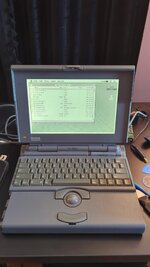
Beautiful! The 170 is one of the best PowerBooks out there 
Everyone knows 180 is best...Beautiful! The 170 is one of the best PowerBooks out there

If you can find one without tunnel vision, sureEveryone knows 180 is best...
Good luck with that though - they seem much more likely to have it than the 170 is unfortunately.
Sweet! It sure looks great. It shouldn't be too hard to rebuild the battery - buy a 5-pack of NiMH (i.e. 5 x 1.2 V = 6 V) or 2 5-packs of NiCds, cut open the battery with a carpet cutter (be careful around the area where the contacts are), and remove the dead cells inside. If you have a single 5 pack, just solder it in (taking care of the polarity. The red wire is usually "+"). If you have 2 5-packs, they need to be connected in sequence. It is a bit tricky to get 2 5-packs inside the battery. Then use tape to close the battery pack. If you have an external charger for Powerbook 1xx series batteries (usually cheap on Ebay), test your rebuild in the charger before you slot it into your Powerbook.Here it is!!
This rebuilt battery will not power your 170 for long, maybe 10-15 minutes or just a day or two when the Powerbook is sleeping - but it's fine for working with the Powerbook while it's connected to the mains. I turn mine off after work, and then disconnect it from the mains.
That doesn't seem too bad. I might buy some individual NiCd cells since it would be a good opportunity to improve my spot welding skills, but getting a prewired pack probably is easier.Sweet! It sure looks great. It shouldn't be too hard to rebuild the battery - buy a 5-pack of NiMH (i.e. 5 x 1.2 V = 6 V) or 2 5-packs of NiCds, cut open the battery with a carpet cutter (be careful around the area where the contacts are), and remove the dead cells inside. If you have a single 5 pack, just solder it in (taking care of the polarity. The red wire is usually "+"). If you have 2 5-packs, they need to be connected in sequence. It is a bit tricky to get 2 5-packs inside the battery. Then use tape to close the battery pack. If you have an external charger for Powerbook 1xx series batteries (usually cheap on Ebay), test your rebuild in the charger before you slot it into your Powerbook.
This rebuilt battery will not power your 170 for long, maybe 10-15 minutes or just a day or two when the Powerbook is sleeping - but it's fine for working with the Powerbook while it's connected to the mains. I turn mine off after work, and then disconnect it from the mains.
Similar threads
- Replies
- 2
- Views
- 250

- Replies
- 2
- Views
- 605

- Replies
- 2
- Views
- 242

- Replies
- 75
- Views
- 8K

- Replies
- 9
- Views
- 733