• Hello MLAers! We've re-enabled auto-approval for accounts. If you are still waiting on account approval, please check this thread for more information.

Unable to find HD SE/30

The short answer is yes. If you have an external floppy disk drive for the Mac SE/30, whether an 800k drive or 1.44m drive you can boot with the disk tools floppy disk that you already used to boot the Mac with, while using a second floppy disk in the second drive loaded with the utilities that you need to diagnose your SCSI drive(s).
The difficult part is creating that second floppy disk with the utilities needed using as you say a modern Mac or PC from downloads from the internet. The issues arise when the items that are downloaded will then need to be decompressed as explained by @A24A. Doing this on a Modern Mac or PC can be complicated. The most successful way is if someone near you can mail you a floppy disk with the utilities that you need on it made on a vintage Mac. The second floppy should include SCSI Probe, Lido, StuffIt expander, Snooper and possibly Apple HD SCSI Setup the Hacked version that supports non Apple drives.
I’d be happy to create and send you one but i am in the USA, perhaps there is someone closer willing.
 
Last edited:
mikes-macs kindly offered to create a floppy disk. If necessary, and if the normal approx. 2-5 days letter delivery time within the EU is acceptable/faster, I would also be glad to help you. If so, just send me a direct message with your address.
 
Last edited:
First of all, I want to thank A24A for sending me the floppy disks!
I tried using the available utilities, and this is the result:
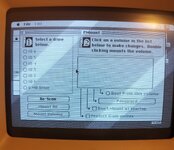
Apple HD SC is unable to find the disk

IMG_20251112_215504.jpg
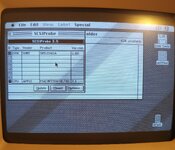
SCSIProbe find it, but it doesn't let me mount it (Nothing happens when I press the button)

IMG_20251112_214731.jpg

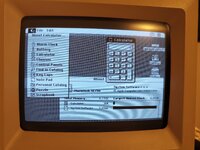
PMount find somenthing, but...

IMG_20251112_201142.jpg

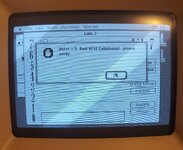
Lido7 is not able to find the disk

IMG_20251112_200818.jpg

Mt.Everything give me the following situation:


View attachment VID_20251112_201356.mp4

At this point, I think the disk is broken. Should I start looking at alternatives such as SCSI2SD?
 
to do some other test or to use it as HD (can I?)? I have ordered the external one (DB25) but I was looking (thinking) to have something fixed inside
 
to do some other test or to use it as HD (can I?)? I have ordered the external one (DB25) but I was looking (thinking) to have something fixed inside
If you’re cautious: try the DB25 and if that works then get something internal.

If you’re impatient: go ahead and order something internal since it seems likely now that the issue is with the Sony hard disk rather than the computer.
 
I’m glad someone sent you a floppy disk with the utilities needed. Sorry it didn’t fix the issue. I’ve seen that same phase error in Lido and I believe it is due to improper termination on the SCSI drive IIRC.
 
I’m glad someone sent you a floppy disk with the utilities needed. Sorry it didn’t fix the issue. I’ve seen that same phase error in Lido and I believe it is due to improper termination on the SCSI drive IIRC.

It could be that one of those resistor networks on the hard drive PCB has gone bad, if op has a multimeter they could test them out of circuit. I don’t recall there being a termination jumper on that model.
 
Glad to hear that the floppies arrived safely. Sometimes, an already existing bad SCSI hard disk driver can be prevented from loading by holding down the four keys Command(Apple) + Option(Alt) + Shift + Delete(Backspace) when starting the computer. That may not change anything here, though. If necessary, you could also try to boot from the Network Access disk 7.5 (the white floppy) instead of your Disk Tools disk.
 
I tried with Network Access and I got the same result.

I don't know if my soldering skills are good enough to remove the resistors from the hard drive to test them.
 
Found wiki.preterhuman.net/Maxtor_LXT213SY via a web search. Would this possibly be of any help at all regarding jumpers et cetera for the other hard drive (the one that is not spinning at this point)?
 
Last edited:
I had already looked at those websites (to see how to connect the status LED), but I didn't find anything else of interest.
 
I tried with Network Access and I got the same result.

I don't know if my soldering skills are good enough to remove the resistors from the hard drive to test them.
They’re socketed - you can lever them out.

Can you check continuity on your motherboard fuse - F3 I think it is.
 
I had already looked at those websites (to see how to connect the status LED), but I didn't find anything else of interest.
Different connector/jumper names/numbers appear to be used on different web sites. Should it be J6 with pins 9-10 connected??? To be double-checked. However, the idea would be to determine whether the Maxtor drive is set to automatically begin spinning when power is applied. Could it be something else, like "stiction" (where one may have to try some kind of centrifugal or direct mechanical way of moving the platters)?
 
Last edited:
Different connector/jumper names/numbers appear to be used on different web sites. Should it be J6 with pins 9-10 connected??? To be double-checked. However, the idea would be to determine whether the Maxtor drive is set to automatically begin spinning when power is applied. Could it be something else, like "stiction" (where one may have to try some kind of centrifugal or direct mechanical way of moving the platters)?
Check the Maxtor drive also has its termination resistor packs fitted.
 
Furthermore, IF it turns out that your Sony hard drive in fact is OK, would it be correct to assume that you have seen https://68kmla.org/bb/index.php?threads/se-30-cant-recognize-scsi-hdd.33956/ about a (solved) SE/30 logic board problem?
I have already checked the connections between the chip and the connector, and they are all working.
They’re socketed - you can lever them out.

Can you check continuity on your motherboard fuse - F3 I think it is.
If I can, I'll take it apart tomorrow and check it.
 
So, I didn't test it by removing the terminals or measuring the fuse. However, I received the blueSCSI and downloaded a ready-made image from the BlueSCSI website (HD0-OpenRetroSCSI-7.1.hda).
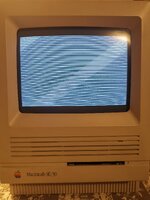
The PC started up correctly, but when I turned it on for the second time, the lines you see in the second image appeared. However, this problem did not recur on subsequent restarts.

IMG_20251118_202450.jpgIMG_20251118_202832.jpg

At this point, I think the problem is the hard drive. I just have to decide whether to continue using this external BlueSCSI or get an internal SCSI2SD, so everything stays cleaner. What do you think?

At this point, I have two more problems to solve.
-The internal floppy disk does not eject the disk when I press eject. I will try a second drive that I already have at home. I know about the well-known problem of gears getting damaged.
-I think the audio is not working. I am not able to replace that type of capacitor myself, so I will try to find someone in my area who knows how to do it.
 
The fuse F3 it's ok, it gives me continuity.

The 3 resistor on the back of the hd give me 140 ohm (left) and 160 ohm (center+right). The last pin on the right in every resistor have got a lower value, around 80 ohm
 
Back
Top