• Hello MLAers! We've re-enabled auto-approval for accounts. If you are still waiting on account approval, please check this thread for more information.

Trying to identify PDS video card make

aminor

6502
Hi All,

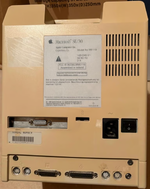
I'm trying to help an acquaintance identify the manufacturer of a graphics card in an SE/30 she is selling. Her husband was in the publishing industry and this Mac has come from that time.

Unfortunately they are not technical and do not have access to someone who might be able to help. I would help them except they are at almost the opposite end of the UK from me, almost 600 miles away.

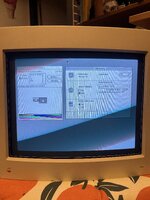
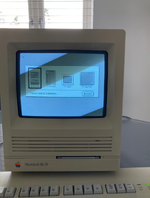
Does anyone recognise the monitor selection screen here? Which manufacturer might have used that screen? I first thought SuperMac from the 19 inch monitor mentioned, but the only SuperMac card I can find only runs at 640x480, far below what I'd expect from a 19 inch screen in the publishing world.

This machine is advertised on UK Gumtree in the Aberdeen area and on UK Ebay, neither of which I'll post here in case I fall foul of a rule. However I've posted the photos she has listed along with the adverts.

Many thanks for any help.

Andrew
 

Attachments

  • SE30Front.png
    SE30Front.png
    1.2 MB · Views: 53
  • SE30Rear.png
    SE30Rear.png
    1.9 MB · Views: 52
@zigzagjoe @Aeroform thank you both for your comments. That was very helpful.

I was wondering about buying the machine myself to preserve the card for posterity, but I need it to work with System 7. I've already got issues with my non-32bit compatible Lapis ColorServer PDS/30-14 and don't have cash to blow on another card that'll bring it's own limitations. I'm most likely now in the market for a 30Video from you, Zigzagjoe.
 
@zigzagjoe @Aeroform thank you both for your comments. That was very helpful.

I was wondering about buying the machine myself to preserve the card for posterity, but I need it to work with System 7. I've already got issues with my non-32bit compatible Lapis ColorServer PDS/30-14 and don't have cash to blow on another card that'll bring it's own limitations. I'm most likely now in the market for a 30Video from you, Zigzagjoe.
Yhea it's a bit of a struggle to get it working under System 7. The way they implemented the screen / resolution picker breaks booting anything above 6.08. The only way to get it into 7+ is to first boot in < 6.08, and then have the setting you choose retained in pram. I have one myself, but due to the above it sits in a box unused..
 
@Aeroform do you recall if it was 32-bit mode compatible? I have a BMOW ROM-inator II Atom that I'd like to use with a colour card and to add more RAM from OWC.
 
Yeah, they have to be doing something fairly gross to make that monitor selector UI work at boot. PrimaryInit as normally used by video cards doesn't run when there's quickdraw or keyboard input to work with. BootRec as I use on the NuCF boards does have both of those, but that's only for cards intended to be bootable and selected as such so that's not how they are doing it. It would not surprise me that there's some edge cases with whatever they're doing especially if they do anything but quickdraw primitive drawing calls.

I recently came into a Lapis ProColorServer 24 myself... it seems to be OK in 32 bit mode but I haven't played with the extensions yet. My thinking was that for cards like the Lapis which have issues with their CDEV in 7.5+, it ought to be possible to suss out what settings lead to which PRAM values in the card pram and build a simple resolution picker utility instead.
 
Yeah, they have to be doing something fairly gross to make that monitor selector UI work at boot. PrimaryInit as normally used by video cards doesn't run when there's quickdraw or keyboard input to work with. BootRec as I use on the NuCF boards does have both of those, but that's only for cards intended to be bootable and selected as such so that's not how they are doing it. It would not surprise me that there's some edge cases with whatever they're doing especially if they do anything but quickdraw primitive drawing calls.

I recently came into a Lapis ProColorServer 24 myself... it seems to be OK in 32 bit mode but I haven't played with the extensions yet. My thinking was that for cards like the Lapis which have issues with their CDEV in 7.5+, it ought to be possible to suss out what settings lead to which PRAM values in the card pram and build a simple resolution picker utility instead.
I have a rom dump for the card if you'd like to dig into it to see what it is doing. I myself have zero clue on how to read / disassemble one of those and kind of gave up. My initial idea way back was to learn how to hack the rom to add additional resolutions / modes (ie maybe greyscale to run as internal greyscale card haha) as the card features sockets for 4 crystals that could easily be swapped. Also wanted to get rid of the resolution picker to get it System 7 friendly.

@Aeroform do you recall if it was 32-bit mode compatible? I have a BMOW ROM-inator II Atom that I'd like to use with a colour card and to add more RAM from OWC.
Sorry not sure, I'll let you know if I find the time to test it out (although that means I'd have to hunt down my 6.08 system disk which is... somewhere haha).
 
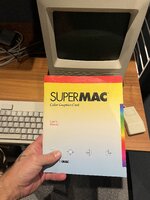
@aminor works fine under 32-bit mode 🎉. Only "issue" is the mentioned need for initial boot with Mac OS < 6.08. Perhaps there's a way to set the needed pram parameter some other way to ensure 7+ compabillity. @bigmessowires might have an idea as he bought my 2nd SuperMac card and has played around with it some(?).

Any other question let me know and I'll consult the manual 😂.

(Somewhat funny, when trying this out for you I couldn't for the life of me get the card to initialise, it was completely dead and I thought it must have gotten broken. Tried EVERYTHING, until I realised I'd pulled the rom chip and it was still in my reader haha).

IMG_1569.jpegIMG_1572.jpeg
 
Back
Top