Follow along with the video below to see how to install our site as a web app on your home screen.
Note: This feature may not be available in some browsers.
Hello MLAers! We've re-enabled auto-approval for accounts. If you are still waiting on account approval, please check this thread for more information.
Howdy,
I just adjusted the CRT on a compact Mac (this time a SE/30).
Adjusting the tilt and screen position meant cutting/breaking the glue on the rings and collar.
I've done a few of these and haven't bothered re-gluing. Just curious what most folks do...
Thanks
Which ring’s need adjustment? I replaced the crt in a mac plus and two rings came loose. So just left them. It works fine but the display is a little to the left. How to adjust that?
So, rubber gloves and a non conductive tool to move it? Like a piece of wood the rings are already unglued so should be fairly easy. Thanks for clarifying what I need to do. Cheers
This site uses cookies to help personalise content, tailor your experience and to keep you logged in if you register.
By continuing to use this site, you are consenting to our use of cookies.













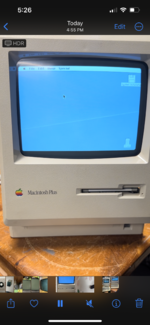

 the rings are already unglued so should be fairly easy. Thanks for clarifying what I need to do. Cheers


