I just got two Titanium PowerBook G4 laptops on Craigslist for $30. One is a 400MHz (Mercury) model with extensive water damage. The other is a 550MHz (Onyx) model with broken hinges but working otherwise.
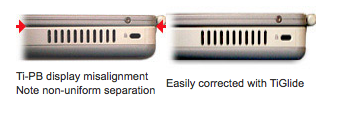
I moved the entire lid/display assembly from the 400MHz to the 550MHz. Everything works, except the lid won't close all the way. It starts to resist strongly at around 5 degrees from completely closed. This leaves about an inch of space between the latch and the screen. I'm afraid to put any more pressure on it for fear of breaking the hinges again. Opening it more than 5 degrees feels normal.
I can't see anything that would block it and I triple checked everything as I put it back together. Everything seems to be seated properly. Is the 400MHz lid just not compatible with the 550MHz model or did I do something wrong?
I moved the entire lid/display assembly from the 400MHz to the 550MHz. Everything works, except the lid won't close all the way. It starts to resist strongly at around 5 degrees from completely closed. This leaves about an inch of space between the latch and the screen. I'm afraid to put any more pressure on it for fear of breaking the hinges again. Opening it more than 5 degrees feels normal.
I can't see anything that would block it and I triple checked everything as I put it back together. Everything seems to be seated properly. Is the 400MHz lid just not compatible with the 550MHz model or did I do something wrong?
Last edited by a moderator: