• Hello MLAers! We've re-enabled auto-approval for accounts. If you are still waiting on account approval, please check this thread for more information.

The quest to get ANOTHER fully working PowerBook 180

PB145B

68000
Some of you remember the like-new and tunnel-free PowerBook 180 I got a while back.

Well, I’m going down the rabbit hole of trying to get a SECOND tunnel-free 180! Or at least mostly tunnel-free anyway… I really want a “beater” machine I can carry around and not have to worry about. The mint one I have is so nice I’d be devastated if something happened to it.

I thought I had one when the second beaten up 180 I bought also showed ZERO signs of tunnel vision! But then the LCD started “bleeding” or getting “pixel rot” as some people call it after a few days of use. At first I was able to push around on the LCD and get rid of most of it, but it came back even worse! So I tried baking it, and that put a big, black splotch in that area of the screen. What a shame!

So, I bought a third 180. This one has pretty bad tunnel vision and it would start to set it almost immediately after power on. Baked it for 5 hours at 212F which helped a LOT, but it still wasn’t perfect.

So I decided to go for another 2 hours, but this time I had the genius idea to go up to 215F, and that was too much! This screen now also has a black spot on it! I was pretty pissed. What’s more sad is the tunneling is pretty much gone, so if it wasn’t for the black spot this screen would be good!

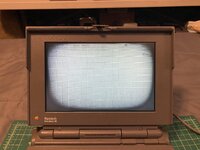
So I now have a fourth PowerBook 180! This one isn’t terrible at all. It tunnels pretty good within 20 minutes or so, but that’s better than the previous one that would get bad within 5 minutes.

Here’s a pic of it after running for a little over 40 minutes.
IMG_0401.jpeg

Pretty bad but I’ve seen worse. I recently baked a screen from a Compaq LTE Lite 4/25e that had almost this same level of tunneling, and I was able to almost completely cure it, so I’m thinking I should be able to fix this one if I do it right.

I might buy one more scrap 180 too to get one more LCD panel. I’m very thankful that 180s are common and pretty cheap, that makes these experiments possible and somewhat practical at least!

If all else fails I might just get a 160 and steal the passive screen from that. If you swap the cable that panel will work fine in a 180, and you’ll still get the benefit faster CPU and FPU. Other than the cap issues those passive screens are much more consistent than these old mono active panels, but man there’s nothing quite like a functional monochrome active matrix display!

But I’ve got good hopes for this latest one so hopefully I won’t have to do that! The plastics are actually pretty good too.

So, in my opinion, I would NEVER go above 212F for baking a screen. I think longer at a lower temp is better than shorter at a higher temp. 212F is pretty close to the limit I think before you start actually destroying the liquid crystal.

More to come!
 
PROGRESS!!!

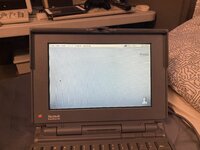
Baked the above screen for 5 hours at 212F, and here it is now after a full HOUR of running!

IMG_0426.jpeg
I’m going to let it run longer and see how it goes. If it doesn’t get much worse I might just call this one done. I don’t want to push my luck and potentially ruin the screen baking it again just for some very slightly dark corners. I wasn’t going for perfect anyway, just wanted something usable.

And yes, the polarizer did get some light checking cracks and is a bit glossier, but that’s alright.
 
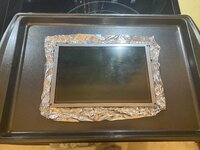
And here’s how I baked it, with the PCB attached!
IMG_0423.jpeg

It turns out that you can remove the backlight assembly and then slide the defuser out from the side! This is very good, because realigning the LCD to the PCB is very difficult I’ve found.

I also unsoldered and removed the flex cable connector, as I was concerned it might melt. Well worth it to avoid having to fight with the alignment of the LCD!

Oh, and there was some hot glue on the back over some potentiometers I also removed. The PCB was completely unharmed!
 
And here’s how I baked it, with the PCB attached!
View attachment 75781

It turns out that you can remove the backlight assembly and then slide the defuser out from the side! This is very good, because realigning the LCD to the PCB is very difficult I’ve found.

I also unsoldered and removed the flex cable connector, as I was concerned it might melt. Well worth it to avoid having to fight with the alignment of the LCD!

Oh, and there was some hot glue on the back over some potentiometers I also removed. The PCB was completely unharmed!
Well this is a great result. I have a 180 LCD that’s ready for a first bake and I’ll do exactly as you’ve done including leaving the PCB in place (what a time saver - thanks for figuring out you don’t actually have to remove it!).

I wonder if there is some way to protect the polariser during baking.
 
Well this is a great result. I have a 180 LCD that’s ready for a first bake and I’ll do exactly as you’ve done including leaving the PCB in place (what a time saver - thanks for figuring out you don’t actually have to remove it!).

I wonder if there is some way to protect the polariser during baking.
Yes, just make sure to remove the backlight tube and defuser, and I recommend unsoldering the video cable connector too, as I don’t think the heat will be kind to it. This was nerve-wracking attempting this, but as I said it’s really not enough heat to damage the electronics, so it ended up being just fine.

Not sure about the polarizer. I really can’t think of a good way to protect it unfortunately.
 
Been letting the baked screen run some more today. Here it is after almost three hours!

IMG_0437.jpeg

What a huge improvement. It’s 100% usable now, though not perfect. It seems like the tunneling doesn’t really progress much more once it gets to this point.

I think I’m calling this one done for now! I just don’t want to bake it again right now and potentially ruin the LCD, that would make me so sad. If the tunneling starts coming back then I’ll definitely bake it again though.

The plastics are also quite good on this one as I mentioned earlier. None of the standoffs on the lower chassis have broken free yet! Some have hairline cracks, but I was really shocked to see that they were all secure still.

I also got a 6MB RAM expansion with this one, so I have 10MB total now, versus the 8MB I had before. There is also room for more RAM chips on this expansion card, so I could probably fill it up and get the full 14MB if I wanted.

It also had its original IBM 120MB hard drive which still worked great, but swapped that for a new little toy I got lately.

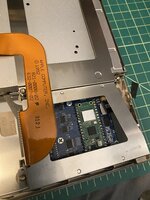
IMG_0428.jpeg
IMG_0429.jpeg

A BlueSCSI V2 PowerBook edition! Now I’m very pro-mechanical-hard-drive, but the BlueSCSI is one of the best new products for vintage computers I have ever seen, PERIOD! This thing is sick, it’s very easy to use, and even has WiFi so I can browse the web on my PowerBook! And all for a very reasonable price! Absolutely an outstanding product!

And also, trying to find SCSI drives for a reasonable price has always been frustrating. However, I am getting a good stockpile of good 2.5” SCSI drives from all of the junk 180s I’ve been buying lately! I’m definitely going to keep mechanical drives in a lot of my Macs still, but the BlueSCSI V2 is just too good to ignore!

Oh, and I did swap in a different set of hinges, because the originals on this PowerBook were stiff. I could possibly lubricate them but I have so many sets it was easier to just swap them for now.

So there you have it. This project is coming along very well I must say!
 
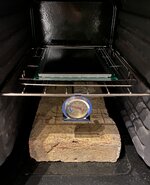
So this is the second of one of these LCDs I've baked. I went for 5 hours at 105˚C (221˚F) which is a little bit on the hot side. I had intended to bake at 100˚C (212˚F), but the temperature kept creeping up. It's pretty hard to regulate a basic domestic oven accurately, but I did put some masonry bricks inside which helped.

I went with @PB145B's method of leaving the PCB attached to the LCD, and removing the backlight/diffuser and desoldering the flat flex connector. I highly recommend this genius approach – not having to deal with zebra stripe alignment issues afterwards is such a relief.

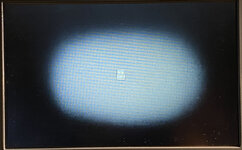
The screen in question tunelled aggressively. When I took the photo below, as far as I remember it had been on for something like 20-30 minutes.

IMG_4584.JPG

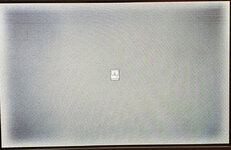
Now, it looks like this after exactly an hour:
IMG_2442.JPG

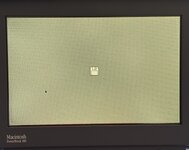
I am a little bit concerned about a mark that looks like damage to the panel. I hope it doesn't grow..
IMG_2439.JPG

I'm going to go for another 5 hour round of baking at 95-100˚C (203-212˚F), taking more care this time not to let it creep over 100.
 
Ooh, just noticed as well that the tunnel effect clears up within a minute or two once shut down, far quicker than the half an hour or more I usually had to wait.
 
So this is the second of one of these LCDs I've baked. I went for 5 hours at 105˚C (221˚F) which is a little bit on the hot side. I had intended to bake at 100˚C (212˚F), but the temperature kept creeping up. It's pretty hard to regulate a basic domestic oven accurately, but I did put some masonry bricks inside which helped.

I went with @PB145B's method of leaving the PCB attached to the LCD, and removing the backlight/diffuser and desoldering the flat flex connector. I highly recommend this genius approach – not having to deal with zebra stripe alignment issues afterwards is such a relief.

The screen in question tunelled aggressively. When I took the photo below, as far as I remember it had been on for something like 20-30 minutes.

View attachment 83120

Now, it looks like this after exactly an hour:
View attachment 83121

I am a little bit concerned about a mark that looks like damage to the panel. I hope it doesn't grow..
View attachment 83122

I'm going to go for another 5 hour round of baking at 95-100˚C (203-212˚F), taking more care this time not to let it creep over 100.
I'm happy to hear you have had success with baking and leaving the PCB attached as well. Trying to get those zebra strips realigned is a complete and utter nightmare so being able to avoid that entirely is amazing.

That is a HUGE improvement! Very nice. Hopefully that little dark spot doesn't grow any... If it doesn't grow any in the coming weeks then it will probably be fine.
Ooh, just noticed as well that the tunnel effect clears up within a minute or two once shut down, far quicker than the half an hour or more I usually had to wait.
Awesome! I have noticed this too. The very slight tunneling my baked 180 screen gets after a few hours of use clears up very quickly once turned off. But on mine now even after 7 or 8 hours of use it's barely noticeable.
 
I have good news about this PowerBook 180! In the months since I baked it, it has gotten better! I let it run a few days ago for almost 8 hours and just the very bottom left and bottom right corners had the slightest darkening. Not even noticeable unless you look close. The top corners were completely unaffected. Next time I let it run for an extended period I'll get a pic. This gives me hope for repairing more of these in the future! I also have a Compaq LTE Lite 4/25e I baked around the same time I need to check again soon.
 
My LTE Lite 4/25E which I baked regressed last I had checked. Maybe I'll do another test today.
My oven isn't very precise so I think the temperature may have been a little too low. I saw improvement after like 4-6 hours of baking, but not much.
 
I have good news about this PowerBook 180! In the months since I baked it, it has gotten better! I let it run a few days ago for almost 8 hours and just the very bottom left and bottom right corners had the slightest darkening. Not even noticeable unless you look close. The top corners were completely unaffected. Next time I let it run for an extended period I'll get a pic. This gives me hope for repairing more of these in the future! I also have a Compaq LTE Lite 4/25e I baked around the same time I need to check again soon.
I’ve noticed the same on my 180 - it got better in the months after baking
 
My LTE Lite 4/25E which I baked regressed last I had checked. Maybe I'll do another test today.
My oven isn't very precise so I think the temperature may have been a little too low. I saw improvement after like 4-6 hours of baking, but not much.
Yeah, it definitely sounds like the temp was too low. But going too high or too long can be a disaster too, as I learned with a previous 180... Got to find that sweet spot. But I think baking these will always be risky. What won't hurt one screen may ruin another.
I’ve noticed the same on my 180 - it got better in the months after baking
Oh, nice! That's really good to hear.
 
Hey, is there a potential risk/benefit to running it more than 5 hours? Or is that just an arbitrary number that seems to produce good results? Could I run it longer at the same temp without risk to the panel? I just bought a 180 and just planning my approach while waiting for it to ship.
 
My LTE Lite 4/25E which I baked regressed last I had checked. Maybe I'll do another test today.
My oven isn't very precise so I think the temperature may have been a little too low. I saw improvement after like 4-6 hours of baking, but not much.
Can confirm this isn't really the case, I think it is still a good bit improved from pre-baking.
 
Hey, is there a potential risk/benefit to running it more than 5 hours? Or is that just an arbitrary number that seems to produce good results? Could I run it longer at the same temp without risk to the panel? I just bought a 180 and just planning my approach while waiting for it to ship.
Congrats on buying a 180! 5 hours is a good start I think. I don't think I'd go longer than that on the first run. I would imagine even at the same temp that these screens can only take so much heat before potential damage occurs.

Definitely though, my advice is to NEVER go above 212F, even though it may be tempting. That seems to be the limit. I had another before the one in this thread and I think I went to like 214F or something and that ruined the panel with a huge black spot in the middle.

Can confirm this isn't really the case, I think it is still a good bit improved from pre-baking.
That's great!
 
So I received my PB 180 and I was prepared to bake it but the tunnel vision on it is very minimal I think. At least compared to some of the pictures I’ve seen. After an hour, there’s a slight edge forming at the bottom left of the screen. But other than that, the screen looks perfect. If it was yours, would you still bake it?

Edit: Tried to upload multiple versions but they all come out with weird artifacts. In person, the screen looks very crisp and uniform, other than that the bottom left corner. Honestly, if it had OS loaded, I don't know that I would notice it.

IMG_5514.jpeg
 
Last edited:
Back
Top