Some of you remember the like-new and tunnel-free PowerBook 180 I got a while back.
Well, I’m going down the rabbit hole of trying to get a SECOND tunnel-free 180! Or at least mostly tunnel-free anyway… I really want a “beater” machine I can carry around and not have to worry about. The mint one I have is so nice I’d be devastated if something happened to it.
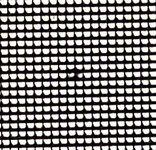
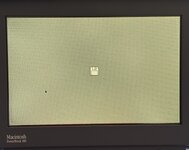
I thought I had one when the second beaten up 180 I bought also showed ZERO signs of tunnel vision! But then the LCD started “bleeding” or getting “pixel rot” as some people call it after a few days of use. At first I was able to push around on the LCD and get rid of most of it, but it came back even worse! So I tried baking it, and that put a big, black splotch in that area of the screen. What a shame!
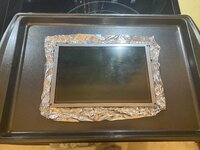
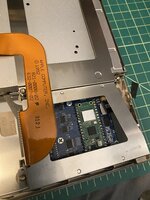
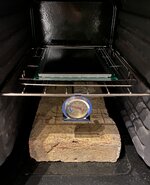
So, I bought a third 180. This one has pretty bad tunnel vision and it would start to set it almost immediately after power on. Baked it for 5 hours at 212F which helped a LOT, but it still wasn’t perfect.
So I decided to go for another 2 hours, but this time I had the genius idea to go up to 215F, and that was too much! This screen now also has a black spot on it! I was pretty pissed. What’s more sad is the tunneling is pretty much gone, so if it wasn’t for the black spot this screen would be good!
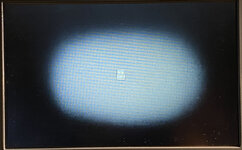
So I now have a fourth PowerBook 180! This one isn’t terrible at all. It tunnels pretty good within 20 minutes or so, but that’s better than the previous one that would get bad within 5 minutes.
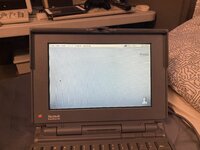
Here’s a pic of it after running for a little over 40 minutes.
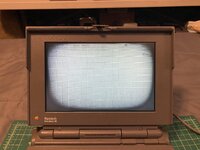
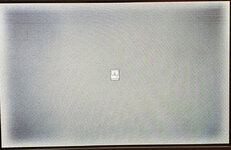
Pretty bad but I’ve seen worse. I recently baked a screen from a Compaq LTE Lite 4/25e that had almost this same level of tunneling, and I was able to almost completely cure it, so I’m thinking I should be able to fix this one if I do it right.
I might buy one more scrap 180 too to get one more LCD panel. I’m very thankful that 180s are common and pretty cheap, that makes these experiments possible and somewhat practical at least!
If all else fails I might just get a 160 and steal the passive screen from that. If you swap the cable that panel will work fine in a 180, and you’ll still get the benefit faster CPU and FPU. Other than the cap issues those passive screens are much more consistent than these old mono active panels, but man there’s nothing quite like a functional monochrome active matrix display!
But I’ve got good hopes for this latest one so hopefully I won’t have to do that! The plastics are actually pretty good too.
So, in my opinion, I would NEVER go above 212F for baking a screen. I think longer at a lower temp is better than shorter at a higher temp. 212F is pretty close to the limit I think before you start actually destroying the liquid crystal.
More to come!
Well, I’m going down the rabbit hole of trying to get a SECOND tunnel-free 180! Or at least mostly tunnel-free anyway… I really want a “beater” machine I can carry around and not have to worry about. The mint one I have is so nice I’d be devastated if something happened to it.
I thought I had one when the second beaten up 180 I bought also showed ZERO signs of tunnel vision! But then the LCD started “bleeding” or getting “pixel rot” as some people call it after a few days of use. At first I was able to push around on the LCD and get rid of most of it, but it came back even worse! So I tried baking it, and that put a big, black splotch in that area of the screen. What a shame!
So, I bought a third 180. This one has pretty bad tunnel vision and it would start to set it almost immediately after power on. Baked it for 5 hours at 212F which helped a LOT, but it still wasn’t perfect.
So I decided to go for another 2 hours, but this time I had the genius idea to go up to 215F, and that was too much! This screen now also has a black spot on it! I was pretty pissed. What’s more sad is the tunneling is pretty much gone, so if it wasn’t for the black spot this screen would be good!
So I now have a fourth PowerBook 180! This one isn’t terrible at all. It tunnels pretty good within 20 minutes or so, but that’s better than the previous one that would get bad within 5 minutes.
Here’s a pic of it after running for a little over 40 minutes.
Pretty bad but I’ve seen worse. I recently baked a screen from a Compaq LTE Lite 4/25e that had almost this same level of tunneling, and I was able to almost completely cure it, so I’m thinking I should be able to fix this one if I do it right.
I might buy one more scrap 180 too to get one more LCD panel. I’m very thankful that 180s are common and pretty cheap, that makes these experiments possible and somewhat practical at least!
If all else fails I might just get a 160 and steal the passive screen from that. If you swap the cable that panel will work fine in a 180, and you’ll still get the benefit faster CPU and FPU. Other than the cap issues those passive screens are much more consistent than these old mono active panels, but man there’s nothing quite like a functional monochrome active matrix display!
But I’ve got good hopes for this latest one so hopefully I won’t have to do that! The plastics are actually pretty good too.
So, in my opinion, I would NEVER go above 212F for baking a screen. I think longer at a lower temp is better than shorter at a higher temp. 212F is pretty close to the limit I think before you start actually destroying the liquid crystal.
More to come!