• Hello MLAers! We've re-enabled auto-approval for accounts. If you are still waiting on account approval, please check this thread for more information.

The ongoing saga of Andrew's SE/30

Techknight is right... those quantums are pretty much garbage now.. I've been able to save a bunch of other manufacturers hard drives but not the quantum scsi's... and that logic board needs to be cleaned and recapped... try to get the gunk off before it does anymore damage to the board. I use a toothbrush and 90% rubbing alcohol in the bath tub... before that I first I remove the SMD caps by squishing them opposite of the solder joints so it makes it easier to rock them back and fourth.. You have to be REALLY CAREFUL when you do this not to pull up and pull off the pads. If you haven't done it before just doing the rock back and forth method is the best while pressing slightly against the board so your not pulling up.. and when one breaks free keep pressing against the board till both leads break free.. DON'T PULL IT. I let it sort of fall off in my fingers on the board before I take it off the board. Then I clean with a q-tip and 90% alcohol 1st to get the initial goo off around where the caps were.. Finally I do the bath in the tub with 90 % rubbing alcohol. I scrub with the toothbrush in between chips and where the caps were..  after scrubbing is done I rinse down the front and back with the 90% rubbing alcohol bottle to rinse off any debris. I shake it in the tub to get off excess alcohol and put it in front of a small space heater with fan in my bathroom to dry it off... (a hair dryer would work better I'm sure). The alcohol dries pretty fast... also be sure to ventilate where you are doing this.. don't inhale those rubbing alcohol fumes.
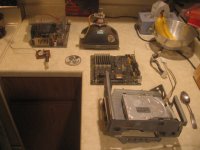
 
Okey dokey. Just to itemize, here's what's been done so far:

* Computer disassembled

* Front bezel glued back together

* Drive cage reattached properly to chassis

And here's what's left to do, in more or less priority order:

* Logic board needs to be cleaned and recapped.

* Hard drive needs to be replaced (and system software somehow needs to be installed on it, despite me lacking any media).

* Missing floppy drive cable needs to be replaced.

* Missing hard drive LED cable needs to be replaced (optional).

Of course, this list could grow if other parts like the floppy drive or analog board turn out to be duds as well. I'll keep my fingers crossed.

Img_5978sm.jpg

And here's the whole happy family of parts!

 
I'm removing capacitors now, and I feel uneasy. How much in the way of capacitor remnants am I supposed to be leaving on the board? Are the metal leads supposed to be left intact? The plastic pads?

Unfortunately the traces below the caps are somewhat corroded, and I can't easily control where they decide to break. :( I have half a mind to stop what I'm doing right now, and send the board off to someone who knows better.

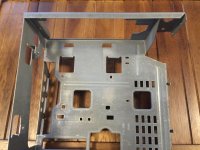
 
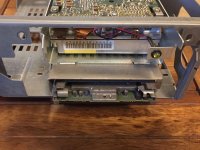
The brace for the chassis should be straight.

IMG_4054.jpg

Here's what the drive activity indicator should look like installed:

IMG_4060.jpg

As far as capacitors, I float them off with hot air which removes everything.  I then clean the pads with a lot of flux and some desoldering braid.  If you are using the twist off method, you'll want to make sure the plastic base is removed.  You can leave the legs intact on the board if you wish, and solder your new capacitors directly to the old legs.  This might be easier if you are using PCB mount capacitors.  If you are using surface mount replacements, you should remove the legs with an iron and some braid first so the component sits flat.  There are a lot of YouTube tutorials on capacitor replacement methods.

Make sure to clean the area under the plastic base, the leaky goo sits there under the cap and eats the traces.  I use some acetone followed with a chase of 99% isopropyl alcohol.  You can use a loupe to inspect the traces, and the continuity mode on your multimeter to check any questionable traces between vias.

 
Last edited by a moderator:
The other method concerning the capacitors is to cut the head off, you will be left with the remains of the leads and plastic base.

remove the plastic base by folding it in two and remove each half away from the board, clean the board.

unsolder the legs and clean the area with a wick.

I agree concerning the Quantum drives, most of them are dead.

 
Thanks for the advice so far (with a special hat tip to joethezombie for the reference pictures!)

IMG_6003sm.jpgIMG_6015sm.jpg

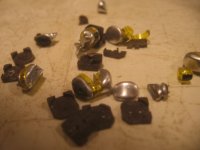
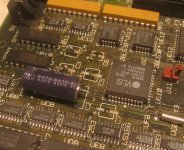
After a trip to the hardware store and a couple rounds of twisting, cutting, and cursing, all the aluminum can-style caps have been removed. Not a minute too soon either, from the looks of things.

As fate will have it, I wound up preserving the legs of only two (C3 and C4)...the rest came off flush with the board. Do the big axial caps (C2 and C11) need to be replaced as well? They're not obviously leaking.

Make sure to clean the area under the plastic base, the leaky goo sits there under the cap and eats the traces. I use some acetone followed with a chase of 99% isopropyl alcohol. You can use a loupe to inspect the traces, and the continuity mode on your multimeter to check any questionable traces between vias.
I've seen a variety of different prescriptions on 68kmla for cleaning logic boards: Vinegar, baking soda solutions, and alcohol; long soaks, short soaks; tap water, distilled water. Is there a "right" method?

I may need to make another shopping trip for the 99% alcohol, acetone, and multimeter. Maybe a soldering iron too, if I feel brave enough.

If you don't want to do the cap job yourself Charles (uniserver) does a great job... contact him!
The banned one? That might be...awkward.

 
On the Uniserver front, I contacted him for a recap of a couple SE/30 boards through his site (maccaps.com) a little before the banning incident and sent him my boards a little bit after. There was nothing awkward about it. Regardless of the moderation decision and everything around it, the guy is really good at this kind of stuff. I think they kept up the testimonial threads, if you want reassurances. I would't worry too much, especially to the point that you end up doing a recap job you're not comfortable with. The surface-mount capacitors in the SE/30 are a bear, and those boards aren't getting any cheaper to replace. In my opinion, it's better to have the peace of mind.

 
Last edited by a moderator:
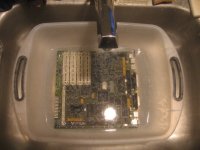
As a belated update, I gave the logic board a bath. Removing all the socketed chips (including the 68030) may have been overkill, but it seemed like the right thing to do.

IMG_6044sm.jpg

After letting the board soak in soapy water, the capacitor goo dissipated...but the pads and IC legs were still corroded. I tried applying 91% rubbing alcohol with a swab, but to little avail. Next, I used the same method to apply white vinegar...which did seem to clean up the worst of the corrosion. I rinsed the board in distilled water, shook it, and left it in the dish drainer to dry.

Except my worries aren't over: After drying, the aluminum bits near the capacitor sites still look duller and whiter than those on the rest of the board. Maybe the legs and traces are thick enough that conduction won't be an issue?

On the other hand, I did a better job removing the capacitors than I feared. Near as I can tell, not a single pad was lifted.

 
Now, of course, I'm at a crossroads. Do I...

* Buy an iron, learn how to solder, buy the parts, and do all the work myself? This would be satisfying, but I don't know how feasible it would be: My last attempt at soldering ended in disaster, and I'm not sure I want to risk ruining a Mac SE/30 as part of a learning exercise. (Though it doesn't work as it is, so maybe I'd have nothing to lose.)

* Ship off the board, and pay someone to do the work for me? This would be easier. Uniserver's been mentioned already, but is anyone else experienced to do this work?

I don't know which option would be cheaper. A cheap soldering iron from Radio Shack would be less than $20, but a premium one might be ten times that. I have no idea what the going rate for a recap would be.

Doing the work might be easier if I lived in a city with a decent electronics store. I stopped by Radio Shack this week, and to say their selection leaves a lot to be desired is like saying that water is wet.

 
If you want that SE/30 to work again, I'd send it to Uniserver (or someone else here if they volunteer their services and have a good rep).

Uni did my SE/30 and it came out great. He charges about $70 plus the cost of shipping the board both ways. What can get more expensive is if a problem remains after recapping and you ask him to keep working until he solves it - he has an hourly bench fee. I ended up paying him about $150 plus shipping and considered it money very well spent.

I am in the process of learning to solder, but plan to practice on a Classic mobo that is so damaged, I guarantee it will never work again. Good luck!

 
I am in the process of learning to solder, but plan to practice on a Classic mobo that is so damaged, I guarantee it will never work again. Good luck!
Yeah I got an LCII just for the occasion. It's probably dead. I'm not really into LCs or Mac IIs. I really like compact macs. But since I got it for free with a spider as a bonus I can't really complain, apart for that spider.

PS: I'm arachnophobic ;(

You should get a dead PC for free at your local recycling center. Every computer made after 1990 has at least one of those SMD caps.

Practice makes perfect...

 
Was the soapy water made using distilled water? If not, that's what happened, the ions in the house water attacked the metal and precipitated out. No worry, once the ions attached, it basically passivizes the metal that originally attracted the ions, so it will be non-reactive now.

 
If you decide to do it yourself, just be patient. Being impatient while soldering is the best way to screw it up. If you think the board/pcb is too hot or it appears to be melting or visibly did coloring then back it off and let it cool down. You'll probably wants some pliers or other tool to gently hold the part in place while soldering or desoldering.

I wouldn't use a cheap soldering iron since they'll just get hotter and hotter (up to the max) if you leave them plugged in. You can get a station like the one I have (Weller I think) for maybe $40-50 from what I see online. It's very basic. https://www.amazon.com/Weller-WLC100-40-Watt-Soldering-Station/dp/B000AS28UC

 
Back
Top