• Hello MLAers! We've re-enabled auto-approval for accounts. If you are still waiting on account approval, please check this thread for more information.

Super FKEY Pro

JDW

68020
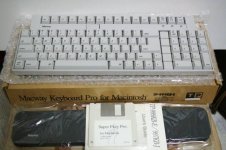
MacWay brand ADB keyboards (example shown below) came with a floppy (control panel) that enabled use of the function keys on Macs that normally didn't support them:

m94118575.2.jpg

I can't find the software on Macintosh Garden or Macintosh Repository.  Does anyone have a copy or know of a software equivalent?

 
So as far as non-Apple keyboards are concerned,  The only way to get the function keys to work is to use a macro program like QuicKeys?

What about the functionality of the function keys on true Apple keyboards that are connected to Macs which originally did not come with keyboards that had function keys?  

If the function keys on true Apple keyboards are indeed supported, then is there anyway to trick the Mac into thinking the non-Apple keyboard is a native keyboard, such that programs like QuicKeys are not needed? 

 
All ADB Macs can have been bought with a keyboard with function keys. The Keyboard I and the Extended Keyboard I both launched alongside the SE and II.

To my knowledge, the OS treats them the same, so any program that uses F-Keys should work with Apple and third party keyboards. In addition, any add-ons should work with both types of keyboards.

I don't know when this was added, but at least in Mac OS 9, if you go to the Keyboard control panels, you can switch F keys over to "hot function keys" which lets you use them to run files, open programs, applescripts, whatever.

When you enable hot function keys in Apple's keyboard control panel, you access the regular F keys (in programs where they're used) by adding Option as a modifier.

 
@Cory5412, if true, why then the "Super FKEY Pro" floppy included with that Macway keyboard shown in the photo of my opening post?

My intent would be to use it with System 6.0.8 or various System 7 flavors on an SE/30.  I've not purchased it yet.  I've just been pondering it.

 
Perhaps it was a value-add for buying their particular keyboard. That utility probably works with Apple keyboards as well as Apple's own system 9 tools work with third party ones.

Like I said, all ADB Macs "support" the F keys, it's just, the OS doesn't do an awful lot with them on its own and not all the applications use them. The original use case for the extended keyboard was terminal emulators for minicomputers and mainframes. 

 
OK.  The reason I even asked is because that photo is very old.  The Macway keyboards out there being sold now don't come with the original box or that floppy, so simply buying a keyboard won't solve the mystery of what's on that floppy.

And for those wondering why I've even been considering that Macway keyboard, it's because it's almost as compact as the highly coveted IIgs keyboard, yet with Function keys.

 
A friend of mine has a Macway keyboard, I've mashed on it super briefly a handful of times. They're very good. Especially if you're using JIS input, which, say, the Apple IIgs keyboard isn't equipped for in the same way.

That said - F Keys are only useful on Classic Macs if you either want yet another shortcut launcher or have software that uses it, or can have additional shortcuts programmed. I'm sure there is software that allows this, but I don't happen to know of it off hand.

My guess is that the software on the disk either does the same thing the later Apple keyboard panel does, or allows reassigning keyboard shortcuts and/or macros in general, perhaps, say, allowing you to map Command+S to "F7" or whatever one you prefer for a quick save button.

It would, of course, be nice to see.for sure.

Given that the software is likely Japanese made by a Japanese company shipped with a Japanese version of that type of keyboard (variants shipped in the US aimed at children), have you considered looking at the Japanese vintage Mac Internet? 

 
Yes, I've checked Yahoo Auctions Japan, which is where most of the vintage Mac equipment is traded.  No floppy disks with any of them though.

Despite being a Japanese product, they offer the US keyboard version, which I prefer.  The reason they offer that in Japan is because a lot of Japanese prefer it too.  You see, the Japanese keyboards really aren't that useful unless you type on them in a non-standard way.  Meaning, if you type out Japanese using the Hiragana characters on each key, then the JIS version has meaning.  But most Japanese use Romaji entry, typing K and A to get the KA character, and so on.

Anyway, thank you for your tips and advice!

 
I pulled the Mac-101 box down of the shelf and the Floppy Copy of the Masterstrokes that came with it copied successfully to the HDD of the pet IIfx. So now it's backed up that way I have printouts of what may be a later version of the docs:

MasterStrokes 1.7 :: MS Installation Guide Txt of April 7, 1989  4 pages

MasterStrokes 1.7 :: MS Tutorial Txt of April 7, 1989  16 pages

Dunno, the Manual on the floppy appears to be from 1988. It's a Document Reader V1.1 application and looks pretty good. It's 22 pages with graphics. The above are all .TXT.

MasterStrokes "developed by DataDesk" program by Cortland Computer (c)1987-1988

The manual mentions 101-KEYS Version 1.2d DA and that it must be removed with 101-Key DA Remover found in the utilities folder. IIRC 101-KEYS shipped with the ADB MAC-101 I got for my SE back in late 87/early 88.

________________________________________________________________________________________________________________

Don't know if this will work with your KBD, but it just may? Can't promise to do it quickly, but I'll try to get it archived and email it to you as I probably won't get around to testing it anytime soon. Gimme a link to the post with the easiest of the "How do I archive" thread's suggestions and I'll give it a try. Meanwhile I'll try to dig out my copy of QuickKeys to see if it's a missing version.

 
I appreciate all the helpful information.  But today I decided not to buy this Macway Keyboard on EBAY.  It's of course still open to those of you who are interested though.  The reason is because I went with this super-clean IIgs keyboard & mouse instead.  :D  It's not tested, so who knows what the switch condition will be like, but fingers crossed it works as perfectly as it looks!

 
Last edited by a moderator:
Very nice, it looks a tad less yellowed than mine. Enjoy, it's a very nice keyboard, softer, a bit less tactile feedback than my MAC-101s, but very, very good for an Apple KBD. Never had an AEK, but I'm not a fan of my AEKIIs or my "Original ADB" either. You'll love the IIgs. What have you been using?

Is the IIgs board all that highly coveted here in the US? Is is popular in general or mostly a Japan thing?

If you ever get an itch for an adjustable, just don't. :p They're the spongy Duo KBDs of the Mac Desktop world. It's worse than the AppleDesign which isn't nearly as bad as most folks make out like it is. I call it ordinary, the Adjustable is fairly bad or at leas the two I have are that way.
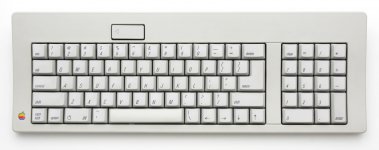
 
I have two SE/30's and already have one IIgs keyboard (with ALPS Orange switches).  My other keyboard is the M0116 (with ALPS Salmon switches), but I bought that clean IIgs keyboard & mouse because (1) I needed another ADB mouse and (2) I like the IIgs keyboard more because it's more compact overall:

Apple_(Standard)_Keyboard_M0116.jpg

Both the IIgs and M0116 keyboards are loud when typing, not because of the ALPS switches, but because there's no cushion under the keys when they bottom-out so its hard plastic slamming on hard plastic.

My M0116 is pretty neat though.  It came with one of my SE/30s when I bought it and has an Apple sticker with barcode on it that shows it was originally owned by Apple.  I carefully removed the sticker (since it was affixed to the top left corner and looks bad), and when a sunny day comes my way, I will Retr0Bright it. It's in perfect working order, and I hand-cleaned every single key, brushed out all the dust bunnies, and even recapped it (yes, even keyboards have those leaky electrolytic caps even though tantalums were available in that size back in the day).  Not sure if I'll keep the M0116 or sell it to an interested party.  Works great though.

 
I've watched that video and even spoken to the person who created it.  There's no hard evidence to show direct sunlight would make the plastic any more or less brittle than traditional H202 deyellowing.  And honestly, I've not seen my plastics get noticeably more brittle due to an 8-10 hour Retr0Bright session.  The main difference is time.  It would take several days of bright sun to achieve what one gets in only a single day with H202.  Time is important to me because I don't want to leave my plastics outside alone when I am at work.  I want to be there to keep an eye on them.  I'm not so much worried about thieves as I am animals.

 
Someone should suggest to him that diffusion effects of overcast ought to be widening the aspect ratio of sunlight from point source to what might be a quantifiable arc. There should be a fairly smooth degradation of effect with increasing angle of view as in LCDs as a direct comparison for quantification of the deflection angle effect. Variability of overcast would be a PITA in terms of quantification, but doing lightbrighting under a perfect Kodak Sky should be better than in direct sunlight.

I'd think that orienting the plastics to match the arc of the sun's path across the sky would be beneficial in evening the effects of lightbrighting. Rotate the object's orientation to be perpendicular to the sun's path at 90 and 270 degrees. Rotating the angle the object to the sun in the vertical plane to better expose sides/top/bottom edge through the process should definitely help. The first should be especially beneficial for the four sides of all keycaps with the latter more beneficial to keys on the outer edges where yellowing is most noticeable. The sun doesn't really move, the earth makes for an economical, if slowly rotating turntable.

I won't sign up to do comments, but a bit of credit if the research pans out would be nice. [;)]

edot: just thought of a use for one of those Adjustables or an AppleDesign. [}:)]

 
Last edited by a moderator:
Back
Top