• Hello MLAers! We've re-enabled auto-approval for accounts. If you are still waiting on account approval, please check this thread for more information.

SOS Macintosh Iicx won't shut down.

toples50

6502
I have a Macintosh IIcx just recapped but now it won't shut down.In fact I've managed to shut down once.Is it a common problem with Iicx machines or have a problem?

 
It's pretty common for II-series machines to have power-on/power-off issues. Has the logic board been thoroughly cleaned? Does the IIcx power off when the case power switch or keyboard power switch is pressed?

 
Astec PSU? Just a thought, because I've run into some really funny issues with those as they age.

Seems that Delta Electronics and Sony branded PSUs were built out of better bits.

 
Yes Astec PSU unfortunately...I have the same PSU to my Mac IIci.Can I try to exchange the PSU's and try the IIcx again?

 
Last edited by a moderator:
Agree with nglevin on the Astec's having issues.

Inspect UK2 and UL2 for any corroded/damaged traces (right next to the battery). The shutdown circuit for the IIcx sits right next to a bunch of caps so it's likely that there's a damaged trace if the PSU turns out to be good.

The PSUs are exchangeable.

 
Last edited by a moderator:
The compact IIs (IIcx, IIci), and the Quadra 700 all had the same PSU, and I am nearly certain that the Quadra 650, IIvx and the PM 7100 had an upgraded version of the same PSU that fits in the same form factor.

I've run a Quadra 650 logic board with the IIcx PSU one time when I was dealing with Astec fun, though I did notice it had trouble booting with too many NuBus cards. Replacing the PSU with one sourced from a dead PM 7100 ended up fixing the problem.

 
Agree with nglevin on the Astec's having issues.

Inspect UK2 and UL2 for any corroded/damaged traces (right next to the battery). The shutdown circuit for the IIcx sits right next to a bunch of caps so it's likely that there's a damaged trace if the PSU turns out to be good.

The PSUs are exchangeable.
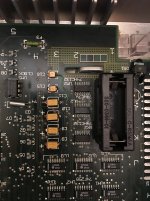
Picture from the motherboard around the battery.

IMG_0107.jpg

 
UK2, UL2, and UM2 all still look pretty corroded. Clean them up with IPA and a toothbrush. If you have a multimeter, check for the voltages on these pins while holding down the case power switch and post what they are:

- Pin 3 of UL2

- Pin 4 of UL2

- Pin 5 of UK2

- Pin 6 of UK2

- Pin 9 of UK2

 
That board has not been properly cleaned.

As said check all traces according to the schematic and if they are fine one of the logic gates is dead, which is a pretty common issue.

 
The board recapped by a friend who is professional.As for power switch I tried everything.Still nothing...
I'm sorry - I find it hard to believe if it was done by professional, but this re-cap job is rather messy - if it was a professional would've cleaned the board 100% and straighten the caps out.

Cheers

AP

 
Back
Top