• Hello MLAers! We've re-enabled auto-approval for accounts. If you are still waiting on account approval, please check this thread for more information.

Sonnet Presto 040 for IIci - Bad Accelerator?

I recently acquired a 40MHz Presto 040 designed for the IIci cache slot. Problem is, with the "Presto" extension loaded in System 7.5, I get a bus error during startup. I have a IIvx, and that machine behaves similarly. I did get it to boot into 7.5 at one point, but the system crashed when trying to benchmark in MacBench 2. Is it common for these cards to fail? I'm hoping the extension I'm using is the problem, but it seems like that's not the case given it's not working in two separate systems. Here's the extension I'm using: http://www.sonnettech.com/support/kb/kb.php?cat=394&expand=_a3&action=b436

Any other ideas to try and make this bad boy work?
 
I have version 3.2 on my website, imaged from the original installer disk. I don't know if it'll make any difference, but maybe it fixes some bugs.

Also, make sure you don't have the OS 8 enablers installed on a non-OS 8 machine. It'll cause it to crash.

Macintosh Garden has version 3.2.1.
 
Thank you! I'll give that version a shot tonight. On a IIci, all I should have is the "Presto" extension in the extensions folder, correct? Fingers crossed this solves the bus errors.
 
Thank you! I'll give that version a shot tonight. On a IIci, all I should have is the "Presto" extension in the extensions folder, correct? Fingers crossed this solves the bus errors.
There are a few other required extensions... not nothing else.
 
Good news and bad news with the 3.2 drivers. I placed the System 7 Enabler in the system folder and the Presto extension in the extensions folder. It initially gave me a bus error mentioning "General Controls". I deleted that control panel, and restarted - it actually booted!

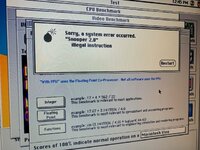
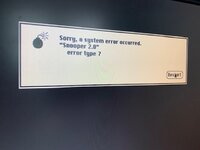
When running benchmarks, both MacBench and Snooper crashed with bus errors. I am beginning to think that there really is something wrong with this card. One interesting thing to note is the the Snooper crashed during the FPU test, which this card does not have. Could that be part of the cause? You'd think it would know better!
 

Attachments

  • a.jpg
    a.jpg
    92.1 KB · Views: 21
  • b.jpg
    b.jpg
    39.2 KB · Views: 19
Good news and bad news with the 3.2 drivers. I placed the System 7 Enabler in the system folder and the Presto extension in the extensions folder. It initially gave me a bus error mentioning "General Controls". I deleted that control panel, and restarted - it actually booted!

When running benchmarks, both MacBench and Snooper crashed with bus errors. I am beginning to think that there really is something wrong with this card. One interesting thing to note is the the Snooper crashed during the FPU test, which this card does not have. Could that be part of the cause? You'd think it would know better!
Do you have very high resolution, well lit, not blury, photos of both side of the card?

The type of photo I can read the tiny numbers off the smallest surface mount components. Doesn't matter if it is two photos per side, but its really worth taking the photo in good daylight.
 
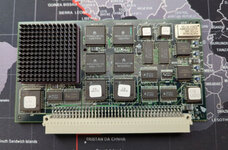
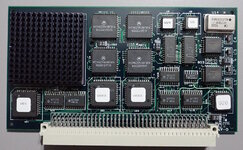
I don't, but I can take some when I get home tonight. The card looks like this (not my photo): View attachment 58217
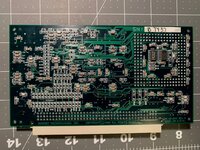
The actual card is what I had in mind, I was going to see if I could spot any visible damage :)

Another thing to try is clocking it down to 33mhz and seing if it is more reliable. Perhaps someone "borrowed" the CPU for something else.
 
Perhaps someone "borrowed" the CPU for something else.
Unlikely, they’re usually soldered down on those cards.
I’d have to dig mine out and see which combination of OS and driver worked. They are really picky. I think anything else but the actual Presto extension made things unreliable (or crash right away) for me.

Try without any Enabler, just use the Presto extension.
I seem to remember from poking my card the last time there’s an option to disable the 128k cache by moving a solder jumper somewhere, that might be another thing worth trying.
 
The cache switch control panel will only control the internal CPU cache. The external 128k won’t be affected.
 
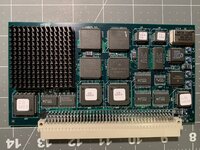
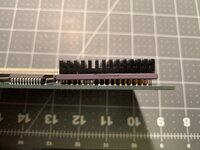
Hi guys - I appreciate the suggestions. Last night, I tried removing the 7 enabler from the System Folder, and had the same issues as before. Freezing during MacBench testing. I rebooted and it froze while working with windows in the Finder. Here are some better photos of my actual card. Interesting that they decided to solder the CPU down at an angle. I'll just tell myself it's for increased airflow... ha!

I do see a jumper wire at B01 on the card, but it is soldered. There is a place for another jumper at B03 but no pin headers. Any other ideas?
b.jpgc.jpgd.jpg
 

Attachments

  • a.jpg
    a.jpg
    981.7 KB · Views: 20
Did you have any luck fixing your crash issues? I have a Sonnet Presto that was in a Color Classic I recently purchased. I did a fresh install of System 7.1 with the proper CC enabler. The only extension installed is the Sonnet Presto 2.0.1 driver. I haven't tried a newer driver, I just now realized there are newer versions on Macintosh Garden.

Overall the system is pretty stable, however on the Norton system test it always freezes at the beginning of the VRAM test, and in Snooper 2.0 it sometimes freezes during the RAM test, it does sometimes pass the RAM test fine. There have been some other random crashes, from time to time. Speedometer 3, 4, and Mac Bench 2 all work fine. I am only using the 4mb of onboard RAM, I had the same symptoms when I had 2x 2mb SIMMs installed.

My next step is to try the newer drivers, and then try System 7.5.3 or 7.5.5 that does not require the system enabler. I have removed the accelerator and sprayed Deoxit into the female PDS connector, and then re-seated the card to make sure there is a good connection.
 
I have not tried anything else with this card just yet. Got too frustrated and put it away for a while. Do keep us posted whether or not the newer drivers make a difference for you. Many times, my system would lock up or bomb right at the load of the Sonnet extension.
 
I tried both v3.1 and v3.2 of the drivers, v3.1 seems to be stable. v3.2 freezes on boot under both System 7.1 and 7.5.5. With the driver v3.1 (and also 2.0.1) the card seems not to work with Snooper 2.0 or Apple Personal Diagnostics 1.1.1. They both crash every time I try to do a system check. Norton System Info runs it's checks just fine, and Tattle Tech correctly recognizes the card. Speedometer 3 & 4 both work fine, as do MacBench 2 & 3. I am cautiously optimistic, but so far the system seems 100% stable. Looking through this thread you have tried driver v3.2 but not 3.1, I would recommend trying 3.1 and seeing if that takes care of your crashes.
 
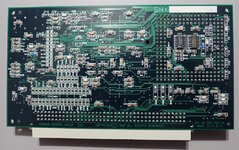
@Garrett B Your card (25th week 1997) is newer than mine (29th week of 1996).

Presto 040 top.jpg

Presto 040 bottom.jpg

Differences:
* Yours says "Sonnet Technologies, Inc". Mine says "Donoho Design Group, Inc.".
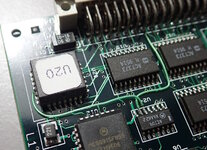
* Mine has two bodge wires. Yours has the traces added.
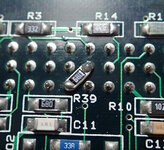
* Mine has a bodge resistor. Yours doesn't.

Hilariously, they didn't bother updating the "Rev A" text.

Bodge wires.jpg
Bodge resistor.jpg
 
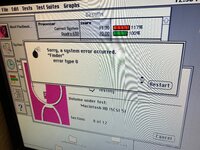
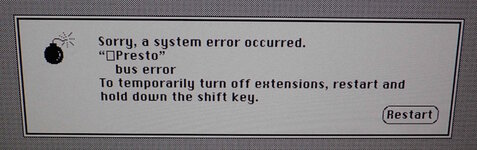
@Garrett B -- now what you really care about. I also got a bus error on boot.

Presto Bus Error.jpg

Switching the Memory to 32-bit addressing fixed this. Everything is stable with System 7.1, Mac IIci, 32-bit addressing, and 3.1 Sonnet Presto extension.

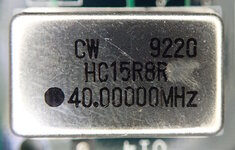
Running Norton Utilities and TattleTech confirms the 68040 is running. Although it says "36 MHz", I double checked and the crystal is indeed running at 40 MHz.

Aside: Someone scratched off some letters on my crystal. I guess it didn't meet specifications. : )

Crystal-label-scratch.jpg
 
Back
Top