SevenTTY — local shell + terminal + SSH for classic Mac OS

The scp support i'm adding now is almost a bigger change, if you can believe that. SSH was previously being treated as a standalone session and I need to break it apart more so it can be inline. This might also mean i could drop the new-tab/window requirement for ssh. I'm hoping to do similar "auto-typing" support for scp as well. I may just make a standalone "auto-fix-type" command while i'm at it, which i'd still find useful for files copied off my NAS through netatalk, etc. I'm attaching the SCP Support plan, for anyone whose curious to see the process in action. I had codex and claude go back and forth a bunch on this plan doc before actually telling claude to implement it, which, it's running now. It's gonna be a bunch more testing after this.
Hmm. I found this in my cache; thought I'd posted it earlier, but it appears I didn't.

I highly recommend retrofitting it for Internet Config/FileType as well, as then you automatically inherit URI and Type/Creator mappings as set in Internet Config (or later by Mac OS, which uses the pre-existing Internet Config API starting with OS 8.0 IIRC). Internet Config was designed by Quinn to be a single place you could map MIME types, file extensions, default apps, and file types and creators. I always found it a shame that more third party software didn't integrate with it (Archie, Fetch, Netscape all did under System 7, and more software once Apple made it part of OS 8).
 
Hmm. I found this in my cache; thought I'd posted it earlier, but it appears I didn't.

I highly recommend retrofitting it for Internet Config/FileType as well, as then you automatically inherit URI and Type/Creator mappings as set in Internet Config (or later by Mac OS, which uses the pre-existing Internet Config API starting with OS 8.0 IIRC). Internet Config was designed by Quinn to be a single place you could map MIME types, file extensions, default apps, and file types and creators. I always found it a shame that more third party software didn't integrate with it (Archie, Fetch, Netscape all did under System 7, and more software once Apple made it part of OS 8).
HMMM!! I was aware of those mappings in there, but for some reason I didn't think it was a thing until os9??? I've mostly only played with that stuff on my G3's is why I probably never noticed otherwise. I'm trying to make the dataset of my "auto-type" feature be re-usable between the various things that now use it - FTP/SCP/Wget/typefix (standalone command), so hopefully fixing that only requires changing it in one place. I need to finish testing FTP and get another release made, i'm sitting on a ton of changes right now. I probably shoulda did a release the other day. The wget command will also support ftp:// style urls as well.

I remember you'd asked about size/memory the other day, as a follow-up to that, I did find one gotcha of adding https support to wget - that actually ends up including a bunch more from mbedtls that wasn't included by ssh alone, and it did add a nice chunk to the binary, like 200-300kb. It'd still fit on a floppy, but it's definitely not 780kb anymore. Ah well. I'm actually exploring some other options - like WolfSSL, which might even get me TLS1.3 support and not just 1.2, but, this is probably for later and would likely require a license change to GPL3, and I'm not sure how I feel about that. I could probably make wget HTTPS an optional compile-time flag if I wanted to get this back down in size again, but besides that, it's not really changed a ton and everything still fits in the 2mb I've allocated for memory. For now.
 
HMMM!! I was aware of those mappings in there, but for some reason I didn't think it was a thing until os9???
OS 9 integrates it into the OS; OS 8 bundles Internet Config with the OS. System 7.1+ required you to find and install Internet Config yourself.
 
OS 9 integrates it into the OS; OS 8 bundles Internet Config with the OS. System 7.1+ required you to find and install Internet Config yourself.
That actually explains it. Though, on this 8.1 install (which i'm pretty sure I did a full install, it has the internet setup wizard, etc), I'm still not sure I see that control panel that has the big list of extensions...I do see some extension mappings under pc exchange, but it's literally just got .txt and that's it. I will try to boot up my G3 later and compare, but curious if it needs a specific version of internet config or something? I may need to apply some update beyond the included one in 8.1 is my guess...

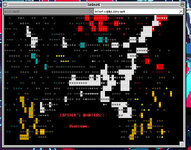
On my Mac, it still doesn't enumerate ANSI correctly, has anyone seen it enumerate properly?
got a screen shot or photo? is it a specific app I can reproduce it on? curious what text it's not getting right, there might be characters that i need to generate glyphs for...
 
got a screen shot or photo? is it a specific app I can reproduce it on? curious what text it's not getting right, there might be characters that i need to generate glyphs for...
I don't have a screenshot (I should put Flash-it on my 637CD, I'll probably do that and use my home server to get them to my modern PC), but it doesn't show the proper upper ASCII characters when I connect to the Captains Quarters II BBS
 
Why.jpg
Here's what it looks like on my Performa 637CD running OS 8.1 (I updated to the latest version of SevenTTY that's available for download on github)
 
View attachment 96158
Here's what it looks like on my Performa 637CD running OS 8.1 (I updated to the latest version of SevenTTY that's available for download on github)
Oh strange. I feel like I saw it do that once when I ssh'ed into another box, then telnet'ed from within there, like some strange escape issue or something, although now I can't reproduce it. Definitely seems like the custom glyphs are showing up as lozenges. I'll try this from my actual hardware this weekend and see what I can reproduce.
 
I have one of several possible causes for the character-encoding issue, which is nowadays somewhat obscure, so I do not know whether you'd be aware of it.

A rambling explanation of the background: Prior to Unicode, terminals and the like that followed ISO, ANSI, or ECMA standards could achieve extra characters beyond the 128 in ASCII (or the various proprietary 256-position encodings, for that matter) by mapping four smaller codesets like ASCII into various parts of the 256-position code space, that were switched amongst via escape codes. (It's actually more complicated than that because there were two 32-position ranges for control codes that were managed separately, so the actual printable character sets were mapped in 94- or 96-position chunks, but you get the idea.) If you listed out all the available positions using 16, 16-entry columns (ignoring the ranges reserved for control codes), you got "Left" and "Right" sets; Right sets (AKA "upper" sets, filling positions numbered from 160–255, so encoded with the highest bit set) could have 96 positions, but Left sets could only have 94, because of Space and Delete being preassigned. This is why ISO 9855-1 (ISO Latin 1) and its fellows had nothing encoded in the 128-159 range; it was already in customary use for the C2 control set. (Naturally, industry took advantage of what looked like freely available space and allocated printing characters there, which is why "Windows Latin-1" is a thing.)

So, how does this tie in to your intermittent display issue? Simply put, it may be trying to switch into one of the other three graphics sets, which if you didn't know existed probably is not defined yet.
 
View attachment 96158
Here's what it looks like on my Performa 637CD running OS 8.1 (I updated to the latest version of SevenTTY that's available for download on github)
This one is definitely fun to reproduce, it's sporadic as hell, and it would often work on 2nd try for me anyway. However, I've put in two fixes now that hopefully address this. One, the font resource was purgable, so it could get purged from memory, and on real hardware with more memory pressure, this was more likely to happen than on QEMU. Second, I picked a randomized higher font ID, to ensure there's less likelihood of a collision
I have one of several possible causes for the character-encoding issue, which is nowadays somewhat obscure, so I do not know whether you'd be aware of it.

A rambling explanation of the background: Prior to Unicode, terminals and the like that followed ISO, ANSI, or ECMA standards could achieve extra characters beyond the 128 in ASCII (or the various proprietary 256-position encodings, for that matter) by mapping four smaller codesets like ASCII into various parts of the 256-position code space, that were switched amongst via escape codes. (It's actually more complicated than that because there were two 32-position ranges for control codes that were managed separately, so the actual printable character sets were mapped in 94- or 96-position chunks, but you get the idea.) If you listed out all the available positions using 16, 16-entry columns (ignoring the ranges reserved for control codes), you got "Left" and "Right" sets; Right sets (AKA "upper" sets, filling positions numbered from 160–255, so encoded with the highest bit set) could have 96 positions, but Left sets could only have 94, because of Space and Delete being preassigned. This is why ISO 9855-1 (ISO Latin 1) and its fellows had nothing encoded in the 128-159 range; it was already in customary use for the C2 control set. (Naturally, industry took advantage of what looked like freely available space and allocated printing characters there, which is why "Windows Latin-1" is a thing.)

So, how does this tie in to your intermittent display issue? Simply put, it may be trying to switch into one of the other three graphics sets, which if you didn't know existed probably is not defined yet.
You aren't kidding, that type of information is like a lost art anymore. I was originally thinking maybe the character set commands were getting corrupted, like, split up or cut-off/offset midstream type thing, or even some kind of network corruption issue.

However, while testing on the quadra 700, the issue was happening way more consistently, but almost always on the first connection attempt. The fact it wasn't just consistently broke (at least for me), and seemed to "fix" itself, lead me down a slightly different avenue, possibly to do with the glyph font not being consistently loaded in memory, and/or getting purged from memory, and on an older machine like the quadra @ 25mhz, it can't keep up on that first load. I have put some fixes in place, but still testing. My last fix was definitely not 100%, but seemed to reduce it somewhat. I suspect there's still something else going on.

Also been doing a whole bunch of screen-refresh optimizations, using gworld to reduce flicker, added a proper scrollbar as well. I'm definitely down another rabbithole, and there's so many pending features now, I might bump the next version to 1.2.0. We'll see!
 
This one is definitely fun to reproduce, it's sporadic as hell, and it would often work on 2nd try for me anyway. However, I've put in two fixes now that hopefully address this. One, the font resource was purgable, so it could get purged from memory, and on real hardware with more memory pressure, this was more likely to happen than on QEMU. Second, I picked a randomized higher font ID, to ensure there's less likelihood of a collision

You aren't kidding, that type of information is like a lost art anymore. I was originally thinking maybe the character set commands were getting corrupted, like, split up or cut-off/offset midstream type thing, or even some kind of network corruption issue.

However, while testing on the quadra 700, the issue was happening way more consistently, but almost always on the first connection attempt. The fact it wasn't just consistently broke (at least for me), and seemed to "fix" itself, lead me down a slightly different avenue, possibly to do with the glyph font not being consistently loaded in memory, and/or getting purged from memory, and on an older machine like the quadra @ 25mhz, it can't keep up on that first load. I have put some fixes in place, but still testing. My last fix was definitely not 100%, but seemed to reduce it somewhat. I suspect there's still something else going on.

Also been doing a whole bunch of screen-refresh optimizations, using gworld to reduce flicker, added a proper scrollbar as well. I'm definitely down another rabbithole, and there's so many pending features now, I might bump the next version to 1.2.0. We'll see!
So it sounds like a new release is on the way
 
You know, since you're adding FTP support, I imagine it wouldn't be hard to add SFTP (uses same port as SSH) or TFTP (uses port 69, nice) support
 
I just installed SevenTTY and found it nice. I also found that redirection ( "<", ">" ) does not work. Would it be possible to implement? Think about nc and its possibilities with redirection as there is no sftp/scp.
 
I just installed SevenTTY and found it nice. I also found that redirection ( "<", ">" ) does not work. Would it be possible to implement? Think about nc and its possibilities with redirection as there is no sftp/scp.

MacRelix includes tcpclient (and tcpcat) and a shell with pipes and I/O redirection. For servers, there's listen.

If you just want simple file transfers, you can use htget and httpd.

https://www.macrelix.org/
 
and (@jjuran ) does MacRelix have dd built-in? Would it be able to copy a raw .iso file to a SCSI device (e.g. the equivalent of dd if=myIso.iso of=/dev/sda0 )?

Not today. Not any time soon.

I'd be glad to do a port of Sortix's rw (which is a better dd), but I'd have to exercise great care in designing and implementing access to SCSI (or any disk) devices. For starters, I think I'd want to make them privileged, so you have to use sudo or such.

In any case, this would take some time and attention that I can't spare right now.
 
Not today. Not any time soon.

I'd be glad to do a port of Sortix's rw (which is a better dd), but I'd have to exercise great care in designing and implementing access to SCSI (or any disk) devices. For starters, I think I'd want to make them privileged, so you have to use sudo or such.

In any case, this would take some time and attention that I can't spare right now.
OK, no worries! The DumbDD thread is the best route then and there's an alpha-quality app for it!
 
I just installed SevenTTY and found it nice. I also found that redirection ( "<", ">" ) does not work. Would it be possible to implement? Think about nc and its possibilities with redirection as there is no sftp/scp.
no shell redirection/pipes etc yet...ultimately the nc is more useful for basic testing than doing anything fancy...but maybe in the future.

Admittedly I've been busy with other priorities the past week or so, but I have a whole bunch of screen drawing fixes / caching and some other stuff done, still trying to get one FTP bug resolved and then I'll cut another release. the wget feature alone was probably worth a release, but I kinda jumped the gun into FTP after that and now i'm down a rabbithole, lol. ah well.
 
I finally fixed the FTP bug, and so i felt good about cutting another release. I also added in > / >> redirection for various commands too! Wget with auto-file-typing and TLS1.2 support (TLS did add some size to the binary, but memory usage still decent due to other optimizations). Also a proper scrollbar, lots of other goodies.

SevenTTY v1.2.0

The biggest release yet — SCP and FTP file transfer, 34 new shell commands, flicker-free rendering, output redirection, and major memory and performance improvements.

New Features​

  • SCP file transfer — download and upload files over SSH with scp command. Supports password and key auth, glob patterns for batch upload (scp *.txt user@host:~), transfer progress display
  • FTP client — full FTP client with ftp get/put/ls subcommands and wget ftp:// integration. PASV mode, progress bar, glob uploads, password prompt
  • Output redirection — shell commands and nc now support > file (truncate) and >> file (append) to redirect output to local files
  • 34 new shell commands:
    • Checksums: md5sum, sha1sum, sha256sum, sha512sum, crc32
    • Text processing: grep (-ivnc), head, tail, wc (-lwc), nl, cut (-d -f), fold (-w), rev, rot13, strings (-n)
    • File utilities: hexdump, xxd (-r), cmp, ln -s (creates real Mac aliases), readlink, realpath, which, basename, dirname
    • Line ending converters: dos2unix, unix2dos, mac2unix, unix2mac
    • System: uptime, cal, hostname, history, sleep, seq
  • fixtype command — auto-set Mac type/creator codes from file extension, with glob and multi-file support
  • Vertical scrollbar — proper Mac scrollbar control with arrow, page, and thumb tracking
  • Finder alias resolution — local shell commands transparently resolve Finder aliases (cd, cat, open, ls, cp, head, tail, etc.), including in glob expansion and tab completion

Improvements​

  • GWorld offscreen row buffer — terminal rows are composed offscreen and blitted atomically via CopyBits, eliminating erase-then-draw flicker
  • Dirty row tracking — only changed rows are redrawn (10-24x fewer cells drawn for cursor blink, single-char echo, etc.)
  • GWorld depth matching — uses screen depth instead of fixed 32-bit, avoiding expensive depth conversion on 8-bit displays
  • Memory diet — scrollback and shell history moved from embedded arrays to heap-allocated pointers (saves ~320KB from globals). Thread stacks reduced. Partition size reverted to 2MB, runs on 4MB Macs
  • Mac Roman to UTF-8 conversion — local shell output correctly converts Mac Roman high bytes to UTF-8 for proper glyph rendering in vterm
  • ANSI.SYS compatibility — translates ESC[s/u (cursor save/restore) to DEC VT sequences for correct BBS ANSI art display
  • wget threaded worker — downloads run in a cooperative thread (no more UI freeze). Inline progress, download speed on completion, -n flag to suppress progress
  • wget improvements — TLS handshake timeout, redirect handling (scheme-relative, absolute, bare relative), content-length validation
  • rm glob support — rm *.bin with -i interactive confirm
  • Scroll shortcuts — Cmd+Up/Down scrolls one line, Shift+PageUp/Down scrolls half page
  • Paginated help — help output now shows --more-- prompt
  • cal improvements — full year view (cal 2026) with 3 months per row, today highlighted in reverse video

Bug Fixes​

  • FTP multiline response fix — FTP connections no longer hang on servers that send multiline 230 responses (e.g., ftp.gnu.org). Root cause: null-termination of parsed line corrupted the first byte of the next buffered line
  • FTP connection refused handling — properly handle kOTLookErr/T_DISCONNECT
  • OT send deadlock fix — kOTFlowErr now yields instead of falling through as fatal. Fixes busy-loop deadlock during sustained writes (SCP upload)
  • SCP upload stall fix — broken int64 formatting on 68K fixed with manual uint64-to-decimal in libssh2 fork
  • SCP path fixes — filenames with spaces, ~ as remote directory, basename from Mac colon paths, buffer overflow guard
  • Symbol font fixes — font family ID moved to 29183 to avoid conflicts with system fonts. Resources pinned with HNoPurge, Font Manager cache primed at startup
  • DrawGrowIcon clipped — prevents horizontal line from cutting across terminal content
  • Memory leak fix — scp_auth_prompt prefs restoration
 
Back
Top