


Hello all!
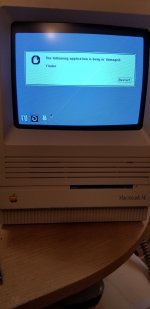
I'm starting my retro collection with a Mac SE that I got for free from a friend who was going through his fathers things. I brought the unit home and it powered on and booted just fine. However, yesterday I got the following message upon startup (after a happy Mac): The following application is busy or damaged: Finder" (see pic). The only option I have is restart and the process just repeats (see video). The SE did have some issues powering down, and I read that 7.0 did have a 'finder recycler', but I'm on 6.0.8 so is the OS just stuck and can't find it's way back? Will taking the battery out reset it? Or should I boot from a new OS disk? I appreciate any help! Happy New Year!
Mike
View attachment Booting.mp4
I'm starting my retro collection with a Mac SE that I got for free from a friend who was going through his fathers things. I brought the unit home and it powered on and booted just fine. However, yesterday I got the following message upon startup (after a happy Mac): The following application is busy or damaged: Finder" (see pic). The only option I have is restart and the process just repeats (see video). The SE did have some issues powering down, and I read that 7.0 did have a 'finder recycler', but I'm on 6.0.8 so is the OS just stuck and can't find it's way back? Will taking the battery out reset it? Or should I boot from a new OS disk? I appreciate any help! Happy New Year!
Mike
View attachment Booting.mp4




