• Hello MLAers! We've re-enabled auto-approval for accounts. If you are still waiting on account approval, please check this thread for more information.

SE/30 No Chime / Herringbone-y Pattern

Hi Everyone in 68k World,

I'm new. I'm an amateur. I've learned a lot about soldering and electronics in the past 2 weeks. Primarily 1) Not all solder wicks are the same. Fine solder wick performs a whole lot better than course solder wick. This would have saved me hours and hours had I known. 2) I will never ever use lead-free solder again. The difference in quality of the weld and ease of use-- my crappy first attempts came out gorgeous once I changed solder. Who knew? Mac SE/30 after recap. Here's my current issue:
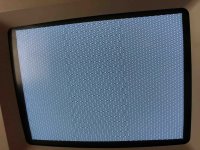
IMG_1509.jpg

No bong, and that pattern. 

I know it's not the analog board or the power supply. I have good readings across the multimeter (12v/5v). After recapping the analog board and power supply I was able to restart the computer and it booted.

This pattern is after the logic board recap. I've run as many traces I can find, particularly everything surrounding my work areas. All are making contact across the work area. I've used a magnifying glass to check for solder blobs or anything abnormal, can't see anything obvious.

I'm afraid I may have overheated a chip. When I was working on the 470uF axial, I had a huge problem getting the holes unplugged (see solder wick issue and lead-free solder above). 

I am planning on checking the 8 video out pins once my oscilloscope arrives Tuesday. I know from Tech Knight's awesome video which pins to check, and I'm learning to read the schematics.

Any clues on what to check first? Anyone seen this before? I'm learning on the fly and know just how much of an idiot I can be. Enjoying the love/hate and embracing learning a new set of skills.

Here's the logic board now. The one trace jump wire on the bottom was on the computer when I purchased it 10 years ago. It tests fine.
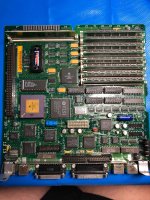
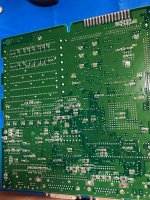
IMG_1507.jpgIMG_1508.jpg

 
Watching through test videos, I'm getting these readings from my Bourns chips:

.02
x
100.6 kOhms
100.9 kOhms
x
502.6 kOhms
101.6 kOhms
.0554 MOhms
0.555 MOhms
.2

.2
x
x
x
x
.554 MOhms
.554 MOhms
.554 MOhms
.554 MOhms
.2

Short in a cap? Bad chip? 

 
Did you wash the board before or after the recap? if not you need to do so. 

Also, no chime could most likely be a broken trace to ROM if all else fails. 

 
Did you wash the board before or after the recap? if not you need to do so. 

Also, no chime could most likely be a broken trace to ROM if all else fails. 
I used Staticide Flux Remover all over the board and the pads wound up shiny and super clean before I soldered the new caps. It's possible some electrolyte could have slid under something when I sprayed. I've seen people dunk the board in water in some YouTube videos. Frankly, that scares the living crap out of me. 

 
I did a dunking sort of wash, and got the same result. Assuming that wasn't good enough, I ran it through the dishwasher, which appears to have trashed the caps. They look like they're bleeding out like an ebola patient. Trails of crap coming out of them, and the Bourns readings are still hosed.

Soooooo... It's a lesson learned. We're going to pull all the caps off the board, I bought plenty of extras for this purpose. Re wash the sucker, and cap it again. Then see where we're at.

 
If that happened then the caps you put in it were junk to begin with. 

I have NEVER had this happen except for the old caps, or crap caps. 

 
You guys rock. 

IMG_1514sm.jpg

I still haven't cleared all the grounding on the bourns chips, but clearly things have taken a turn for the better.

 
Last edited by a moderator:
Maybe I spoke too soon. It's crashing intermittently. Extremely unstable. That same original pattern comes back now and again. I probably have to work those grounding issues. 

Even some bongs of death. Seemingly random. 

I'll run the traces to the ROM chips and look for an odd break. Any other suggestions, I'm all ears!

Programmers button doesn't seem to have any affect on the computer. 

 
Last edited by a moderator:
 UPDATE: Well... It appears to have self-corrected. Perhaps there was some residual moisture somewhere causing a glitch. It's been up and running for a few hours now. Zero glitches.

The problem was the dirty board. A trip through the dish washer fixed 'er up.

This was a neat project. Along the way, I put in a quiet fan, and exchanged the hard drive for a micro-sd drive. 

 
Last edited by a moderator:
After washing, I immediately bake the board at 195 for at least 15 to 25 minutes to drive out all the moisture. It will be faster if you dip it in alcohol and then bake it. 

Intermittencies could have been moisture related, but it can also be due to a slightly conductive, but not so superconductive trace. I hate those. because itll still be connected, but at a much higher resistance than it should be. (partially open via). Those are a real PITA. 

 
After washing, I immediately bake the board at 195 for at least 15 to 25 minutes to drive out all the moisture. It will be faster if you dip it in alcohol and then bake it. 

Intermittencies could have been moisture related, but it can also be due to a slightly conductive, but not so superconductive trace. I hate those. because itll still be connected, but at a much higher resistance than it should be. (partially open via). Those are a real PITA. 
Great tip. I will check it out next time. 

After working perfectly for 8 hours last night (I threw everything I could at the computer to test it), I fired it up this morning-- got the chime-- and it won't budge past the question mark floppy. It was doing this before I did the cap service, too. In the past it would eventually start after an hour or so. The hard drive lamp flashes while it sits on the question mark-- so there's power to the drive and it's trying to get data, it would seem.

My thinking at the time-- was the caps were so bad, it was trying to get enough charge in the SCSI circuit to trigger it (I know, this could be entirely flawed thinking, I'm a rookie). 

With the problem back, I'm going to check those bourns again and see if there is still a ground in there. If I can find a tutorial, I'd love to put the oscilloscope on the board and make sure the fire up procedure is timing correctly. But I need some instruction there. 

Definitely going to run the traces off the SCSI port on the board. Maybe it's calling for data but not getting a response?

I'm willing to work for it, I just need to learn the "how" of it all.

Thanks for the help!

 
Last edited by a moderator:
What hard drive? Your motherboard is likely fine if it booted from the HD once, and recognized floppy disks. 

If its the original quantum its no surprise. they ALL fail. There is rubber that turns to goo and causes the head actuator to stick. 

 
Last edited by a moderator:
What hard drive? Your motherboard is likely fine if it booted from the HD once, and recognized floppy disks. 

If its the original quantum its no surprise. they ALL fail. There is rubber that turns to goo and causes the head actuator to stick. 
When I first saw this issue with the original caps installed a month ago, I, too, assumed the hard drive was failing. I first replaced the hard drive from my warehouse garage with another. The problem replicated with a different drive installed. Changed the SCSI cable. Changed the power cable to the drive. Still-- same issue. The drive I booted from last night was a mini-SD drive emulator. Worked great for 8-hours.

Today, back to blinking floppy question mark.

Still have those bad readings off the bourns chips. 

 
Last edited by a moderator:
Back
Top