• Hello MLAers! We've re-enabled auto-approval for accounts. If you are still waiting on account approval, please check this thread for more information.

SCSI2SD vs Floppy Emu

I have a SCSI2SD, Aztecmonster and a Floppyemu.

I installed one SCSI2SD at the front of an external SCSI case that came with an opening for  small media. It lets me swap media and move the enclosure from one computer to another.

The Aztecmonster feels a little faster. I’ve considered replacing the SCSI2SD as my mobile drive but haven’t gotten around to it. One bonus would be that it’s easier to label the media. I’ve ordered an extension with MicroSD on one end and regular SD on the other. I’ll see how that works out.

The Floppyemu is very versatile. If you’re using a IIc or Fat Mac it’s the one to have.

 
It has around 300 disk images for Mac, Apple II, and Lisa, including the common OS versions for each platform and emulation mode. See here. The card makes it easy to get up and running quickly with the Floppy Emu. You may not need it if you already have a spare SD card and good collection of disk images, or don't mind spending a little time downloading, unstuffing, and format converting images from the web. 

 
The Deluxe bundle is worth every penny, essential in fact if you are working on early compacts as so many disk drives have failed (usually due hardening of the lubrication). The biggest benefit I found are being able to switch systems relatively quickly and use tools like TattleTech without having to go digging around. I also used it to install a system on a SCSI2SD, so they are rather complimentary in pre-CD native Macs.

BMOW is a retro golden god for assembling all they key things one needs.

 
Everyone talked me into it.. I just bought one as well!! :) BMOW is rakin it in this month.. lol!
 
Last edited by a moderator:
I'm guessing that either the CF or the SD converters will be faster than an actual SCSI - is that a correct assumption?

v6 of the SD - why would someone buy that over the v5? 
These devices can only go as fast as the SCSI bus in the computer you're putting them in. They are generally going to be faster than the disks Apple used in most old Macs, up to a certain point. AztecMonster is faster, mostly because CF is less complicated to implement. That said, SCSI2SD, even old versions, aren't slow enough to be a problem on compact Macs, or likely most Mac IIs, or even noticeable on most Quadras, LCs, and 68k Performas.

This leads to the SCSI2SDv6: You would buy it because you want a faster emulation (say, if you were going to put it in a late Quadra or a Power Macintosh of some sort) or if you wanted to use USB on a newer computer to put files onto it. If I'm reading the page correctly, you could hypothetically use system 8/9 on a newer Mac to load files onto it with USB.

 
SCSI2SD/CF is the next purchase for me. I'm leaning toward SD only because they seem to be the more popular one. I could still be talked in to a CF though. I don't think card speed is an issue when dealing with pre PPC Macs as the bus is going to be the bottleneck for the most part.

And how much speed do I really need? I have a modern i7x4 MacBook Pro to do things that require real speed, rendering 3d, etc.

Mainly what I want this for is to boot pre-intel Macs to their native OS without having a bunch of drives laying around. I have a HD20SC, a Rodime20 and a Jasmine DirectDrive 20 for display purposes and period authenticity but keeping these spindles spinning after 20 or 30 years ain't easy.

Too bad BMOW doesn't make one. I'm really happy with my Floppy EMU and the Mac Rominator he created.

 
Just to clarify again, there is no "SCSI2CF" -- the CF adapter is called the CF AztecMonster and is a different device designed by different people and it does its work in a slightly different way.

It's reported that on high end 68k Macs (think: 650/800/950/840) that there is a noticeable difference, and you'd definitely notice the difference if you were using something like an SEIV or a Jackhammer, but those tests were in general done with older versions of the SCSI2SD, and the newest versions of the SCSI2SD are supposed to be much faster.

Regarding speed in general: Depending on what you're doing, probably not much. A SCSI2SD is going to be a bad choice in an 8500/8600 for video capture tasks, but for almost anything else in almost any beige Mac, I can't really think of anything it will have a hard time doing. Even if raw data transfer is slower, responsiveness will probably be better, due to reduced seek times of solid state media.

Either a SCSI2SD  or a CF AztecMonster will work well. If you need faster than they can provide, there are better ways to get it anyway.'

EDIT: The PowerBook version is called the CF PowerMonster II.

 
Last edited by a moderator:
I can attest to panasonic industrial SD cards. I use them in our LED message centers, and those things run 24/7 continuously and the sign controller runs my own proprietary OS/driver setup to read and write data to the FAT partition on the cards. 

Not a failure yet. 

 
Last edited by a moderator:
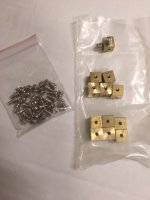
Just bought these from China.... Gonna try tonight to see if I can mount a SCSI2SD board with them on a hdd sled in an SE/30... :) I couldn't figure out what they were called for the life of me... and then I found them... Cube nuts... or something to that effect

IMG_4326.JPG

 
Last edited by a moderator:
Well one sled works ok.. The other is too tight of a fit.

image.jpeg

Sorry about the pic orientation.. Uploaded from my phone

 
Last edited by a moderator:
In case anyone is trying to decide between the V5 and V6 versions of the SCSI2SD, I've got both. The V5 works like a champ, seems to be bullet proof. The V6, not so much. I'm using the V5 in an SE/30, but have had it in other machines, an LC575 and PM7600, and never had a hiccup. The V6 is very picky as to cables and cable routing, probably other things as well. I'm still playing with it's many options. It was working well in my 7600 until I recently upgraded the firmware, now it's not.

So my recommendation: if you want a solid "plug it in and forget it" device, get the V5. If you want to play with the thing with the potential for better performance, get the V6. 

Charlie

 
I recently bought both a v5 and a v6, so I'm excited to get some SD cards and put them in things and try them out.

It seems like the consensus is the v5 is the current safe bet.

 
Back
Top