


I have a Hard Disk 20SC external SCSI drive enclosure that has a SCSI ID selector switch on back. Because I am using a non-stock IBM DGHS 4.5GB drive inside, I've left the SCSI ID select switch cable disconnected. But I am eager to change the SCSI ID on the fly.
Here's a photo of the drive label, showing the SCSI ID jumper settings:

I believe the precise jumper settings follow what is shown on page 17 of this PDF.
And here's a photo of the inside of my HD20SC (a still image from my PSU recapping video):
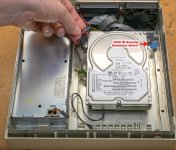
It seems that an ST-225N was the stock drive and its SCSI ID jumpers seem to correspond to that blue connector in my above photo:

What I am curious about is how the HD20SC's SCSI ID selector cable works. I haven't yet torn apart my HD20SC to figure it out myself. I will do that, but I wanted to post here first. The above ST-225N diagram shows 4 pairs of pins that can be shorted to select SCSI ID, but the drive enclosure's blue connector only has a 6-wire cable, meaning it could only control 3 pairs, not 4.
Any thoughts?
Here's a photo of the drive label, showing the SCSI ID jumper settings:
I believe the precise jumper settings follow what is shown on page 17 of this PDF.
And here's a photo of the inside of my HD20SC (a still image from my PSU recapping video):
It seems that an ST-225N was the stock drive and its SCSI ID jumpers seem to correspond to that blue connector in my above photo:
What I am curious about is how the HD20SC's SCSI ID selector cable works. I haven't yet torn apart my HD20SC to figure it out myself. I will do that, but I wanted to post here first. The above ST-225N diagram shows 4 pairs of pins that can be shorted to select SCSI ID, but the drive enclosure's blue connector only has a 6-wire cable, meaning it could only control 3 pairs, not 4.
Any thoughts?




