• Hello MLAers! We've re-enabled auto-approval for accounts. If you are still waiting on account approval, please check this thread for more information.

Reviving a 512K Hyperdrive - Error Code 0F0100

Hey guys/gals

There's a Hyperdrive upgraded 512k Mac for sale on eBay right now. I've been looking for one for ages. I'm ready to cough out a lot of dough.  :p

Unfortunately it doesn't work... it displays an error code: 0F0100.

I looked everywhere and couldn't find any info about that code. It's an exception all right, but what does 0100 stand for??

From the Mac512:

Exception chart

YY = 0F
Sub Code
YY0001 Bus error
YY0002 Address error
YY0003 Illegal instruction
YY0004 Zero divide
YY0005 Check instruction
YY0006 Traps instruction
YY0007 Privilege violation
YY0008 Trace
YY0009 Line 1010 or Trap dispatch error
YY000A Line 1111
YY000B Other exception or trap
YY000C Unimplemented trap
YY000D NMI (normal indication)- Interrupt button on Programmers switch was pressed
YY0062 64K ROM Mac reading a HFS formatted disk
YY0064 Couldn't Read System File into Memory or 64K ROM Mac reading a HFS formatted disk
YY0065 Bad Finder
Maybe the killy clip's damaged or simply not fully down?

NB: It also says that most 0F errors can be fixed with 'just a disk swap'. But the seller says he tried a couple of disks with no luck whatsoever... Maybe he didn't reboot the machine with the disk in??

I'm gonna ask the seller if he can hear the HD spinning, you never know, maybe the Hyperdrive was removed from this unit?


 
bump.

PS: the auction ends in less than 3 days. I think I'll bid on the mac nevertheless. Still, I'd like to know what this means...

 
It's either a hyperdrive software glitch, or a hyperdrive hardware problem. Unfortunately, I think it's the latter. What are the odds of fixing this thing? 

-Mac 512k Logic boards are certainly mendable, 'cos there's a lot of info available online and there are no damn SMD caps or PRAM battery anywhere near them!

-A/Bs are mendable too. But it wouldn't cost me a fortune to replace it with another one. I doubt it's the cause of the problem though.

-Hyperdrive LB are hard to diagnose. There is NO info about them anywhere. I hope it's not faulty.

-Hyperdrive A/Bs should be okay? I mean I can't see why they would break. This computer sent most of its life in a closet somewhere in California. No one incorrectly plugged it to 220V mains.

-Hard drive could be faulty. But I think there are suitable replacements. IIRC, GCC used MFM drives.

What else could cause this??

 
 I had the same error popping up on my 512ke with upgrade card, reseating the card made it boot without issues!

 
Last edited by a moderator:
 I had the same error popping up on my 512ke with upgrade card, reseating the card made it boot without issues!
THANK YOU SIR. You just made my day. 

I wasn't completely sure a badly seated card could be the source of the 0F0100 error code. Of course that could mean there's a problem with the card talking to the computer. But it seems the killy clip goes out of alignment quite often. The seller (a really nice bloke by the way) said he couldn't open the case up (damn torx screws). So it probably means this thing hasn't been opened since the mid-80s. 

What kind of card your 512Ke was upgraded with? Hyperdrive, Memory?

One could only be so lucky. Fingers crossed for you BadGoldEagle.
Thanks for the support. I really hope I'll win. This would be a first for me, having lost every single auction I entered. This time I'll bid big money.

I'll let you guys know how things turn out!

Cheers! 

BGE

 
I AM SO HAPPY RIGHT NOW! 

I just won the auction! It never happened to me before! I always got sniped at the last minute but this time I got lucky.

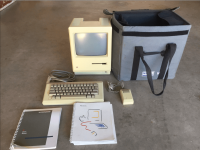
In the end, I paid just under $170 for a 'broken' 512k Hyperdrive. I know this is a lot but this one is actually mendable I think, and it comes with manuals and disks!

So I'll be digitalising the manual and uploading the disks on the Mac Garden. 

This is a Hyperdrive 20. So it will likely come with V2R1 and V2R2, the latter being absent from the archive up to this point!

More to follow!

Piccies:

Screen Shot 2016-10-15 at 11.48.07 pm-2.png

 
Sweet! Looks like a great package for 170, with the manuals and bag, and not forget the HYPERDRIVE!  Congrats.  I hope the sadmac is an easy fix!

 
I really need to thank olePigeon for this. He talked about it in the "Ebay finds" thread, and I had no idea there was one for sale. And now it's mine, all mine!  }:)

 
Hopefully someone didnt remove the drive and etc... the HyperDrive 2000 Plus I had, someone yanked the drive for data reasons :(

Congrats though :) I really hope everything works out. 

 
I asked the seller if everything was in there. He told me there's no reason why it wouldn't be. This thing was put into storage more than 20 years ago. His dad was the original owner. He told me that he could hear something buzzing and spinning when it was on, indicating the presence of a hard drive. Technically non-upgraded 512ks are virtually silent. So fingers crossed, everything is in there.

 
Good luck with it BadGoldEagle.  I also had a Sad Mac error but I don't recall what it was.  I ended up having to replace the Killy clip and ribbon cable.   I'll be watching this pace for updates. 

 
Hey snuci !

Yeah I think that both boards and the HD are healthy. The killy clip was notorious for failing even back then!! 

Where did you find a replacement Killy clip/ribbon cable? These are kinda rare and you can't buy new ones, right? I know you can buy new 030 PDS connectors, but killy clips for the 68000?? 

Edit: You can still buy sockets. I guess it's possible to run 64 jumper wires from the socket to the hyperdrive Logic board...

Edit2: Are you referring to your Hyperdrive 20 you couldn't get to work a couple of years ago?

 
Last edited by a moderator:
Hey snuci !

Yeah I think that both boards and the HD are healthy. The killy clip was notorious for failing even back then!! 

Where did you find a replacement Killy clip/ribbon cable? These are kinda rare and you can't buy new ones, right? I know you can buy new 030 PDS connectors, but killy clips for the 68000?? 

Edit: You can still buy sockets. I guess it's possible to run 64 jumper wires from the socket to the hyperdrive Logic board...

Edit2: Are you referring to your Hyperdrive 20 you couldn't get to work a couple of years ago?
The killy clip I bought came from eBay.  I looked around for the right number of pins and cable end and ended up finding one for a completely different application.  I think it might have been for debugging other chips but it was not specific to the 68000 and it said nothing about "killy" so it was just a lot of manual searching.  This was unused but not new because mine had the old rainbow color cable :)  As I recall, I had to put my own end on it because the ribbon cable was too long.

I have three (or maybe four) Hyperdrives now.  Two are the original 10Mb versions and the other one or two are 20Mb versions.  One of mine has a bad hard drive so I look for a 10 Mb hard drive from time to time. They are not easy to find.

 
When you open it up, it may not even have a Killy clip.  I have a boxed Hyperdrive, and it has a ribbon with a manual clip instead of the board socketing directly onto a killy clip.  What it's missing is a special IC tool for clipping it on without bending the pins. :O

I fear the tool is even more rare than a killy clip. :-/   I suspect they moved to the killy clip to make installation easier and less prone to damage.

Don't think I'll ever be able to install mine unless I find the tool somehow. :(

 
Last edited by a moderator:
So the Mac arrived today. I'll have to wait until saturday to have a look at the insides (forgot my T15 driver)

According to the User's manual, it's a Hyperdrive 10. I will be scanning the manual once I get a chance. I couldn't find it anywhere online. ole did upload the service manual, but not the User's manual (which is the same for both Hyperdrive 10 and 20 machines).

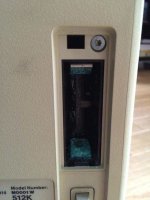
The bad news is that the seller forgot to remove the battery when he stored the mac in his cellar, and the compartment is completely oxidised now  :(

That's not good. But apparently the Analog board wasn't too damaged (CRT still produces a bright image). So if it did leak, it didn't leak all over the insides, hopefully.

Will report back on Saturday.

Edit: it comes with Hyperdrive Disk #1 and Disk #2. Hope they haven't been erased. They're probably V2R1 disks, given that it was made in '85 before the Plus (and Hyperdrive V3 disks) were introduced.

 
Last edited by a moderator:
Here's a picture of the battery damage. That's about what I can do until I go back home.

rsz_img_3418.jpg

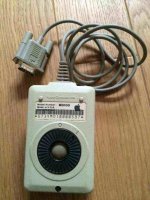
What is interesting is the serial number on the mouse:

rsz_11img_3419.jpg

That's August 1987. And it's beige. So I don't know when Apple stopped making beige mouses... but pretty late I think.

 
Last edited by a moderator:
Oh, that's nothing.  I've seen worse.  It's when the battery explodes and leaks everywhere.  A little vinegar should neutralize it.

I totally forgot about the Hyperdrive manual.   I was scanning it in and redoing the pages in Illustrator so it'd look like an original PDF, but at some point I stopped and just forgot I was doing that. :p

I have Thanksgiving and Christmas breaks coming up, I should be able to revisit a lot of old projects then.

 
Last edited by a moderator:
Back
Top