• Hello MLAers! We've re-enabled auto-approval for accounts. If you are still waiting on account approval, please check this thread for more information.

Reviving a 512K Hyperdrive - Error Code 0F0100

Well, I did about a tenth of the manual. It's a pain in the @rse but it looks great. Using Photoshop CS6 & ilovepdf

What it looks like: hyper1.pdf The final pdf will get the OCR treatment.

Thanks for the tip! Yeah I don't think it leaked all over the insides. Damage was contained to the battery holder. At least I hope.

I can see the Hyperdrive support through the security hole thing. Yeah! And the vent opposite to the A/B has a lot of dust bunnies in it. Double Yeah!

These are good signs.

Will backup those floppies this weekend using my Plus, the M0130 drive, and good old DiskDup 2.7. Maybe they're different to the ones you uploaded on the garden... Disk #2 doesn't look good though.


Attachments

Last edited by a moderator:
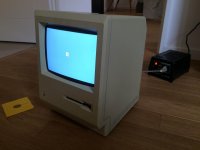
I couldn't wait. I had to give it a shot.

Hurray!

IMG_3420.JPG

I thought it would display the error code right at startup but it doesn't. Instead, it starts right off. Hard drive spins up as it should, produces the right kind of noises too. But it doesn't boot.

Hyperdrive_startup.mp3

The first time, it got stuck on the floppy disk icon. I think the Hard drive had problems starting up. (but after a couple restarts it's as good as new).

I tried one of the disks that came with it, the original MacPaint disk. Throws me the 0F0064 error. Then I tried Hyperdrive Disk #1. Same thing. So either both disks are bad, or there's something wrong on the Logic board because my external floppy drive works great.

I'm thinking RAM or Bourns Filter... but I need a known good disk to be sure. I left the floppy EMU at my parent's house with the screwdriver so, I have to wait until Sunday. But I don't think this is Hyperdrive related. 

Then, I tried with no disks in at all. Got a happy mac as it was trying to boot from the HD, but soon after, the 0F0100 error kicked in. 

I don't know how the hyperdrive system works, but bad RAM or bourns filter could upset it...

More to follow.


Attachments

Last edited by a moderator:
So either both disks are bad, or there's something wrong on the Logic board because my external floppy drive works great.
Can be you internal drive also, try to disconnect the inner drive for another test (i suppose the drive is the 400 k one)

The 512k is probably trying to boot from the inner drive first.

The Hd can be also faulty...maybe you can try to hook it up to another working macintosh for a test.

 
Last edited by a moderator:
I can definitely hear the external drive spinning. The internal drive sits there, doing nothing. Although, when I click the mouse button while switching on the mac, the internal drive's mechanism tries to eject a floppy, as it should. But there's nothing in there and the mechanism is not in the right position to read, it's all the way up... Weird.

I will try with the internal drive disconnected as soon as I get a chance to do so (Sunday)

Unfortunately, you can't hook that drive up to another mac. This Hard drive is NOT SCSI: it's an ST-506 compatible drive. 

I scanned about 70 more pages today. I got to a point in the manual when they say the Hyperdrive Macintosh will behave just like any normal 512k if a startup disk is inserted before switching it on (that's actually pretty logical...). If I can get passed the booting sequence, I could diagnose the HD from any version of the system (1.0-4.1) using some special Hyperdrive software olePigeon uploaded onto the Mac Garden a couple of months ago. 

I don't know how the Mac "sees" the Hyperdrive". As a big floppy perhaps? But maybe this is just another problem with the floppy drive.

Edit: Mine's equipped with a 10mb hard disk, just like the one JDW has. In one video, he says the drive is a MMI 112. And look what I've found.

So even if the drive is bad. Could be as I can't hear the heads moving, there's a solution.

 
Last edited by a moderator:
So, turns out the floppies are completely shot. They aren't even mountable. That probably explains it. Will try with known good floppies later today. 

That's no big deal though. We already had that version (V3R1)

 
Last edited by a moderator:
Too bad about the floppies.   :(  But I guess if that version is already out there, at least images are available.  I think it is very cool that you have taken the time to scan the documentation in so professionally.  Giving back to the community like that speaks volumes about a persons character.  Cheers!  And best of luck with the restoration.
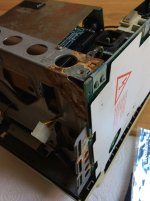
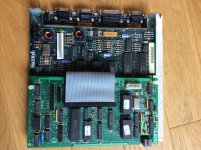
 
Thanks joe! But that's nowhere near a real professional's job as ole's: He started recreating every single page in Illustrator. Now that's really difficult, I just scan pages and put them together. 

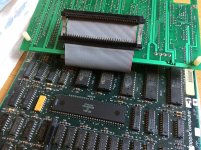
So I opened it up, revealing the aftermath of a massive battery leakage...  :'(

IMG_0090.jpg

Thankfully the Hyperdrive logicboard was intact!  ;D

IMG_0091.jpg

The 512k logic bord looks good too.

I detached the "clip". That was rather easy. Looks undamaged. Maybe I'll check continuity to be sure it's fine.

IMG_0094.jpg

Then I removed the hard drive. Turned out to be the exact same unit as JDW's: MMI MM112. 

Ouch ! Drive definitely seen better days! Looks like the impact was so big the gauge literally exploded.

IMG_0095.jpg

I think the drive is shot, as I expected. And, now that I think of it, I couldn't hear the heads moving at all... Maybe there's a way to fix it though?

Noticed another thing as I was re-assembling the Hyperdrive system:

IMG_0099.jpg

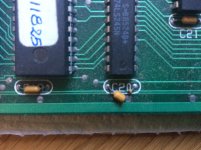
Dead cap. Could be the source of many problems. But now it's in half, how can I determine what the capacitance was?? Hyperdrive Logicboard is version 1.1.

Side note: I noticed when I was moving the unit around that something was rattling in there. Turned out to be the fan, which fell off from its support and was completely loose: solder joints had broken off as well!

-- 

I'll try to attend this Cap problem before attempting anything on the hard drive.

 
Wow, I was hoping the battery damage would have been isolated to the holder plastics and terminals.  Shoot.  Luckily, it looks like the frame sustained most of the damage, although I can't see the A/B.  It can be treated and lightly sanded and polished to like-new.  I did the same on a Classic II frame.  I would assume the capacitors in the general area are of the same values.  I can't quite tell from the picture, but it looks like C21 has some values printed on it?  Perhaps use a loupe and see if you can make them out?  I had an SE/30 network card that had a bad capacitor and I couldn't read the values on, so I used the values from a visually identical part on the board.  It fixed it.

I'm not familiar with the HyperCard system, is that clip the only thing needed to install it?

 
The Analog board is working fine. The mac "works" as a standard 512k, but the Hyperdrive doesn't. The upgrade consists of a daughterboard, a fan, an additional psu and a hard drive, of course. I think the Hyperdrive PSU is okay, as the HD spins, but I'll double check the voltages right at the molex plug, just to be sure.

Yeah I think those caps around C20 are the same as well, I just don't wanna make a silly mistake ordering the wrong capacitor. I don't know if it was already broken when I removed the board, or if I broke it while removing it... Maybe it's what's causing the error code? I doubt it. But who knows. 

 
0.1uf cap. 

That cap was physically damaged by impact. You can use any MFM-Style HDD in place of the original if its bad, but you WILL need the hyperdrive utility to LLF the drive. 

The heads on those old drives are notoriously bad at keeping their existing alignment, so an LLF may bring that drive back good again. MAYBE. 

 
Last edited by a moderator:
Thanks techknight !

I'm gonna have a look at it later today. Again, just to be sure. But if I can't find anything, which one should I buy? There's quite a lot of 0.1uf caps available from digikey!

From 50volts to 1kV! I think a 50v one will do fine...

I'd like to keep this thing as close to original as possible, so i'd rather buy an old MFM drive rather than an emulator, even though the chances of it working are not that good. I stumbled across this yesterday evening: http://www.mfarris.com/hard/mmi.html

Do you think this could work? I know this is not really ethical, but I like keeping the original owner's stuff on an old hard drive like this one. Plus I already told the seller I would send him the documents on the hard drive once I get it working...

 
it would be very surprising if they still have MFM drives in stock, Although not too surprising though as I have seen some industrial machines that are in every day use that still run on old hardware that use MFM drives... 

Anyways. That board will run fine without that capacitor in place, although its meant for decoupling VCC/ground bounce from the IC power rails itself. 

Also, you need to see if you can boot the machine with the hyperdrive kit installed, and use the hyperdrive disks to low level format the drive and see if it works. It may, it may not. 

 
Last edited by a moderator:
Okay so I opened the thing up, again. This time I got the hang of it. Took me about 2 minutes. (it's difficult to unhook everything because it's so cramped inside!)
They used the same capacitor on the entire Hyperdrive logic board. It's a K5U 104M. That stands for 5volts, and the tolerance is 104M. Apparently you were right (as usual). It's a 0.1uF. It's 5V. +-20%. But I can't find any of these on either digikey or mouser... 

Is it bad if I use one with a higher voltage?

So it will work even without this cap? I'm going to power it up now, and see how that drive behaves.

I sent the company in question an email. They do repairs on old MFM drives, I was thinking they "might" just fix this one...

 
I tried booting it up with olepigeon's disks (V2R1). The Mac works just like a normal 512k. So that's something at least.

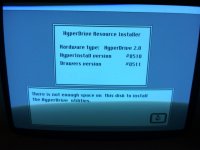
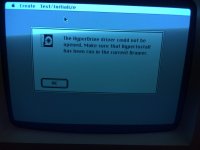
Here are some pictures of what happens if I try to run Hyperdrive Install and the Manager. (sorry for the poor quality pics, damn refresh rate!)

IMG_3422.JPG    IMG_3423.JPG

HyperInstall V2R1                                                                                                          Manager V2R1

I don't know what the "hyperdrive driver" is. But it's probably a system file that is supposed to live on the hard disk, right? Because it says in the manual that Manager should be on a Hyperdrive drawer in order to be used. But there are no Hyperdrive drawers available...

At least it can see the Hyperdrive board! 

When I performed these tests, the rear bucket was off. The hyperdrive LED is always lit. It's not supposed to do that. It's supposed to blink every now and then as the disk is accessed like a normal Hard drive LED should.

What I'd really like to know is what happens past the Hyperdrive ressource installer screen. Is the software looking for something else after checking the Drawers version? Maybe the Hyperdrive driver? If so where is it? Hard drive? ROM on Hyperdrive board?

Only someone with a working Hyperdrive can tell me this. So would you be kind enough to run HyperInstall on your machine? HyperInstall is located inside the Startup Drawer. If not, it must be somewhere on the disk. It won't hurt your machine or install anything on top of your existing system.

THANKS!

 
that installer requires a drive thats already pre-formatted and preconfigured. There has to be a utility that comes before that which initializes the drive. 

 
OK. Did some more tests today. 

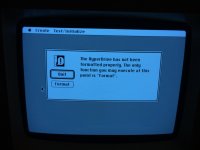
First I fired it up using one of the Hyperdrive V3R1 disks. Manager said there was a problem with the hard drive.

IMG_3424.JPG

But this time, V3R1 gave me the choice either to quit OR format the drive.

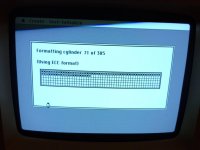
So I went ahead and formatted the drive, knowing that it would be kinda difficult, since the heads don't seem to move. IMG_3425.JPG

It began formatting the drive. It took Manager about 2 minutes to format all those 305 cylinders, only to tell me that this had failed. I repeated the operation a couple of times, hoping that the heads would unjam at some point. But it did the same thing, over and over again.

At this point, I rebooted the mac. But I noticed it wouldn't try to boot from the hard disk anymore. So the 0F0100 error is gone. So it must mean it formatted the drive somehow, without moving the heads. Definitely odd.

Then I tried HyperInstall, V3R1. Same thing, it can't find the Hyperdrive Driver. But now I know that's normal since this driver is supposed to be on the Startup drawer, which is gone.

I was about to give up, but at the last minute I noticed tanaquil uploaded Hyperdrive System V1 disk 2. (sadly disk 1 is unreadable). But Disk 2 contains Manager V1. And I must say Manager V1 seems to be a lot more advanced than the versions that superseded it. 

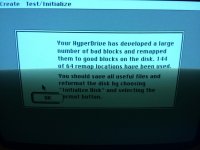
After re-formatting the hard drive once more, it gave me this message. Ouch, that's a lot of bad sectors!

IMG_3428.JPG

But I have finally come to the conclusion that the hard drive is completely shot. I'm currently looking for a replacement drive. Maybe I'll find another MMI 112? Who knows. I know buying the emulator won't be as troublesome, but I like the noise of big hard drives. I don't mind having a SCSI2SD inside my Mac SE or Portable as these are not as rare as the Hyperdrive.

Edit: techknight, apparently the utility in question is the Hyperdrive Manager. 

Edit 2: can you replace the front faceplate on MFM drives?

 
Last edited by a moderator:
You can use any MFM-Style HDD in place of the original if its bad, but you WILL need the hyperdrive utility to LLF the drive. 
So even if it's got like three times as many cylinders, it's ok? 

There is a working ST-251 for sale right now on leboncoin (french equivalent to craigslist) for about $70. That looks like a good deal, considering that most drives I see on ebay go for about $50 and are untested.

The ST-251-1 has 820 cylinders, it's a 40mb drive. There is no reason why it won't work. I mean, Hyperdrive themselves say the only difference between the Hyperdrive 10 and the Hyperdrive 20 is the drive itself. No logic board modifications are needed.

I would have preferred an original 10mb drive, but this one is dirt cheap. And if I manage to get a working 10mb mmi/seagate in the future, I could always sell this one (probably for a greater price too!)

PS: I should probably point out that this ST-251-1 is the MCL1 version: ST-506 compatible. The plain ST-251-1 is only ST-412 compatible.

 
Last edited by a moderator:
Well it would only format the drive to what the hyperdrive card is configured for, because I dont see a way where you can enter the C/H/S data of the drive. 

So it will only format it to the same number of cylinders. Unless there is a hidden option in one of the formatting utilities to define the drive type. 

 
Back
Top