• Hello MLAers! We've re-enabled auto-approval for accounts. If you are still waiting on account approval, please check this thread for more information.

Retro68 Codelite setup

I've been trying to setup Retro68 for quite a while on my Macbook. Initially, I was unable to compile the project, but after trying it enough times, I at least got far enough in the compilation process to have a working 68K toolchain.

It was mentioned in some other posts, as well as in this blog post, that it is possible to setup Retro68 to work with the Codelite IDE. I have however not been able to setup Codelite in such a way as to have code completion and building from the IDE. I was hoping, that there is maybe someone in the community who can maybe write a tutorial or something on how to setup Codelite to use the Retro68 toolchain? I am sure a tutorial like this would be beneficial to all the aspiring retro-programmers among us  :)

Any help or suggestions would be greatly appreciated!

CM

 
I use Visual Studio on a PC, but I managed to connect the Build button in my IDE to trigger a Retro68 build. I've never used Codelite, but below are the commands I run when I build from Visual Studio:

Code:
cd $(ProjectDir)$(Configuration)    <-- Move to your build directory (you might need to do a mkdir first)
make clean   <-- This is optional, it can slow down the build significantly
cmake .. -DCMAKE_TOOLCHAIN_FILE=~/your_path_to/Retro68-build/toolchain/m68k-apple-macos/cmake/retro68.toolchain.cmake   <-- Create/update the makefile
make   <-- do the build
xcopy *.APPL "C:\your_path_to\BasiliskII\Virtual Desktop\" /y /s   <-- Copy the resulting build into my emulator shared directory, so I can run it
I understand some of these commands are PC/Microsoft specific, but they should give you the idea...

 
Hi ants, thanks for the answer!

I am not bound to Codelite, I only mentioned it because it seemed that most people have had success in integrating the code completion and build process into it. :)

Were you able to get code completion working in Visual Studio? 

 
By and large, code completion and other refactoring tools work well in Visual Studio. The only thing I've struggled to get working are some of the standard C++ classes (such as std::string) - but I haven't really invested much time in trying to fix the issue.

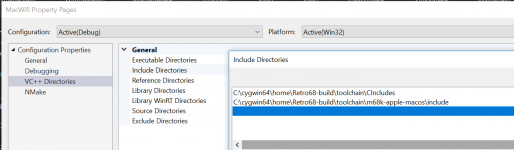
In Visual Studio you just specify any system include directories, and the IDE will pick them up when coding. I added some of the toolchain folders:

includes.PNG

 
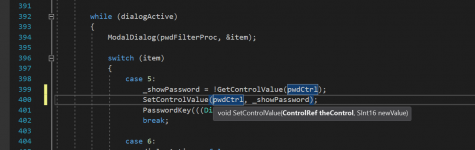
Here's an example of what I get in Visual Studio:

code.PNG

Toolbox functions are identified by the IDE, function parameters are shown, variable highlighting etc... possibly better than any original Mac IDE??!

 
I've got a few Retro68 projects on GitHub, which include the Visual Studio project files (.vcsproj). If anything, you can just grab the project file, delete all my files and then add your own. Also, check the Properties of the project in Visual Studio, as there's probably a few hard-coded folder paths in there  :/

 
Unfortunately it looks like Visual Studio for Mac isn't fully compatible with the Windows version. When I try to open the project you linked, the IDE doesn't recognise.  :-/  I've been messing around with Visual Studio Code, and I have gotten a little further, but I'm not completely happy yet. I'll keep trying though! Thanks a lot for the tips so far  :)

 
Visual Studio Code is fun let me tell ya. I have been using it the past two weeks trying to debug and learn a NodeJS application we bought, built by someone else with NO comments, and obfuscated "letter" variable names. Ugh. 

 
So, after messing around a bit, I think I finally got it to sort of do what I want. The trick in Visual Studio Code, was to edit the c_cpp_properties.json file, and include the following:

"includePath": [
"path/Retro68-build/toolchain/CIncludes",
"path/Retro68-build/toolchain/m68k-apple-macos/include"
],


This will enable the syntax checking, as well as jump to definition, which is exactly what I needed. I'll be playing around a bit more, to see if I can get the build process refined a bit  :)

 
See my Retro68 + CodeLite + pce/macplus set up here http://www.toughdev.com/content/2018/12/developing-68k-mac-apps-with-codelite-ide-retro68-and-pce-macplus-emulator/

The combination form a very good development environment for 68k Mac apps. Mac apps can be run on various emulators on different Macintosh system software just by changing the CodeLite project configuration dropdown. Autocomplete is supported as well. CodeLite can also be configured to tail the serial port output file and this can used for debugging purposes.

 
Hi @mdanh2002 thanks a lot for the post, it has already put me on a better path to getting my setup working. Unfortunately there seems to be some features that are for some reason still not available even after I followed the guide you wrote. For example, function calls are not recognized by the IDE, however datatypes are highlighted correctly, as you can see below (sorry for the bad picture. I'm traveling at the moment). I can also follow the includes, it just seems that the function calls for some reason are not recognized. Do you have any suggestions of what I might be doing wrong?

highlighting.png

 
Back
Top