Repairing graphics cards

gsteemso

6502
I've been trying to work out how to fix a stack of graphics cards I've got. The most urgent are a pair of Nvidia GeForce 6600s (just 6600, no following letters).

Alas, every thread on the topic seems to already have an obvious starting point, in the form of dodgy caps or heat discoloration or, in extreme cases, a trail of scraped-off components from the scrapping process. What do I do when there's nothing apparently wrong with them, apart from the failure to function as expected?

One of the other cards works, but has a cooling fan that sounds like a wood chipper. Where in the heck do you look to find a replacement for something so absurdly model-specific? Is there a way to fix the old one instead? (Not sure I'd trust it if there was, mind you.)

Any advice will be gratefully received.
 
Hi,

What cards are they - Apple branded or generic? Cooling on these cards could be pretty average and without decent airflow and cooling the core burnt out on a lot of these cards. You may also read about "bump gate" for Nvidia GPUs of the era but this was mostly 7x00/8x00 models. Also check for damage as in clearly missing caps and other components on your e-waste cards.

You can strip down fans to lubricate and renew.
 
Oh, they're not e-waste, that was an example taken from what other threads on here I've managed to track down. The two cards I'm most concerned with, the Nvidia GeForce 6600s, are Apple OEM cards for a Power Mac G5 dual core machine, and as such never had fans in the first place. When the first one started acting flaky, I bought another… which promptly suffered the same fate (just long enough after I bought it that I can't call it the seller's fault). I think if I can't find any other issues the thermal paste may need renewing, because I've got the G5 running relatively cool these days (for a G5, at least, they’re a bit toasty by nature).

Two of the others are likewise Apple OEM for Power Mac G5, but these are for the older model with AGP 8x slot. I'm not too worried about them, except in obsessive-completionist terms of wanting to fix the whole stack, because they only have maximum resolution of 1920x1200.

Lastly, I managed to find (this is from memory and may be inaccurate, I'm typing this while on my break at work) a Radeon X850 Mac Edition, likewise for the AGP 8x slot – that’s the one with a fan that sounds like a wood chipper. When you say that the fan can be stripped down, does it need to be popped apart with mechanical force, or are there usually screws with which to dismantle them? I haven’t been brave enough to try tearing the thing down yet, I was hoping to find a YouTube example or something first. (No such luck just yet, though I'm sure there are several.)
 
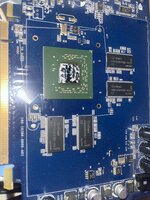
Amazingly, the one GeForce 6600 that is not inaccessible due to being inside the machine seems completely pristine under the heatsink – no thermal discoloration at all!image.jpg
However, the thermal paste can only be called “not crumbly” on a technicality, so it’s a good thing I had a look in there.

On advice from a fellow vintage computer enthusiast here in my area, I’m also going to preëmptively re-cap the thing. These particular cards only have six electrolytics apiece, so it seems achievable, hopefully without too much fuss. On the other hand, one of the other threads here mentioned large ground and power planes inside multi-layer video cards (which these clearly are, there are not nearly enough visible traces), which apparently make through-hole components very annoying to desolder as the heat is conducted away. We shall see, I suppose.

I’ve seen advice on removing old thermal compound that basically amounts to “use a very soft scraper [wood or soft plastic] and then wipe with isopropanol”. Does anyone have anything they would change about that summary?
 
Ah - I get it now. The stock Apple 6600 cards are not particularly hot running cards and much better in quality than the equivalent x86 enthusiast level cards, there is no obvious failure point apart from the obvious (clean contacts, remove the crusty thermal paste and replace with new). Look at each card under magnification and compare to the working one to ensure no components are missing/damaged. Replacing caps shouldn't be too hard, however the ones on this era Apple GPUs were usually good quality.

Removing old thermal compound: for the glue-like stuff, acetone and a razor/scraper on the heatsink will get there, finished by some IPA to clean all surfaces. If just paste, leave in IPA and a clean rag.
 
@Byrd, do you know whether the GeForce 6600 would have used lead-free solder? I don't want to try to apply fresh stuff to loosen the old and get the type of it wrong – that makes a horrible mess.
 
Hard to say - around that time the GPUs started to become all lead-free solder, I'd use the leaded stuff though on the caps if going there.
 
whether the GeForce 6600 would have used lead-free solder?
Make sure you are using plenty of good quality flux (I despise ROHS solder, so any advice I give would be biased, and I like a good Ag-Sn-Pb mix).
It appears that NVIDIA would have gone lead-free to meet the EU regs that were coming in 2006 (is that really 20 years ago already?!?) so its likely that it might have been using lead solder, but could easily have gone the other way by then.

There are lead test swabs available pretty cheaply, so you don't have to guess, if that's important to you.
 
Eh, I'll just try each type I have on a solder-filled through-hole (there are several) until I get one that mixes properly, then I'll know. (My replacement caps won't all arrive until April because some were on backorder, so it will be a while before I report back on this for anyone in the future who wants to know.)

Speaking of replacement caps – it looks like the ones on the card are all still in production, but their rated lifespans are only 2000 hours! If the machine is running on average 8 hours a day – a conservative estimate, as I usually leave it asleep rather than fully shut down – I’ll run through that in less than a year. Even if they’re only powered when video is active, so on average maybe 2–3 hours a day, it’d still be past the predicted EOL in only 3 years. (I know, it will still work just fine at that point, but the chances of one of them going out of spec supposedly get a lot higher.) That’s why I went with backordered caps – these ones’re rated for 8000-10000 hours. Overkill? Probably, but I loathe recapping (it’s tedious and I’m not very good at it), so I don’t want to have to do it again any time soon.
 
No output and no apparent damage is the most difficult starting point for a repair, I think. My experience in those cases is that the GPU is usually dead, but I would start with the basics: does it have the correct voltages and clocks? The positive sides of capacitors are good places to check voltages since they're going to be at the input and output of each voltage regulator. You should at least be able to find the DRAM voltage (probably 2.5V for DDR1) and whatever the core voltage for the 6600 is supposed to be.

For fan replacement, usually eBay will turn up something, either searching by model or by the fan's diameter and the spacing of the mounting screws in millimeters. For lubrication, usually you can peel off the sticker on the back of the fan motor and add oil directly to the sleeve bearing. Don't reuse the original sticker, use some new tape with a strong adhesive. I've had good luck with aluminum tape and kapton tape; whatever you do probably won't last as long as the original, but it will get it going again.

I have never had a reason to worry about repairing a lead-free board with leaded solder. Just wick up as much of the lead-free solder as you can before resoldering with leaded. Lead-free is mostly tin, so if you resolder with leaded over residual lead-free, you do end up with a mystery alloy with unknown properties, but in my experience it's never worse than the lead-free solder was to start with.

Capacitor lifetimes are specified at their max rated temperature, so that's 2000 hours at 85C or 105C. If they're not running that hot, which they rarely do, their lives will be a lot longer. A thermal camera helps a lot to see whether the board has any trouble areas. For what it's worth, I've never had something magically come back to life after replacing capacitors that were not obviously bad.

Good luck, and please share your progress. 6600s aren't valuable cards, so most people wouldn't attempt to repair them, but I like the "it should work" ethos and giving some attention to hardware that others overlook.
 
Back
Top