

What's the best way to clean a discolored PowerBook keyboard? Some of the keys are more brown than gray, not sure how that happened. I haven't tried my usual keyboard cleaner yet but I figure someone here probably has played around with this!



It depends. What kind of PowerBook is it you are wanting to replace the keyboard on? If it’s any of the 100-series excluding the 100 and 190, yes, it should work. The 150 may also use a different keyboard, but I don’t know for sure.Would a 180c Keyboard work? I have one I’m parting out.
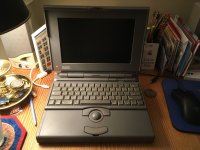
Hey, it’s me! :lol: Yes, that 180c keyboard should work fine.It's a 145B in otherwise great shape aside from needing new caps for its screen.
View attachment 34976
Yes, I recapped my screen with tantalums (you can use whatever type of caps you want as long as they fit). Also just recently did the inverter as well, which has two radials on it.Awesome! Have you done the recap for the screen? If so, how tough was it?
Mine just has a blank gray screen but the hard drive works. Playing with brightness and contrast don’t work unless you turn brightness all the way down, then it goes black/off.
I removed them by gently applying some downward force on the while rocking back-and-forth until they broke free.How did you remove your caps? I'll have to look that video up.
Sorry, I should’ve clarified. Yes, I used some needle-nose pliers.Did you use a tool to remove them or just bare hands?
I did dig up your old thread where you had new caps on the screen. If you don't mind, do you have the list of caps you ordered? I'd probably use tantalum caps myself; have them in my LC and it's been working great since I put them in.
No problem!Definitely! Thanks!!
Excellent!It does indeed have the door! I also have a teardrop ADB mouse for it that's in perfect shape.





