• Hello MLAers! We've re-enabled auto-approval for accounts. If you are still waiting on account approval, please check this thread for more information.

PowerBook 3500 video repair

Mac Gurus and Low End Mac report the 3400c as having 1MB and based on the board layout that makes sense. To say I'm a bit confused would be an understatement.

The 3400c uses different pin spacing from the kanga so it's unlikely to be able to use them.
I saw that as well and also confused. I wish I could just find the chips.
 
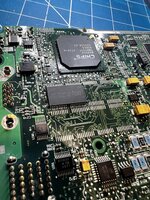
Here's a front and back shot of the 3400c. Very very similar layout.
 

Attachments

  • IMG_0804[1].JPG
    IMG_0804[1].JPG
    2.9 MB · Views: 38
  • IMG_0805[1].JPG
    IMG_0805[1].JPG
    2.9 MB · Views: 26
Mac Gurus and Low End Mac report the 3400c as having 1MB and based on the board layout that makes sense. To say I'm a bit confused would be an understatement.
Mactracker and everymac both report 2MB. If the chips themselves come out to just 1MB then I'll update my website's spec table.
 
What about external output? Can it do higher than that?

Edit: Appears external VGA out is limited to 800x600 mirrored mode only. I guess it does only have 1MB then, given the chips. I'll update my website.
 
Also wondering if I could lift a bank of ram and see if the issue changes or improves to maybe confirm that it is indeed a vram issue.

And if so how can I tell which two are a bank?
 
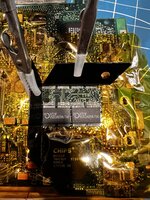
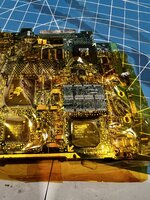
Well shoot. Just spent hours replacing the vram and same problem. But worse. May be incompatible ram in some way or I have a bad solder connection but it looks good to me. Regardless it’s apparently not the vram.

If anyone has any ideas please let me know. I don’t think there are any schematics out there…
 

Attachments

  • IMG_7851.jpeg
    IMG_7851.jpeg
    2.4 MB · Views: 22
  • IMG_7846.jpeg
    IMG_7846.jpeg
    2.3 MB · Views: 18
  • IMG_7845.jpeg
    IMG_7845.jpeg
    3.8 MB · Views: 15
  • IMG_7842.jpeg
    IMG_7842.jpeg
    1.9 MB · Views: 15
  • IMG_7844.jpeg
    IMG_7844.jpeg
    2.1 MB · Views: 19
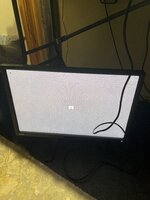
I have the exact same problem. Started my 3400c today after it being in the cupboard for a few years and getting the same issue. when I change the mode to 256 colors I get less issues. Feel like doing another? 😂
 
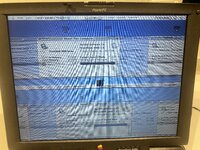
This look similar to what you were getting? When I connect external display I get the same output. Tried reseating everything. Cleaning etc. but no different. Where did you get the vram from? Mine is a 3400c 240
 

Attachments

  • IMG_4537.jpeg
    IMG_4537.jpeg
    4.7 MB · Views: 27
This look similar to what you were getting? When I connect external display I get the same output. Tried reseating everything. Cleaning etc. but no different. Where did you get the vram from? Mine is a 3400c 240
Well unfortunately the issue came back. I haven’t figured it out yet. It’s rather applying head fixes it temporarily for I can’t get a good connection on the board to all 4 rams. I kept working on it all night and made things worse. Going to go through all connections carefully and hopefully get it back to working.

Got the ram from mouser there’s a link a few posts back.
 
Well unfortunately the issue came back. I haven’t figured it out yet. It’s rather applying head fixes it temporarily for I can’t get a good connection on the board to all 4 rams. I kept working on it all night and made things worse. Going to go through all connections carefully and hopefully get it back to working.

Got the ram from mouser there’s a link a few posts back.
How did you go Sideburn? Still getting the issue?
 
Back
Top