


Powerbook 3400c RAM weirdness

A while ago I picked up a couple of new old stock 64MB RAM sticks for a Powerbook 3400 for cheap. I later acquired a 3400/240. It works great and already has a 96MB stick in it for a total of 112MB. While going through the mounds of accumulation in my computer room recently I happened upon the sticks, so I decided to test them. Both sticks are clearly 64MB and explicitly made for the 3400, yet both sticks are only recognized as 32MB. I know that there were some oddities with 128MB sticks between the Kanga and the 3400, but I don't think that applies to this situation. PRAM zaps and NVRAM resets don't help. It passes Mac Test Pro. Both Mac OS 8.1 and 8.6 see only 32MB on the module. This is bizarre.

Heh, maybe Transcend will make good on their lifetime warranty...
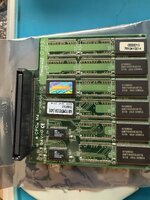
 

Attachments

  • 3400ram.jpg
    3400ram.jpg
    1.7 MB · Views: 9
Clean the RAM slot and connectors thoroughly (electronic solvent cleaner is your friend), I had a similar issue with a 64MB modules in a PowerBook 3400c. Also check part number is for the 3400c not Kanga (G3), which are also at times not fully compatible.
 
Clean the RAM slot and connectors thoroughly (electronic solvent cleaner is your friend), I had a similar issue with a 64MB modules in a PowerBook 3400c. Also check part number is for the 3400c not Kanga (G3), which are also at times not fully compatible.
Yeah, I need to get some contact cleaner for a number of machines. I've ordered some. It's 100% a 3400/240, and the RAM is 100% for a 3400 (it's on the label), so I can't imagine anything is incompatible. I doubt it's the slot on the 3400 as the 96MB card works fine, but I'll give it all a good clean when the stuff arrives.
 
Yeah, I need to get some contact cleaner for a number of machines. I've ordered some. It's 100% a 3400/240, and the RAM is 100% for a 3400 (it's on the label), so I can't imagine anything is incompatible. I doubt it's the slot on the 3400 as the 96MB card works fine, but I'll give it all a good clean when the stuff arrives.
May I recommend looking at DeoxIt?
 
Just cleaned the contacts, no luck. Transcend told me that it's EOL, so no warranty, which was expected. I dunno what the problem is. Maybe loose solder joints? I've put the 96MB stick back in and put the 64MB sticks in a bag. Maybe someday I can have someone with the right equipment and expertise take a look at them (along with a couple of bad 128MB FPM DIMMs that I can't bear to throw out) to see if there are any damaged traces or cracked solder. These things are rare enough that it might be worth a look someday, but it's out of my wheelhouse.
 
Back
Top
