• Hello MLAers! We've re-enabled auto-approval for accounts. If you are still waiting on account approval, please check this thread for more information.

Powerbook 180c boot issues

Looking for some advice with a problematic 180c I'm working on.

I had no issues cleaning up the display caps, so that work is all done.

The hard drive was spotty and wouldn't reliably boot (at all, but the seller had it boot once), so I swapped in a BlueSCSI.
I was having issues with that and I spent quite a bit of time going down the troubleshooting rabbit hole there. Seems that was a bit misguided, but here's the observations from that:
- If the image (known good) is fresh to the SD card, most of the time it will boot to desktop but will freeze up at some point. After a hard reset it will no longer find a boot image
- If that same image is kept and I leave the system unplugged for a while, it will find the boot image and get some time i not the boot process but will not make it to desktop

It hadn't occurred to me to use a boot floppy up until this point, which I did. The floppy was tested in an SE, it's an Apple original "Utilities" diskette and works fine there.
After inserted it begins booting up, seeking sounds completely normal but it just halts at the "Welcome to Macintosh" screen and any seeking on the floppy stops. Will hang there and needs a hard reset.

There is the standard 4MB daughtercard of memory installed and an additional 4MB in an expansion card installed. Removing the expansion yields the same results.
The interrupt console comes up fine during boot but I don't know enough about it to have done anything further on it. I can interrupt it to reach the sad Mac screen for hardware test (I assume) but the code it spits out shows all is well.

I'm still on a hunch it's something with memory. The system had no corrosion and is quite clean so I don't expect any issues in that regard. However I don't have a spare daughtercard for testing. Can the expansion be used on it's own? I'd assume no.

Any tips for troubleshooting further?

Thanks!
 
No battery corrosion? Also check the battery on the interconnect board. My take on the 180c and i have done 5 now, is the interconnect cable can get damaged and cause weird issues. Without having another one to swap out and try it is hard to determine if it is that. That also goes for the daughter cards I guess too. I have a dead 2400c but in order to find the issues I basically need to buy another working machine to swap parts with.. not sure i want to do that.
 
No battery corrosion on either spot. It's a shame the button cell is soldered in like that, I would be more inclined to swap it if it would at least have a cable and connector. Oh well. I'll get around to it sometime.

I'll probably buy a replacement daughter card since there's a few on eBay for the "why the heck not" price range. Always good to have spares anyway.

What has your experience been specifically with that interconnect board cable? Have you gone through the process of diagnosing specifically what had caused failures in the past (checking continuity)? If it is just the cable I will see about souring a replacement, but if I can confirm that the cable needs to be swapped (or any other repairs) all the better.
 
No battery corrosion on either spot. It's a shame the button cell is soldered in like that, I would be more inclined to swap it if it would at least have a cable and connector. Oh well. I'll get around to it sometime.

I'll probably buy a replacement daughter card since there's a few on eBay for the "why the heck not" price range. Always good to have spares anyway.

What has your experience been specifically with that interconnect board cable? Have you gone through the process of diagnosing specifically what had caused failures in the past (checking continuity)? If it is just the cable I will see about souring a replacement, but if I can confirm that the cable needs to be swapped (or any other repairs) all the better.
Yeah, try the daughter card first. Then see. I had a 165c show up without a daughter card, so i had to use my spare otherwise i could have sent that to you. You located in Canada?
 
I made that username a while ago when I was living in Canada. Now I’m in the states (NY).
I’ll go snag the daughter card I saw on eBay for a relatively good price.

Thanks for the advice! I hope this fixes it up. I really like this PB, it’s gonna be a permanent member of my collection.
 
I made that username a while ago when I was living in Canada. Now I’m in the states (NY).
I’ll go snag the daughter card I saw on eBay for a relatively good price.

Thanks for the advice! I hope this fixes it up. I really like this PB, it’s gonna be a permanent member of my collection.
yeah let us know. I have three working 180c. They are my favourite pb of the 68030 era, along with the 170.
 
Well, no dice. Same behavior with the replacement daughter card.

Either they’re both bad in the same manner or it’s something else entirely.

Damn frustrating. I really wanted this to work!
 
That stinks. I can send you a different interconnect board to try. Try hitting both reset and programmer buttons on back at same time and hold 10 seconds Then power on. Probably wont help, but can’t hurt. I would also wash the boards is isopropyl 99% and scrub connectors with soft toothbrush. Let dry. Let me know if you want to try this interconnect board.
 
I’d like to try the interconnect board. I have already tried the reset procedure. Thanks!
I will give the boards a cleaning tomorrow.
 
Updating this thread as imactheknife and I worked a bit in PMs. Hopefully this information will be of use to someone.

The inability to boot from floppy mentioned before was a silly mistake, due to an incompatible boot floppy. One built from an appropriate set of images off Macintosh Repository (with system enabler 131) booted fine.

The interconnect board did not have any effect on the system's ability to boot. Did give me plenty of time to reinforce the standoffs, though.

I attempted to boot from an external SCSI device that I loaded with the same "known good" 7.1 installation with the correct system enabler. This also failed, however as it turned out removing the SD card from the BlueSCSI was not sufficient. When the whole BlueSCSI was removed, the system boots fine.

With regards to BlueSCSI. I have several of the desktop ones that did not come assembled but work fine with the procedures I use to prep them. Brand new SD cards, SD card formatting tool, fresh installation done in emulator, Disk Jockey to drive-ify them.
The Powerbook BlueSCSI I'm using here came assembled, so I'm going to touch up the solder joints just in case. However, I had updated the system, and also completely nuked and flashed the BlueSCSI just as an extra measure.
 
don't forget to recap the display!

1727301678994.png

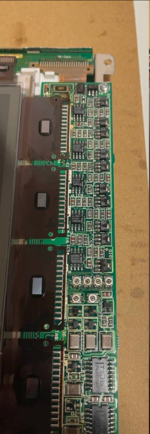
and make sure to clean off this area too. the fluid leaks through the vias...
 
One more last update. The BlueSCSI was sent off to the seller, who determined the SCSI connector had been soldered on upside down. While still pin compatible, it seems to have lead to it forming a weak connection with the internal ribbon cable.

For the record, I purchased it assembled! So this issue was not of my doing (for once!)

Seller sent it back to me, and it booted up perfectly with the same SD card, same installation, but the new connector soldered in place.

Now I've got one happy 180c!

Thanks to everyone, especially @imactheknife for the help.
 
One more last update. The BlueSCSI was sent off to the seller, who determined the SCSI connector had been soldered on upside down. While still pin compatible, it seems to have lead to it forming a weak connection with the internal ribbon cable.

For the record, I purchased it assembled! So this issue was not of my doing (for once!)

Seller sent it back to me, and it booted up perfectly with the same SD card, same installation, but the new connector soldered in place.

Now I've got one happy 180c!

Thanks to everyone, especially @imactheknife for the help.
Excellent:) sometimes something simple can cause a problem so hard to find. Mine was a bent memory pin on a 540, and once on s scsi connection lol.. glad you got it going!! Love these little beauties:)
 
Back
Top