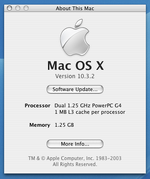
I'm troubleshooting a FW800 MDD (Dual 1.25 GHz) with some weird behavior and am in need of some help on this one.
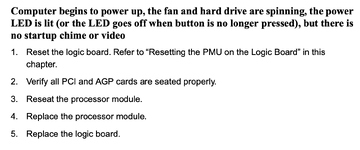
Description of the problem: The machine turns on / powers up; fans spin; HDDs spin up but then slowly spin down to a very low RPM (abnormal behavior). There is no boot chime and no video. The power LED glows briefly when first depressed, but does not turn back on and stay on like it's supposed to. There are no warning chimes.
Things I've tried so far:
- My first thought was RAM issues - have tried many different configurations, at least 3 different known-good sticks, and also no RAM at all. No change in behavior. Also no warning chimes when no RAM is installed, which is odd.
- Resetting PRAM (No response to this - same behavior).
- Removing all non-essential PCI cards, AirPort card, HDDs.
- Replacing speaker with known-good unit.
- Re-seating graphics card.
- Re-seating main power connector on the logic board.
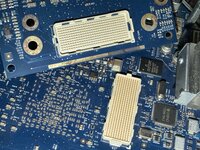
- Re-seating CPU daughterboard and heat sink. (Inspected CPUs; they look normal).
- Application of new thermal paste.
- Installation (and removal) of PRAM battery.
Your first thought might be ... dead/failing PSU! That's what I thought also, so I've already sent it off to the MDD PSU repair service (ACX Electronics, Austin, TX). They replaced several of the usual-suspect caps and reported the PSU should be working normally. I also measured the voltages and they are normal. So I am wondering if this is actually something wrong with the motherboard or the CPU daughterboard. I do not have replacements for either on hand.
I've found some similar threads around, such as this one, but they're either not quite a match (e.g., slightly different symptoms), for a different model like the AGP, or they fixed theirs by doing things I've already done.
So ... I am at a loss on this one.. Any suggestions would be really appreciated.
Description of the problem: The machine turns on / powers up; fans spin; HDDs spin up but then slowly spin down to a very low RPM (abnormal behavior). There is no boot chime and no video. The power LED glows briefly when first depressed, but does not turn back on and stay on like it's supposed to. There are no warning chimes.
Things I've tried so far:
- My first thought was RAM issues - have tried many different configurations, at least 3 different known-good sticks, and also no RAM at all. No change in behavior. Also no warning chimes when no RAM is installed, which is odd.
- Resetting PRAM (No response to this - same behavior).
- Removing all non-essential PCI cards, AirPort card, HDDs.
- Replacing speaker with known-good unit.
- Re-seating graphics card.
- Re-seating main power connector on the logic board.
- Re-seating CPU daughterboard and heat sink. (Inspected CPUs; they look normal).
- Application of new thermal paste.
- Installation (and removal) of PRAM battery.
Your first thought might be ... dead/failing PSU! That's what I thought also, so I've already sent it off to the MDD PSU repair service (ACX Electronics, Austin, TX). They replaced several of the usual-suspect caps and reported the PSU should be working normally. I also measured the voltages and they are normal. So I am wondering if this is actually something wrong with the motherboard or the CPU daughterboard. I do not have replacements for either on hand.
I've found some similar threads around, such as this one, but they're either not quite a match (e.g., slightly different symptoms), for a different model like the AGP, or they fixed theirs by doing things I've already done.
So ... I am at a loss on this one.. Any suggestions would be really appreciated.