
-
 Hello Guest! We're hosting a challenge to welcome vintage Intel macs to the MLA during the month of July! See this thread for more information.
 -
We've made some quality of life improvements to the Trading Post. More info here.
You are using an out of date browser. It may not display this or other websites correctly.
You should upgrade or use an alternative browser.
You should upgrade or use an alternative browser.
Power Mac G4 Gets Really Hot In Sleep Mode
- Thread starter reodraca
- Start date


First, can you describe the degree of "really hot"? So hot that you can't keep your hand on the heatsink. So hot that if you were to keep your hand in contact with the heatsink it might cause discomfort and eventually some potential burn mark on your hand? This kind of hot? Can you keep your hand on the heatsink without feeling discomfort yet still report it as very hot?really hot during sleep mode
Answering this will help understand the degree of heat being described as "really hot".
Despite this, I would consider turning off the machine, letting it cool and then proceed with removing the heatsink, removing the old thermal paste with thermal paste remover and then apply new (not expired) thermal paste. This would be my first step especially if touching the heat sink results in discomfort and an urge to remove your hand from the heatsink.
After doing this you could rule out old thermal paste as the culprit, which I assume you have not yet changed.
So I recommend new thermal paste and then test the machine.
If heat persists then ensure that those fans are operating as expected.
Replace the 3.6V battery
----------Remember, your machine is old now and as it ages further parts lose their resilience and need replenishing. This is a matter of fact.
Don't dismiss the articles below based solely on their titles, please read them they can help you relate the contents of your question to potential reasons for the reported heat issue. I wouldn't put them here otherwise. Basically the machine may not be going into sleep as prescribed so a reset may be due but please read these articles as there are precautions declared that I advise you review to avoid damaging the main logic board.
Power Mac G4 (PCI Graphics): Resetting the Logic Board
Power Mac G4 (AGP Graphics/Gigabit Ethernet): Resetting the PMU on the Logic Board
Power Mac G4 (PCI Graphics): Resetting the Cuda Chip
Let me know how it goes but in summary, new thermal paste and a new battery are highly recommended.
Cheers!
—Alex
It's too hot to keep my hand on it while in sleep mode. I've already reset everything and replaced the PRAM battery, which is something I always do whenever I obtain a new old Mac.
It looks as if the machine is going into sleep mode like it's supposed to, as the power LED does its usual slow flash. The fans do as they're meant to do while the machine is running and cool everything properly, and I can put my hand on the chipset heatsink in question without it being uncomfortable, but said fans always turn off during sleep mode and it seems as if that one chip continues to run for some reason.
Maybe it's supposed to get as hot as it does, hence why it's the only other chip aside from the processors that has a heatsink. I could be wrong, though.
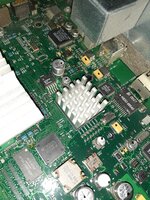
Before I remove the heatsink, what thermal compound do you recommend I use? It's a small passive heatsink about an inch and a half wide and long, with no clip, so I'd assume it uses thermal tape. Should I use new thermal tape or is there some quick drying equivalent to Arctic Silver?
It looks as if the machine is going into sleep mode like it's supposed to, as the power LED does its usual slow flash. The fans do as they're meant to do while the machine is running and cool everything properly, and I can put my hand on the chipset heatsink in question without it being uncomfortable, but said fans always turn off during sleep mode and it seems as if that one chip continues to run for some reason.
Maybe it's supposed to get as hot as it does, hence why it's the only other chip aside from the processors that has a heatsink. I could be wrong, though.
Before I remove the heatsink, what thermal compound do you recommend I use? It's a small passive heatsink about an inch and a half wide and long, with no clip, so I'd assume it uses thermal tape. Should I use new thermal tape or is there some quick drying equivalent to Arctic Silver?

Do you have any PCI cards installed, other peripherals that prevent sleep? Generic PCI cards used to be the main offenders (eg. USB, FW cards)
The heatsink uses a thin layer of paste (usually black or grey), not adhesive that will need to be cleaned and new paste applied - I'd use non-conductive thermal paste - Arctic Silver can get messy and is outdated.
JB
The heatsink uses a thin layer of paste (usually black or grey), not adhesive that will need to be cleaned and new paste applied - I'd use non-conductive thermal paste - Arctic Silver can get messy and is outdated.
JB
I use Arctic, https://www.arctic.ac/eu_en/products/cooling/thermal-compound.html. For whatever reason Byrd appears to have a second opinion on my preference. In any event … any brand of thermal paste will beat whatever is still in your machine. Whatever you consider, maybe read some reviews to get a second opinion.
@Byrd brings up an excellent point, one thing I overlooked are any 3rd party cards. Here's what you can do … remove any 3rd party card or other internal device and for that matter apply the same consideration to external devices. In other words try to reduce the hardware configuration to as close to an out of box situation as possible. After you've done this, try to reproduce the issue. Give it as much time as it would normally need to reach that same heat level that you initially reported.
If the issue can not be reproduced with those internal/external devices removed then shutdown, add one device at a time and again, try to reproduce the issue. If you eventually find that a particular device does provoke the issue to be reproducible consider any outdated software that corresponds to that device.
As Byrd said, something may keep waking the machine while it sleeps but those resets, if you've done them correctly are there to correct sleep issues. Well not all those links refer to that issue but one of them does.
So, even though you should apply new thermal paste, you should also put an effort into understanding what might be triggering the machine to potentially be waking from sleep.
If you need to test with clean software, when it is a point of suspicion, you can always boot from a clean install on another volume or from optical.
@Byrd brings up an excellent point, one thing I overlooked are any 3rd party cards. Here's what you can do … remove any 3rd party card or other internal device and for that matter apply the same consideration to external devices. In other words try to reduce the hardware configuration to as close to an out of box situation as possible. After you've done this, try to reproduce the issue. Give it as much time as it would normally need to reach that same heat level that you initially reported.
If the issue can not be reproduced with those internal/external devices removed then shutdown, add one device at a time and again, try to reproduce the issue. If you eventually find that a particular device does provoke the issue to be reproducible consider any outdated software that corresponds to that device.
As Byrd said, something may keep waking the machine while it sleeps but those resets, if you've done them correctly are there to correct sleep issues. Well not all those links refer to that issue but one of them does.
So, even though you should apply new thermal paste, you should also put an effort into understanding what might be triggering the machine to potentially be waking from sleep.
If you need to test with clean software, when it is a point of suspicion, you can always boot from a clean install on another volume or from optical.
Last edited by a moderator:
The only card in the system is the Rage 128 AGP card that it came with.
From what I can tell, nothing is waking the computer. It's remaining in sleep mode until I wake it, and it wakes normally. No indication pointing towards periodically waking.
On the page you linked, there are 2 pastes and an adhesive pad. Which one would you recommend? Again, I'd need it to dry quickly so it doesn't fall off when I close the case.
From what I can tell, nothing is waking the computer. It's remaining in sleep mode until I wake it, and it wakes normally. No indication pointing towards periodically waking.
On the page you linked, there are 2 pastes and an adhesive pad. Which one would you recommend? Again, I'd need it to dry quickly so it doesn't fall off when I close the case.
Just thought I'd give an update for anyone who's interested: I have since bought 2 more Gigabit Ethernet DP models, as well as a replacement logic board for the one in question. All 4 boards do the same thing as the one I asked about last year: That same tiny heatsink gets nice and toasty during sleep mode, and I ensured that nothing was causing any wake-ups. All 4 boards work perfectly to this day.
I'm going to assume, therefore, that the G4 Gigabit Ethernet is designed as such, and that's why they put the heatsink on that chip in the first place. Another logical conclusion that can be drawn is that I'm a hopeless, paranoid worry wart.
Thanks again for the advice.
I'm going to assume, therefore, that the G4 Gigabit Ethernet is designed as such, and that's why they put the heatsink on that chip in the first place. Another logical conclusion that can be drawn is that I'm a hopeless, paranoid worry wart.
Thanks again for the advice.
Attachments
Yes, it's plugged into my router. However, it heats up regardless of whether or not it's plugged in.Thanks for the follow up. I think that chip is the gigibit chip. Is the computer plugged into ethernet?
It sounds normal, like you said.
I think you're right, though. The chip in question seems to populate what was a vacant set of solder pins on the original Sawtooth model, and since the ethernet speed is the only major difference between the two, I'm assuming you're correct that it's the gigabit chip.
I'd say it's strange that such a chip with a singular purpose would get so hot, but to be honest, I've never really seen any other standalone gigabit ethernet chips, so I wouldn't know. All of my experiences with gigabit ethernet are from such a feature being integrated into multifunction chipsets on PC motherboards. Naturally, those always have heatsinks, and a few have fans.
I'd say it's strange that such a chip with a singular purpose would get so hot
Drivers for twisted-pair Ethernet get surprisingly hot, more so than you might think. I've never stuck a thermometer on a gigabit PHY, but 10Gbit/sec twisted-pair Ethernet runs hot enough that it can't actually fit in the thermal tolerances for the SFP+ pluggable transceiver standard, which is a bit of a sod. In general, Ethernet prioritises speed and robustness over power and thermal efficiency, and I think this is probably what you're seeing here.
I guess that I'm more used to dealing with 10- and 10/100-BaseT chips, since I usually deal with fixing computers older than Apple's fruit flavored stuff. Those chips aren't cooled by anything other than the system fan. Thanks for the information!Drivers for twisted-pair Ethernet get surprisingly hot, more so than you might think. I've never stuck a thermometer on a gigabit PHY, but 10Gbit/sec twisted-pair Ethernet runs hot enough that it can't actually fit in the thermal tolerances for the SFP+ pluggable transceiver standard, which is a bit of a sod. In general, Ethernet prioritises speed and robustness over power and thermal efficiency, and I think this is probably what you're seeing here.
Similar threads
- Replies
- 1
- Views
- 237


- Replies
- 9
- Views
- 797
- Replies
- 2
- Views
- 1K
- Replies
- 6
- Views
- 321

