


• Hello MLAers! We've re-enabled auto-approval for accounts. If you are still waiting on account approval, please check this thread for more information.

Power Book 145B display: bubbles, liquid drops and color change

nikbry

6502
Hello everyone,

This is my first post on this forum, so a bit of background. I'm the proud owner of a PB145B and Mac SE20 since the early 90s. I check on them regularly, power them on and run them for a while, then store them in a dry and dark place.
Today I went to check on them and found the display of the PB145B deformed and changed in color. I've attached a picture showing the bubbles that have formed and the small liquid drops on the surface, plus the color changes in the interior of the display. It's an awful sight, sigh...

I'd be very happy if someone could help in explaining what may have caused this, and if I should take any precautions handling it due to possible chemical risks.
Of course, given the emotional attachment to it, I would be very thankful for any tips or opinions about the feasibility of attempting a repair.

Thanks for reading.
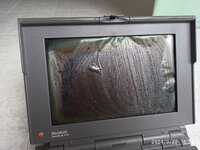

IMG_20240922_185135.jpg
 
Its vinegar syndrome. It is a degradation of the polarizer film and the adhesive which holds it on. The polarizer film is basically what allows you to see the screen properly.

It happens over time and the warmer it is and the more moisture in there air there is, the faster it happens. It can sometimes take decades to develop but can be slowed or accelerated based on those variables. (For example it happens faster in japan and may happen slower in a cold dry climate). There are some people that believe it can spread to other LCD displays (myself included as I have had it happen) so be careful storing it.

It can be fixed with special polarizer film (This 145B needs special passive matrix film). Lots of youtube videos on restoring screens like it. I have fixed a display which had vinegar syndrome and it is not particularly difficult, but is very time consuming and delicate.

This should explain it better than I can: https://www.macdat.net/repair/kb/vinegar_syndrome.html
 
Its vinegar syndrome. It is a degradation of the polarizer film and the adhesive which holds it on. The polarizer film is basically what allows you to see the screen properly.

It happens over time and the warmer it is and the more moisture in there air there is, the faster it happens. It can sometimes take decades to develop but can be slowed or accelerated based on those variables. (For example it happens faster in japan and may happen slower in a cold dry climate). There are some people that believe it can spread to other LCD displays (myself included as I have had it happen) so be careful storing it.

It can be fixed with special polarizer film (This 145B needs special passive matrix film). Lots of youtube videos on restoring screens like it. I have fixed a display which had vinegar syndrome and it is not particularly difficult, but is very time consuming and delicate.

This should explain it better than I can: https://www.macdat.net/repair/kb/vinegar_syndrome.html
Thank you so much for your prompt and comprehensive reply. When looking for an answer to my question I saw some pics of the vinegar syndrome online, but none of them showed signs as extreme as mine, so I was in doubt.
I will try to replace the film then, hoping the corrosion hasn't damaged the display itself.

Thanks again for the quick diagnosis and help.
 
No problem. Good news is that generally the display is perfectly fine underneath the mess. I think (though I am not certain) that there may also be a polarizer on the back of the display.

Best of luck with the repair!
 
No problem. Good news is that generally the display is perfectly fine underneath the mess. I think (though I am not certain) that there may also be a polarizer on the back of the display.

Best of luck with the repair!
With a case that severe it’s not certain, it could be all rusty in there. You’ll just have to take it apart and see.
 
Thanks for the heads up.
Well, I did take it apart, without the proper research and preparation, despite having been taught otherwise and decades of apparently useless experience.
Anyway, I thought oh, only two screws in the front and the front panel shut pop right off... nothing farther from reality... the plastic of the screw assemblies had become brittle and broke off, and worst of all the panel was stuck on the left side and I had to pry it open. It took me quite some time and in that effort I managed to damage the ribbon cable that sits conveniently close to the hinges...
The display seems fine, I peeled off the film and all that's left on it is what seems to me as adhesive residue, that would need to be cleaned. But the display itself looks OK to my untrained eyes.

So this is the end of the journey for my PB145B. Trusty companion of my college years. The ribbon cable should be impossible to source or repair, the display cleaning plus applying the new film and 3D printing some of the hinge plastic parts would just be too much effort I guess, so game over.
To calm my nostalgia in blue moments, I can always take a look at it and run the backup of the HD I have in an emulator.

Well, thanks for all the info, and for reading.
I'm glad to have found the forum, lots of stuff to catch up on and learn for my Mac SE and hopefully prevent another disaster.
 
Last edited:
Yeah, plastics on most of the powerbooks of the 90s are quite brittle. If you still want to try to repair it, the 140, 145, 145B should all use the same cable and I bet there is someone with a spare cable on this forum. You don't necessarily need to glue the polarizer on either, I just cut mine a bit oversized and taped the edges on and it worked pretty well. 3d printed parts are unavoidable though and even then are not necessarily the best choice because of the nature of the thermoplastics involved. (Some thermoplastics like PLA will not hold up that well to the stress)
 
If you know how to do it, getting a 100 series machine apart is pretty easy. It's also very easy to damage one if you don't know the right way. For the display bezel, you remove the two screws and then use a guitar pick in the seam between the two halves to unclip it all. Done right it takes 30 seconds and you'll never break a clip.
If you can't get the two screws out due to broken plastic, the best move is to tension the hinges. This will allow you to get the screws to come loose instead of just spinning in place. Of course, none of that advice helps now, but for the future I suppose.
Display cables are difficult to find but not impossible, might just take a while.
 
Thanks for the explanation, knowing that the cable just sits next to the bear metal hinge with no protection would have helped. My fault for not looking at detailed pics of the layout.

In hindsight I think what happened is that the right side front panel popped open right away coming loose of the hinge. The left side of the front panel was extremely stuck to the rear part, some of the film adhesive may have caused this!?. I used several different plastic spudgers to little avail. Whilst doing this and the left hinge becoming loose too, the whole display assembly started gradually pivoting on the left hinge and since the cable has no protection from the bear metal the friction or pinching with it may have caused the damage. Prying the left side open was no easy task.
Hope this helps in clarifying and add a grain to the collective wisdom of what can go wrong.

As to sourcing the cable, of course it would be nice to have, but being so scarce, I feel that someone else may need it more. I'm no collector nor hobby repair aficionado, just an original owner of a piece of equipment I love very much, broken or not.
 
Back
Top
