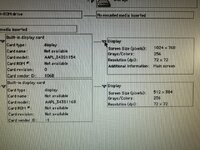
L lobust 6502 Yesterday at 3:25 PM #1 My recently acquired 8500 thinks it has a television connected and it's a bit of a nuisance. Is it normal for the av video out to be active with nothing plugged in? If yes, how do I disable it? If no, ideas how to fix it?
My recently acquired 8500 thinks it has a television connected and it's a bit of a nuisance. Is it normal for the av video out to be active with nothing plugged in? If yes, how do I disable it? If no, ideas how to fix it?
bigD 6502 Yesterday at 8:00 PM #2 IIRC, the AV port is controlled by the Monitors control panel. Is the display shown there?
L lobust 6502 Yesterday at 10:59 PM #3 bigD said: IIRC, the AV port is controlled by the Monitors control panel. Is the display shown there? Click to expand... Yes, it shows as a second monitor like any other.
bigD said: IIRC, the AV port is controlled by the Monitors control panel. Is the display shown there? Click to expand... Yes, it shows as a second monitor like any other.
J joevt 6502 Yesterday at 11:47 PM #4 The 8500/8600 can sense when a composite or s-video display is connected. The DingusPPC emulator does emulate this behaviour. The bits are in a board register accessed at address F301E000. It's a 16-bit little-endian register. Read the register in Open Firmware like this: Code: F301E000 rw@ 4 u.r Composite video is 0x0080 for not connected. 0 for connected. S-Video is 0x0040 for not connected. 0 for connected. Unused bits are pulled high: FF3F. We should be able to see which is stuck at connected. I don't know if there's any Power Mac 8500/7500/7600/8600 schematics that can help you find the related components on the motherboard.

The 8500/8600 can sense when a composite or s-video display is connected. The DingusPPC emulator does emulate this behaviour. The bits are in a board register accessed at address F301E000. It's a 16-bit little-endian register. Read the register in Open Firmware like this: Code: F301E000 rw@ 4 u.r Composite video is 0x0080 for not connected. 0 for connected. S-Video is 0x0040 for not connected. 0 for connected. Unused bits are pulled high: FF3F. We should be able to see which is stuck at connected. I don't know if there's any Power Mac 8500/7500/7600/8600 schematics that can help you find the related components on the motherboard.