• Hello MLAers! We've re-enabled auto-approval for accounts. If you are still waiting on account approval, please check this thread for more information.

PM 6500: Specific hard drive causes instability?

ry755

6502
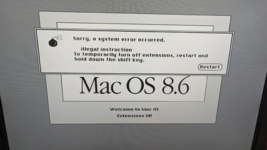
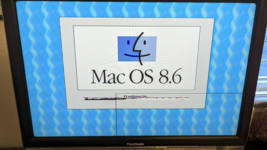
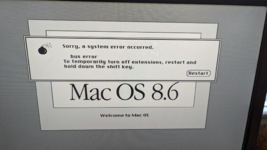
Hey all! I have a Western Digital 320 GB drive which was bought new around 2010-ish. When using it with my Power Macintosh 6500, I can create a partition (without using the whole 320 GB of course, only around 128 GB shows up; I created a 60 GB partition) and install 8.6. But it then fails to boot in different ways (see the attached pictures). However, using a different hard drive (I don't have it in front of me but iirc it's an old 60 GB Maxtor from the early 2000s) works perfectly?? What the hell? I recall reading that this series of boards has some issues with newer IDE specifications, could that be the cause of this? I'd assume if that were an issue then the hard drive wouldn't even show up in Drive Setup. I don't mind using the smaller working hard drive in this computer, I'm just really curious about what could be causing these issues when using the 320 GB drive. Especially the graphics corruption in the image below. Any ideas? Unfortunately these are my only two IDE hard drives that still work, otherwise I'd test more drives in this computer.
1717992711782.png
 

Attachments

  • 1717992669073.png
    1717992669073.png
    4.1 MB · Views: 9
  • 1717992692803.png
    1717992692803.png
    4 MB · Views: 9
ATA incompatibilities, I've encountered same in my 5500, and TAM - some drives detect, seem OK, can install an OS ... then cue random start up errors, corruption, slow starts and freezes. I've found 80-120GB Seagate 7200RPM IDE drives work well in most older IDE Macs.

The only suggestion I have would be to try to format it using Silver Lining < 120GB but usually if the drive doesn't like Drive Setup others won't like it either.
 
Same experience here, with 6400, 5400 and few others too.
Pretty much everything above 120GB may go wrong with pre-G3 hardware.
EIDE is also quite a nightmare when you try to use SSD with SATA adapters.

I switched to IDE HDD with a 120GB limit jumper (the drive will act as a smaller drive to improve compatibility) and CompactFlash based adapters for those kind computers.
 
The pre G3 Macs that use IDE will be picky with drives and even then, the 128 GB limit didn’t go away until the G4 Quicksilver (2001 or later models).

Not sure if this work, but you can try this (you need to create a partition smaller than 120 GB). Otherwise, you need a smaller drive or use an IDE PCI adapter, or use a flashed SATA PCI adapter with Firmtek firmware that can boot into Mac OS 9.

 
id say its the 128gb ATA controller limitation thats making it act weird, id just use any drive smaller than 128gb and youll be good.
 
Back
Top