• Hello MLAers! We've re-enabled auto-approval for accounts. If you are still waiting on account approval, please check this thread for more information.

Picked up two 1984 128k Macs. One working.

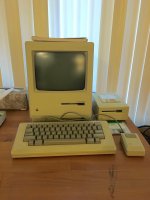
I recently acquired two 1984 128k Macs. One of the two works perfectly. The other one, not so much:
 
I bought it locally, and the guy stated he'd tested it about a year ago and everything was working. However, when we plugged it in, the first time we turned it on, it made the "ding" sound, and sounded normal (read: completely silent), but nothing appeared on the screen. The second time we turned it on, it made a very loud buzzing sound from the upper-left corner, and the "ding" was gone. The buzzing soon tapered to a quieter but consistent sound. At this point I noticed it was getting very warm in the upper-left corner (where the power supply board is mounted). We powered it off, but it continued to get warmer, and started to get a burning smell (although no smoke), so we pulled the plug completely.
 
I ended up buying it for basically the value of the accessories (keyboard, mouse, Mac sack, external floppy) plus a little extra. I'd love to get it working again, if that's in the cards. I know I need to crack the case to assess the damages, but based on the above, does anyone have any thoughts? Blown capacitors? Bad flyback transformer?
 
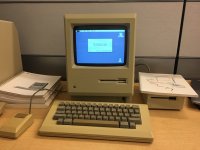
Happy Mac
IMG_1105.jpg
 
Sad Mac
IMG_1145.jpg
 
Last edited by a moderator:
Did you check the brightness knob? Let's start there and see if you get anything on the screen at all... Then, when you report back we'll have a better idea of what's wrong...

 
Yep. Brightness was first thing I tried. No luck there. Nothing on screen even during the first boot before things started buzzing and burning. No flickering, flashing, lines or anything - screen just didn't come on at all.

 
Last edited by a moderator:
Considering there is noise, excessive heat, and a burning smell, all coming from the location of the analog board inside the case, it seems pretty unlikely to be a logic board issue… I can't say I'm overly keen on yanking parts out of the Mac that's currently working either.

 
Last edited by a moderator:
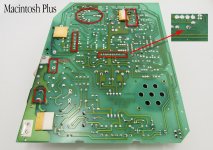
There is a good chance the solder joints on the analog and mobo are cracked. But you may have more problems than that based on what you said. But I have yet to find a unit that had good solder joints. A bad joint can cause all sorts of issues including burnt plugs. So first thing I would do is pop the back bucket and reflow at least the connection locations. Including the mobo. The only thing you have to do is pull bucket and analog protective sheet on side. No need to remove/unplug anything else. Discharging the CRT is probably a good idea though

Really this should be done on both machines. Its the first thing I do on any compact Mac when I first acquire and before first power up.

Diagram for Plus I made, but its pretty much the same as a 128k.

Plus Solder points.jpg

 
Last edited by a moderator:
I agree with Unity, but i will remove all solder as well, and put new one afterwards, reflowing only doesn't work all the time.

 
Great finds!!  :)

You should try swapping the logic boards (i.e. horizontal one). The logic board in the non working mac "should" work. Bear in mind that 128k boards are prone to RAM failure. The RAM they used is just junk. 512k ones don't fail as often.

The one that's working is a 512k. About the finder is reporting 512 kilobytes of memory (pic 1)

It was probably upgraded... check the serials.

128k: M0001 or M0001P. 

512k (400k): M0001W or M0001WP

512ke (800k): M0001E or M0001EP 

 
I agree with Unity, but i will remove all solder as well, and put new one afterwards, reflowing only doesn't work all the time.
One can, I always add fresh solder but dont remove the old unless its carbonized. Never had an issue.

 
Lots of good advice here…thanks!

So looks like I'll need to:

  • Inspect the analog board visually, and see if anything looks ruptured/charred/leaking or otherwise "wrong."
  • Reflow the solder on the logic and analog boards.
  • If there's bad RAM, it can't be the only problem, as I've never known RAM to cause any of the symptoms I'm seeing. I'm thinking worry about everything else, cross this bridge when I come to it.
I've noticed no one has mentioned replacing capacitors. I know this is a very common failure part on classic Macs. Is this something it's recommended to do just in general?

 
Last edited by a moderator:
Great finds!!  :)

You should try swapping the logic boards (i.e. horizontal one). The logic board in the non working mac "should" work. Bear in mind that 128k boards are prone to RAM failure. The RAM they used is just junk. 512k ones don't fail as often.

The one that's working is a 512k. About the finder is reporting 512 kilobytes of memory (pic 1)

It was probably upgraded... check the serials.

128k: M0001 or M0001P. 

512k (400k): M0001W or M0001WP

512ke (800k): M0001E or M0001EP 
Good eyes :) I'd forgotten about that. The serial number is M0001, but the original owner says he did a RAM upgrade back in the 80s.

 
Great finds!!  :)

You should try swapping the logic boards (i.e. horizontal one). The logic board in the non working mac "should" work. Bear in mind that 128k boards are prone to RAM failure. The RAM they used is just junk. 512k ones don't fail as often.
More precisely, it was the early Micron DRAM chips that had problems. Of course, eventually they improved the quality of the chips around the time many other US DRAM manufacturers was forced to shut down after DRAM prices fell in 1985.

 
Last edited by a moderator:
Yep those ones.

DSCN5286.jpg.8980994905e446212c2d6007caf56327.jpg


Used in the IIc as well...

 
Back
Top