• Hello MLAers! We've re-enabled auto-approval for accounts. If you are still waiting on account approval, please check this thread for more information.

Picked up a few macs, don't know where to start

Keep posting your finds and questions, it’s a great thread watching someone go through a pile. Perhaps record a video while you go.
Thats what I was thinking ive been a lurker here since probably 2015 and i always enjoyed this kind of stuff so the first thing i thought of when i happened across this was id post it because i knew people would find it interesting and maybe get something out of it. I sure have learned alot so far just in the last few days
 
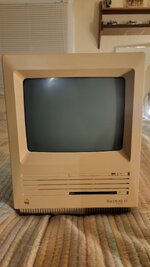
A tip that I have is don't take one of these compacts apart without a magnetic tipped screwdriver. No matter what I did I could not get the inner screw back in the hole when mounting the harddrive back on top of the disk drive I had to leave it out for later. So annoying impossible to get your fingers even close to it and if you leave it in the hole then you cant slide the clips in for the front LOL.
 
I'm back for the night im going to tear into the Power Mac 7xxx's next I have 5 of them some are 7100 some are 7500 i think maybe 7200 as well. But in the mean time I just got back from walmart and I had to put groceries in the back of the tahoe and bam i opened the window and forgot i put a couple machines back there that didnt fit on the trailer.

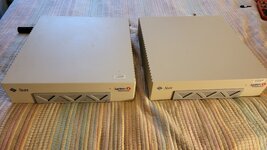
Both were Sun Ultra 1 Creator 3ds I thought I only had one so I am pretty happy about that they seem alot more rare than the SPARCstations... One had no HD in it but they both look good on the inside and out.

Edit: I didn't do the SE FDHD or SE with the radius card yet, one is enough for the day until I find a magnetic tipped screwdriver
 

Attachments

  • 20250826_180835.jpg
    20250826_180835.jpg
    1.1 MB · Views: 50
Last edited:
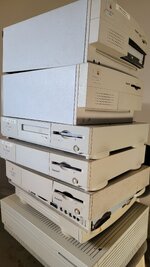
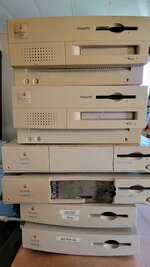
Alright so went through what turned out to be 4 Power Mac 7100/66's and 1 Power Mac 7500/100

Out of the 4 7100s 2 had blown batteries, one so bad i couldn't even get the case off it was frozen on there and the plastic just disintegrated. 2 of them looked good internally.

The 7500 was in nice shape that will probably be a keeper since I have a matching monitor as well. I am not a big fan of this stretch of power macs though, I like the G3 I have an Indigo, and someday when i come across one of those G4s with the round base ill probably snag it, otherwise not a big fan.

The stack with the IIfx on the bottom are all casualties of battery explosions and could maybe be salvaged but i wouldnt bother. I took any relevant cards and ram out already.

The other stack with the 605s on the bottom have good looking internals, but could have other problems as none of this is tested. Most everything in that stack I will likely part with, with the exception of one of the 605s, maybe.

Up next I have 3 Duo Docks to open up, one of them with a mystery laptop stuck inside of it!

Edit: The 7500 doesnt open up from the rear like most macs before it and the plastic is very thin. I hate watching videos so I found this website very helpful as far as opening it up and it shows how to break it all down with pictures. How it used to be before youtube...
 

Attachments

  • 20250826_185351.jpg
    20250826_185351.jpg
    1.3 MB · Views: 24
  • 20250826_185404.jpg
    20250826_185404.jpg
    821 KB · Views: 18
  • 20250826_192935.jpg
    20250826_192935.jpg
    1.1 MB · Views: 14
  • 20250826_192942.jpg
    20250826_192942.jpg
    1.3 MB · Views: 19
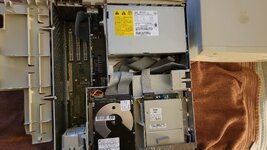
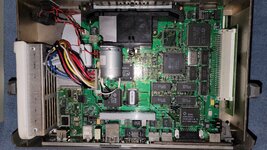
Opened up the SE FDHD and its toast battery went grenade mode doesnt look at all salvageable! RIP!

Is there anything desirable I can salvage from it for my other 2?
 

Attachments

  • 20250826_230347.jpg
    20250826_230347.jpg
    824.6 KB · Views: 25
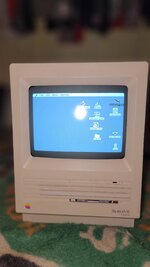
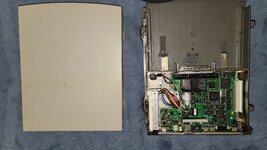
I decided to test out the SE SuperDrive that I tore down and put a new battery in earlier and to my surprise it was perfect. Screen was bright and crisp, drive was good with all the old files still intact. Responsive and fast, fan worked and it sounded good.
 

Attachments

  • 20250826_234558.jpg
    20250826_234558.jpg
    754.4 KB · Views: 22
At least if you do show a battery bombed board, you won’t be blamed for it. We know you just got all this stuff, so you’re off the hook. If you said you had this pile of computers for months and finally now just getting to the batteries, well then you’d never hear the end of it.
 
😘 Wow, that is the hoard of plenty!!!
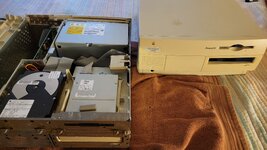
Tons of work there, but most will never see that amount of old equipment at one time, ever.

The "white box" custom builds normally do not resell all that great complete, but I've found many incredible desirable components inside to sell off on eBay. All of it is worth something to someone.

Thanks for sharing and letting us enjoy it with you!
 
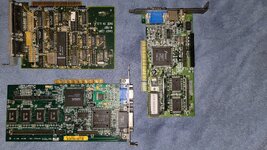
Was feeling lazy today didn't do a whole lot. Went through a bunch of the PC towers to check for cards. Found out im the owner of a shit load of 486s lol. A 386, couple pentium 1s, and a pentium 3 tower. The towers are mostly in rough shape i didnt clean them up yet i just went digging for video cards to see what I could find. I will clean up and salvage the best towers id say about 5 or 6 of them i consider in good shape and not missing panels or plastic. Needless to say im def going to put all the best parts together in the nicest case and build me a nice 486.

Heres the video cards i snagged. I don't know much about 3 but one is a Diamond Stealth 24 and one is an Orchid Fahrenheit 64 VLB

Edit: I also dont know much about those 2 video cards just that they have cool names Lol
 

Attachments

  • 20250827_190748.jpg
    20250827_190748.jpg
    3.8 MB · Views: 16
  • 20250827_190734.jpg
    20250827_190734.jpg
    4.5 MB · Views: 16
  • 20250827_190721.jpg
    20250827_190721.jpg
    3.6 MB · Views: 20
Last edited:
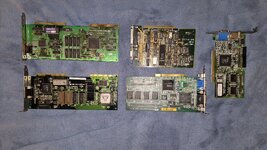
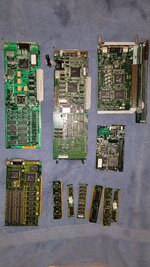
Here are the random cards and ram ive taken out of battery bombed macs so far
 

Attachments

  • 20250827_191709.jpg
    20250827_191709.jpg
    2.2 MB · Views: 24
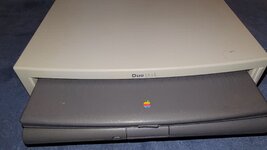
I grabbed one of the 3 Duo Docks, the one with the laptop stuck in it. So it turns out this one and one other one are Duo Dock Plus's and the other one is an original Duo Dock.

I tried pushing the manual release button on the side to get the laptop out i was shaking it upside down over the bed etc just wouldnt come out. I said fuck it and just plugged it in. Fired right up nice startup chime, harddrive was churning real nice. I let it run for a few minutes and hit the eject button and it ejected the laptop no problem. Seems like it was working just fine but no monitor right now ill have to test it later.

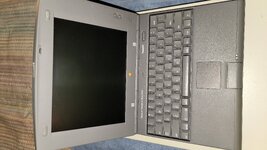
The mystery laptop is................. PowerBook Duo 2300c

Glad to finally know, i will do some research on it now.

Is there a battery in the Duo Dock Plus to remove?

Is this a decent laptop?

Any other recommendations?
 

Attachments

  • 20250827_192314.jpg
    20250827_192314.jpg
    3.3 MB · Views: 20
  • 20250827_192325.jpg
    20250827_192325.jpg
    3.1 MB · Views: 17
  • 20250827_192346.jpg
    20250827_192346.jpg
    2.9 MB · Views: 12
  • 20250827_192632.jpg
    20250827_192632.jpg
    1.3 MB · Views: 18
I had a feeling. If you don’t wind up needing it, I’d pay good money for the 2300c. The one I have had since it was new has needed a new screen for over twenty years!
 
I had a feeling. If you don’t wind up needing it, I’d pay good money for the 2300c. The one I have had since it was new has needed a new screen for over twenty years!
I was checking it out and theres a label on the bottom that says "1.1 GB/20 MB - Bad Screen"

So we're now in the same boat Lol it probably shit out when it was new and spent 30 years in that Duo Dock.

Is it possible to still use the laptop with the Duo Dock?
 
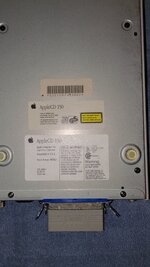
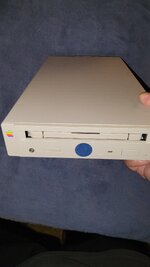
One of these guys mixed in with the random stuff

AppleCD 150
 

Attachments

  • 20250827_194144.jpg
    20250827_194144.jpg
    1.7 MB · Views: 15
  • 20250827_194115.jpg
    20250827_194115.jpg
    1.3 MB · Views: 13
Back
Top