I grabbed a BlueSCSI Ultra to swap out the internal CDROM, but I cannot get anything other than the original CDROM to work in that slot.
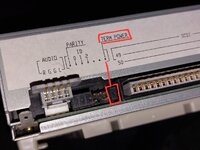
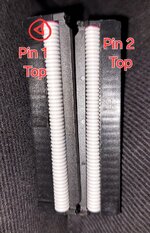
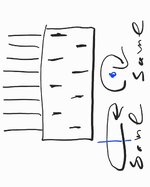
I needed a workaround to use the slot adapter, so I ended up putting long header pins between the two female interfaces.
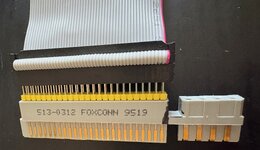
All put together it looked like this:
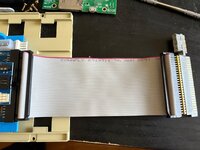
So, I plugged in the power and turned on the machine only to have nothing happen for a very long time.
When the flashing question mark finally appeared it was blinking much slower than it normally would be.
The BlueSCSI Log:
I tried it on the DB25 port using my DB25->SCSI50 adapter and it didn't work there either, in fact, something seems to have broken the adapter since the machine doesn't boot with it plugged in, even by itself.
I also tried my old SCSI2SD (which I was using via the DB25 SCSI port) in the internal slot and it has the same problem.
I was worried that I cooked the SCSI controller, but the second I put the CDROM back in everything starts to work again and discs read fine.
Well, everything except the DB25->SCSI adapter; if that's plugged in the CDROM stops working.
Any ideas what might be going on?
Any help would be greatly appreciated
I needed a workaround to use the slot adapter, so I ended up putting long header pins between the two female interfaces.
All put together it looked like this:
So, I plugged in the power and turned on the machine only to have nothing happen for a very long time.
When the flashing question mark finally appeared it was blinking much slower than it normally would be.
The BlueSCSI Log:
=== SD Card Info ===
SD card detected, FAT32 volume size: 29806 MB
SD Name: 032GB, MID: 0x00, OID: "42" (0x34 0x32)
[3318ms] -- Debug = Yes
[3318ms]
[3318ms] === Global Config ===
[3318ms] Reading configuration from bluescsi.ini
[3320ms]
[3320ms] === Finding images ===
[3351ms] === Finding images in / ===
[3353ms] == Opening /HD0-OpenRetroSCSI-7.5.3.hda for ID:0 LUN:0
[3392ms] ---- INFO: Image file is fragmented (3 fragments), FastSeek enabled for best performance.
[3410ms] ---- Configuring as disk drive
[3410ms] DBG ---- Geometry set from defaults: SectorsPerTrack=63 HeadsPerCylinder=255 total sectors 1024000 (not divisible)
[3411ms] DBG ---- Read prefetch enabled: 8192 bytes
[3412ms]
[3412ms] == Platform supports ROM drive up to 12284 kB
[3412ms] DBG ---- ROM drive image not detected
[3412ms]
[3412ms] === Configured SCSI Devices ===
[3412ms] ID: 0, BlockSize: 512, Type: Fixed, Quirks: Apple, Size: 512000kB
[3941ms]
[3956ms] DBG Waiting for USB enumeration to enter Card Reader mode.
[5056ms] DBG Waiting for USB enumeration timed out after 1000ms.
[5056ms] DBG -- Try increasing 'USBMassStorageWaitPeriod' in the bluescsi.ini
[5056ms] Clock set to: 155MHz
[5056ms] Initialization complete!
[5056ms] Disabling status LED
[5063ms] INFO: Pico Voltage: 3.333V.
[5063ms] DBG -- BUS_BUSY
I tried it on the DB25 port using my DB25->SCSI50 adapter and it didn't work there either, in fact, something seems to have broken the adapter since the machine doesn't boot with it plugged in, even by itself.
I also tried my old SCSI2SD (which I was using via the DB25 SCSI port) in the internal slot and it has the same problem.
I was worried that I cooked the SCSI controller, but the second I put the CDROM back in everything starts to work again and discs read fine.
Well, everything except the DB25->SCSI adapter; if that's plugged in the CDROM stops working.
Any ideas what might be going on?
Any help would be greatly appreciated