• Hello MLAers! We've re-enabled auto-approval for accounts. If you are still waiting on account approval, please check this thread for more information.

PB 180c color display issues

tunnie

6502
hey guys,

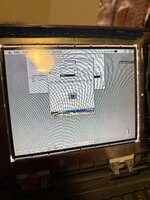
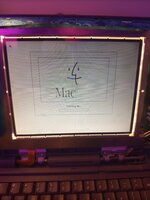
recently picked up a powerbook 180c with some display issues and vinegar syndrome, to which i recapped and replaced the polarizer. however, i'm still having issues with it, more specifically it looks like the lighter colors aren't displaying properly. i've checked most of the boards i'd guess that are related to color, but i don't see anything. anyone have any ideas to fix it?

(ignore the god awful polarizer application please)
C7547411-CD42-4D7F-95EE-1709ADB61993_1_102_o.jpeg4ACF9F66-2CC1-473E-ACC6-99A0AE75992B_1_102_o.jpeg
 
first of all, have you recapped the panel? these have like 9 leaking lytics on the back.

could be the polarizer angle. I assume you tested it with various angles before applying?
 
If it's been recapped and the polarizer is fine, then you need to adjust the potentiometers on the left side of the panel. Unfortunately, this is a very fiddly process and it takes forever to get the image looking "just right". I've had to do this on at least three of these LQ9D01 panels and it's always my least favorite part of restoring any laptop with this panel. Once you do get it correct, these do look great though!
 
hey guys,

recently picked up a powerbook 180c with some display issues and vinegar syndrome, to which i recapped and replaced the polarizer. however, i'm still having issues with it, more specifically it looks like the lighter colors aren't displaying properly. i've checked most of the boards i'd guess that are related to color, but i don't see anything. anyone have any ideas to fix it?

(ignore the god awful polarizer application please)
View attachment 82866View attachment 82867
Can you link the polarizer purchased? Interested as i have a spare 180c display to try on.
 
When something like this happens, you might even consider removing the internal screen and instead using the computer only with an external monitor. The special video adapter cable connected to the video port will work with a number of old Apple monitors. VGA is also supported via an extra external adapter.

Normally, the menu bar will not be visible on the external monitor until a control panel setting has been changed. When using a PowerBook 180c without an internal display, this could be a problem. However, one trick may be to let a little macro utility automatically change to video mirroring mode at startup.
 
Last edited:
okay so little update:

fiddled with it a lil bit, found out the issue was with the interconnect cable as i moved the ribbon cable slightly and the colors shifted slightly, so i’ll try fixing that first to see if that fixes the issue.
Can you link the polarizer purchased? Interested as i have a spare 180c display to try on.
new here so hoping amazon links work, if not i just searched up 45 degree polarizer, should be sold by the brand luenir in a 4pk of different angles: https://a.co/d/6Xichx3

If it's been recapped and the polarizer is fine, then you need to adjust the potentiometers on the left side of the panel. Unfortunately, this is a very fiddly process and it takes forever to get the image looking "just right". I've had to do this on at least three of these LQ9D01 panels and it's always my least favorite part of restoring any laptop with this panel. Once you do get it correct, these do look great though!
ahhh that’s what those are! i thought those were terminals to measure the voltages around the display. do you know what each one does and how exactly to adjust them? didn’t really look like there was a screw head on them or smth
 
okay so little update:

fiddled with it a lil bit, found out the issue was with the interconnect cable as i moved the ribbon cable slightly and the colors shifted slightly, so i’ll try fixing that first to see if that fixes the issue.

new here so hoping amazon links work, if not i just searched up 45 degree polarizer, should be sold by the brand luenir in a 4pk of different angles: https://a.co/d/6Xichx3


ahhh that’s what those are! i thought those were terminals to measure the voltages around the display. do you know what each one does and how exactly to adjust them? didn’t really look like there was a screw head on them or smth
You need a small flathead driver, there are little slots in them. If you're finding that the colors flicker in and out when you mess with the interconnect cable, then don't mess with them, or you'll then sit for 20 minutes trying to get them adjusted right, think you have it, and then second guess yourself 10 minutes later, then mess with them for another 20 minutes..... don't ask me how I know haha.

Another question though - 45 degrees is correct for this LCD? I have one that works perfectly but needs refilming....
 
You need a small flathead driver, there are little slots in them. If you're finding that the colors flicker in and out when you mess with the interconnect cable, then don't mess with them, or you'll then sit for 20 minutes trying to get them adjusted right, think you have it, and then second guess yourself 10 minutes later, then mess with them for another 20 minutes..... don't ask me how I know haha.

Another question though - 45 degrees is correct for this LCD? I have one that works perfectly but needs refilming…
yeah 45 degrees worked correctly for me, and a lot of other places also said 45 for those displays
 
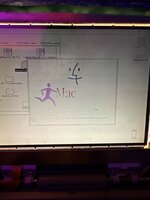
ok so update cuz i finally had time and i accidentally ordered the wrong cable to replace the interconnect, but here’s the display so far after adjusting some of the potentiometers:
image.jpg
some of the colors aren't showing up still, but most is better than basically none (plus the brightness!!!). it's interesting adjusting the potentiometers though, the ones marked "v2, v5, v7" or whatever numbers they are don't behave normally, adjusting them at a certain range has no effect until they're turned to a certain position and then the screen changes drastically. all the others work normally and gradually adjust brightness, etc. might have to go in with a multimeter and test them to make sure they're working properly, or potentially replace them? idk what model they are and it seems like it would probably be hard to find...
 
Last edited:
Thats great to know. My powerbook 180c is fine for now. I thought those active matrix screens didn't go bad like the other ones
 
Thats great to know. My powerbook 180c is fine for now. I thought those active matrix screens didn't go bad like the other ones
if you haven't recapped the LCD in that 180c you should do that ASAP. the lytic fluid leaks directly on the driver ribbons.
 
Back
Top