Outbound Laptop repair/reverse engineering

zigzagjoe

68060
Lacking a more obvious repository, seems like it's time to start a outbound laptop worklog thread.

I've managed to capture an image of the prairietek 240A HD that came with my machine. While it's not remotely a clean image (contains a broken mix of sys 7 and 6.0.8), it's useful as a starting point as something that is known to boot on a physical machine. It's pretty obviously byteswapped and appears to be treated as a giant floppy (ie. no partition table), not particularly surprising on either count. I've attached both the original image and a byteswapped version - would be interesting to try to undelete files from it.

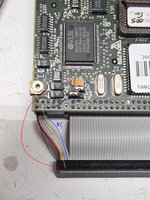
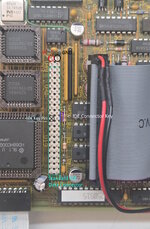
I was able to capture the image by attaching the HD to an old via industrial PC with an IDE interface and a DIY power adapter. I didn't have any luck getting a USB adapter to talk to the drive, but the via machine worked right off the bat. The IDE connector appears to use the standard pinout. Pinout of the power connector is simple: pin 1 is 5V, pin 2 is GND, pin 3 is 12V. Attached is a terrible diagram.

I intend to try to poke at getting a zuluide or old CF card working once I have my machine fully refurbished. I'm expecting I'll probably need to decompile the .PTek driver in the eeprom, I'm sure it's primitive and I'll need to know what it's expecting and/or perhaps modify it.

Appears to be the correct replacement battery, but I've not yet received it: EPP-100C, aka panasonic BP-80 and a bunch of other x-refs.

I've dumped contents of the internal eeproms (2x xicor 28C64). My machine had HDD version 1.1e written but I've included 1.3b2 images which I extracted from the attached installer disk (not my image).

I'm working on refurbishing my external floppy drive. It was riddled with a few nasty SMD caps. Otherwise, it's a rather strange beastie that contains an off the shelf WDC floppy controller, a SCC (???), and more ROM on the PCB. The floppy is a Citizen mechanism which uses a 230mm x 2mm belt. The additional ROM (contents attached) only seems to be used if the HD eeprom image is written to the internal EEPROM. I'm guessing the internal floppy EEPROM assumes the internal drive would be used for booting.

Also attached is a capacitor list with mouser replacements for both the logic board, internal power supply, and external floppy. A couple of the logic board caps (220uf 10v) should really be replaced with short 6mm or so capacitors; on my machine these two were bodged in sideways in order to reduce the height. Note the bipolar cap in the floppy drive! I missed this, so for the moment I've left it alone as it was the only SMD cap in there that appears in good condition.
 

Attachments

Last edited:
Norton UnErase didn't find anything interesting on the disk image.

Ah well. Thanks for trying. It looks to me like someone played with the laptop after its original service life ended, tried to upgrade it to 7.0 and deleted all the applications and ended up with a broken mix of the two. I was curious if there was anything that could be pulled back, but the information on the format was the most important part anyways.

I'll go ahead and add the cap reference to MacDat: https://macdat.net/repair/cap_reference.html

Can't wait to see what you accomplish with this project!

Edit: The cap reference ZIP file seems to be corrupted - showing as 1K and Windows says it's empty.

Ugh, 7zip made me a blank zip as I'd had the file open. A good copy is attached. The power board is rather cramped and some of these are bodged in, so references aren't always present.

--

I've gotten a replacement floppy belt printed in TPU. 225mm and 0.8mm thickness seems to be close enough to work. To get a good section of the belt I printed it with extra height then used a scalpel to begin a split along a layer line to the correct height as I was having some trouble with the initial layers thickness/quality.

My machine has an odd behavior where it doesn't boot sometimes/display refresh issues that are sometimes resolved by touching/flexing the LB... still have to troubleshoot that.
 

Attachments

Hah that's funny, I was just thinking about the outbounds floppy controller today when I stumbled across this thread!

So at least it's good to know that it really is an SCC with an off the shelf floppy controller running the show.

I wonder if the signals to the citizen floppy drive from the adapter board are similar enough or identical to an actual superdrive.
 
Hah that's funny, I was just thinking about the outbounds floppy controller today when I stumbled across this thread!

So at least it's good to know that it really is an SCC with an off the shelf floppy controller running the show.

I wonder if the signals to the citizen floppy drive from the adapter board are similar enough or identical to an actual superdrive.
Rather the opposite - seemingly a standard PC type drive that they're doing shenanigans to make mac formats work. Supposedly it allows 1.4mb Mac formatted floppies, in addition to 800k and 400k. Functionally similar but entirely different.

I believe there was a thread where someone said they managed to get a floppy emulator to work in place of the original drive.
 
The Gotek/Flashfloppy emulators work fine at least for 1.4MB disks, I have one running on mine since my physical floppy drive doesn't seem to work.
 
Here's a clean(er) 6.0.8 image. I prepared this in an emulator, copied over the outbound bits from my drive, then byteswapped it and wrote it to the original HDD. It still complains about AppleTalk; I haven't tested it if works yet as this system 6 install was originally used on a SE/30. At least this isn't some awful mix of 7 and 6.0.8 and includes a variety of utilities on disk. The installed outbound drivers are for the 1.1 eeprom but I've included the 1.3 installer disk (attached in prior post) as a folder on disk. You can drag the contents to the ramdisk, boot off it, and install it.

I've grabbed the HD parameters too. As expected it seems to be a CHS-only drive without LBA, I expect the driver is making assumptions about the disk geometry so that'd explain why newer drives/CF cards were problematic. I've got a zuluide on the way to test that theory. Important part is 615 cylinders, 4 heads, 34 sectors/track.

Also attached is the HD firmware. The physical chip was labeled CODE: 005 REV G and is a 27*256 type. Maybe this could help revive some dead drives. Note: it's expected behavior that the drive won't automatically spin up until it receives a command requiring it to, and I found with a couple USB adapters they'd never cause it to do so.

The Gotek/Flashfloppy emulators work fine at least for 1.4MB disks, I have one running on mine since my physical floppy drive doesn't seem to work.

Did you have to do any adaptation? I kind of doubt it's going to work with macintosh disk images (at least, smaller than 1.4) but could be a good other option to have. Or, I might just find another floppy mechanism that isn't quite as cursed as this citizen drive seems to be.

I've recapped my floppy drive and printed it a new belt, it at least tries to do something but seems to try to seek past the limit so I'm not sure it's all there. I will have to try to track down a 2.2uf bipolar cap (or a MLCC) and see if that makes it behave better.
 

Attachments

I've grabbed the HD parameters too. As expected it seems to be a CHS-only drive without LBA, I expect the driver is making assumptions about the disk geometry so that'd explain why newer drives/CF cards were problematic. I've got a zuluide on the way to test that theory. Important part is 615 cylinders, 4 heads, 34 sectors/track.
With the right factory software, some CF cards can have their CHS values re-programmed, if you want an emulator-less experience.

Unfortunately I've never had the right combo of card and software to try it myself, so I can't recommend a specific model.
 
With the right factory software, some CF cards can have their CHS values re-programmed, if you want an emulator-less experience.

Unfortunately I've never had the right combo of card and software to try it myself, so I can't recommend a specific model.

I'd like that better in the long run, possibly, but at this point I'll call it a win if I can get it talking to anything but the original HD. That way if/when it dies there's another option out there for those in need.

Another thought I had was as long as the target card/drive has the same or greater values for C H and S, I was thinking perhaps you could write a manipulated image to a drive and achieve a similar result. Or, write the image using software capable of CHS addressing - probably some DOS utilities could do this.
 
Did you have to do any adaptation?
No modifications other than converting to the right connector.
I kind of doubt it's going to work with macintosh disk images (at least, smaller than 1.4)
I unfortunately have no idea whether it can work with emulated 800k disks, for some reason the mouse doesn't work on mine so I can't do much interaction with it to even try. It seems like it could be made to work since Flashfloppy supports some odder formats, but it depends on what the controller is doing to make it work in the first place. I haven't got that far in the code yet.
 
Recovering from medical procedure so no long post today, but initial success with ZuluIDE.

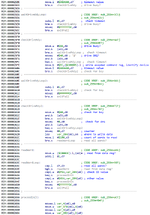
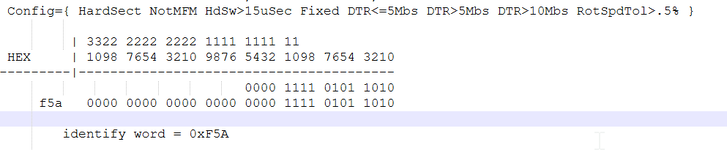
Configured it with appropriate values in zuluide.ini, I'd get an identify in the debug log and then it'd blink a floppy icon at me. Implies something about the drive identity makes it unhappy. Disassembled the hard drive eeprom and did a bit of reverse engineering.
1767403517187.png
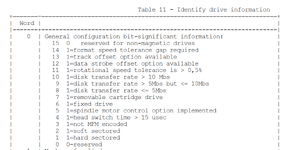
Outbound wants to see a drive ID word of 0xF5A or 0xA5A. This word is very much obsolete, here's the ATA-1 definition.
1767404212129.png
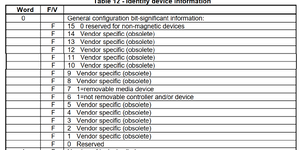
ATA-2 eliminated almost all of those bits.
1767404418847.png
We know this is an ancient drive, so not a surprise. From what I got from hdparm, my drive is giving 0xF5A, referenced against the above chart.
1767404245575.png
Common values for this word these days would be, as I used in my NuCF:

#define CF_IDENT_SIGNATURE_CF 0x848A
#define CF_IDENT_SIGNATURE_ATA 0x044A

So this would explain why with other attempts in the past by others Outbound wouldn't even try the new drive. Ultimately it'd be possible to modify the eeprom to allow for other values, but that would be somewhat inelegant, so instead I cloned the ZuluIDE repository and made a quick change:

change: idf[IDE_IDENTIFY_OFFSET_GENERAL_CONFIGURATION] = 0xF5A; // Device type

Compile, upload.... and it works. At least it boots to finder, so odds are we're good. I will have to submit a PR for a configuration override and figure out physical fittiment/modifications to the ZuluIDE to ease install, but seems I've a working interim solution.

TODO is still figure out why my outbound board is a little flaky - bad solder joint is apparent symptom - and figure out mechanical fitment of the zuluide. Hoping to do a drive blank allowing access to it too.

Other news.

Replacement battery from first post works perfectly. Charges fully and then terminates appropriately. Yay.
No luck getting appletalk working so far, but might be system 6.0.8 may not have been intended to work on these systems. Pops up an error message seemingly from outbound code somewhere and needless to say doesn't work as the error message mentions. With a HD emulator it will become much easier to troubleshoot this.
 
Here's the zuluide firmware and configuration file that's tested to work. Take one of the byteswapped images I've posted previously and it ought to just work. Already submitted a PR for this so hopefully it'll be in mainline soon.

It might be possible to add a feature to have it byteswap all data accesses automatically so there's no need to deal with that in the image files too.
 

Attachments

The PR has been accepted, so future versions of the zuluide firmware will support the new feature natively. Attached is a zip file with everything needed to get a floppy based outbound booting from an IDE drive, with some useful utilities. You'll need to come up with an appropriate cable, zuluide emulator, and a programmer to write the eeproms.

This includes a disk image with system 6.0.8 with Outbound software 1.3 *with* working LocalTalk along with other useful utilities like AirTalk software, stuffit, etc. Note: Do not install the Network Software disk on Outbound. It will break LocalTalk!

Procedure is something like this:
  1. Write the EEPROMs with a programmer and PLCC adapter, such as T48.
  2. Take a standard IDE cable and make any adaptations needed for physical fitment
  3. Make an adapter to supply 5v to the ZuluIDE
  4. Flash zuluide with firmware and write disk image and zuluide.ini to SD card
I'm working with @rabbitholecomputing for a possibly easier way in the future; we think a new design could mount directly to the IDE connector removing the need for fabricating a cable entirely.

Outbound IDE Pinout.jpg1767557830002.png

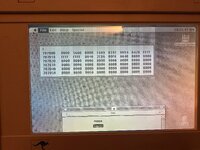
Also attached is a quick benchmark run. As expected, it's somewhat faster than the original Plus.
 

Attachments

The PR has been accepted, so future versions of the zuluide firmware will support the new feature natively. Attached is a zip file with everything needed to get a floppy based outbound booting from an IDE drive, with some useful utilities. You'll need to come up with an appropriate cable, zuluide emulator, and a programmer to write the eeproms.

This includes a disk image with system 6.0.8 with Outbound software 1.3 *with* working LocalTalk along with other useful utilities like AirTalk software, stuffit, etc. Note: Do not install the Network Software disk on Outbound. It will break LocalTalk!

Procedure is something like this:
  1. Write the EEPROMs with a programmer and PLCC adapter, such as T48.
  2. Take a standard IDE cable and make any adaptations needed for physical fitment
  3. Make an adapter to supply 5v to the ZuluIDE
  4. Flash zuluide with firmware and write disk image and zuluide.ini to SD card
I'm working with @rabbitholecomputing for a possibly easier way in the future; we think a new design could mount directly to the IDE connector removing the need for fabricating a cable entirely.

View attachment 94027View attachment 94029

Also attached is a quick benchmark run. As expected, it's somewhat faster than the original Plus.
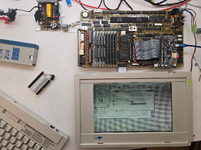
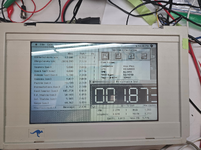
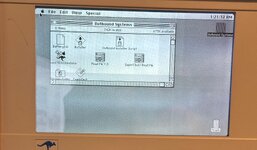
The screen seems surprisingly bright for the era. Camera lying, or is it really that readable?
 
The screen seems surprisingly bright for the era. Camera lying, or is it really that readable?
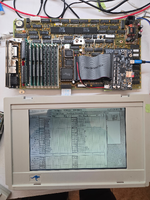
It's quite readable. Actually, it normally looks better than that as I've got an extension on the backlight at the moment to allow prodding of the logic board and that causes it to get somewhat dimmer and uneven (notice the top). Below is a picture without the extension, much better.

1767560809953.png

I think it's passive matrix so lots of ghosting and fairly slow response speed, mediocre viewing angles, and some artifacting (mitigated by reducing contrast). It's usable but I expect this is probably a region the portable wins in with the active matrix display.

Above is with the original HD. With the zuluide performance jumps on disk by ~ 3.5x and boot speed is noticably faster.

Other interesting bits of info:

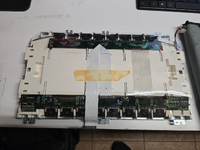
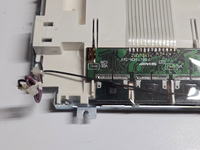
Machine consumes about 650 ma at 12V, which fits with the ~3ish hour claimed battery life. Charges up to around 14.8v before terminating charge. Enabling CPU Sleep reduces power consumption by around 60ma. CPU is an overclocked 12mhz part, I think from hitachi? LCD panel is fairly bulky and brutal, thankfully no caps to replace.

AC Adapter is a 19v AC adapter with an obvious rectifier in the power module. It probably could be powered with an appropriate DC adapter. Not sure I'm brave enough to chance it, though.

1767560585870.png1767560618893.png
 
Back
Top