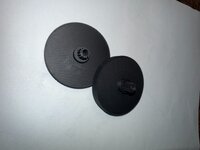
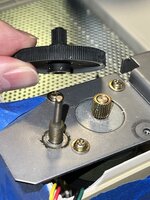
I was able to remove the old gear from my Apple Scanner using a door panel removal tool to lift it up and off. The plastic itself feels sticky and is very brittle. The post either has old lubricant that has hardened or the plastic itself is oozing something because the post itself it also sticky making it very difficult to turn. This is likely why the brass gear starts breaking teeth on the plastic gear.
I took some measurements, guessed at others, used stlgears.com, and modeled a gear in TinkerCad for fun. I didn't really expect this to work on a FDM printer, but I tried it anyway with a 0.2 nozzle. After a couple of iterations, I installed it and reassembled the scanner. I made sure to clean the post and the brass gear from any gunk from the old gear or old lubricant.
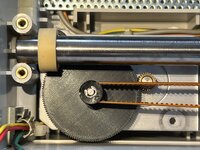
First power up it was able to complete POST. I was then able to perform a couple of scans successfully! I still need to look at the scans more closely to see if they look correct.
The only thing I've noticed now is the gear makes an oscillating sound when it moves at high speed. My only guess so far is that my prints aren't perfectly square? Any ideas? Needs more testing.
I'll put the STLs here: https://www.printables.com/model/1625890-apple-scanner-carriage-gear
Hope this helps folks get their scanners working again.
I took some measurements, guessed at others, used stlgears.com, and modeled a gear in TinkerCad for fun. I didn't really expect this to work on a FDM printer, but I tried it anyway with a 0.2 nozzle. After a couple of iterations, I installed it and reassembled the scanner. I made sure to clean the post and the brass gear from any gunk from the old gear or old lubricant.
First power up it was able to complete POST. I was then able to perform a couple of scans successfully! I still need to look at the scans more closely to see if they look correct.
The only thing I've noticed now is the gear makes an oscillating sound when it moves at high speed. My only guess so far is that my prints aren't perfectly square? Any ideas? Needs more testing.
I'll put the STLs here: https://www.printables.com/model/1625890-apple-scanner-carriage-gear
Hope this helps folks get their scanners working again.