Hello,
I'm new to the forum and Macintosh. I recently bought a non working SE/30 on eBay that came with a nice surprise in the form of a (hopefully working) network card.
-Turned it ON... Nothing (nice Simasi pattern)
-Opened it, all capacitors had leaked.
-Recapped the board, first time I soldered since middle school.
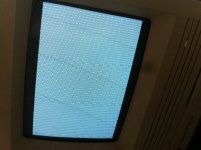
-Still Nothing... but as C9 pads and nearby traces were destroyed by corrosion it wasn't surprising.
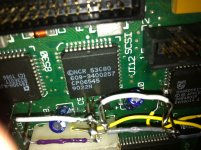
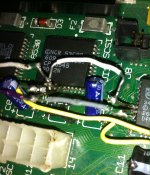
Using the schematics I slowly checked all traces around the SCSI chip and found 3 disabled (D28, D29, D30) between UJ11, UI12 and UG12.
-I soldered wires between the chips pads, it wasn't easy nor aesthetic but it worked:
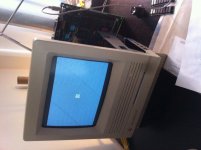
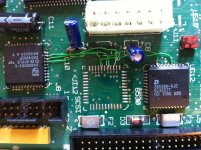
-Still the image was only half displayed so I checked the traces between the video chips and surprisingly found that it was the problem described by genie_mac.
https://68kmla.org/forums/index.php?/topic/19821-mac-newbie-se30-vid-probnot-another-one/?hl=se30
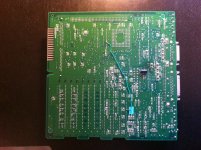
Now I'm the proud owner of an almost working SE/30.
Sadly the system boot up on the HDD only when half of the RAM is removed.
Also the Disk is not seen by Apple HD Setup but Disk First Aid was able to perform a test on it and found errors.
Now I'm in need of your expertise.
What do you think, is the RAM, the HDD, the SCSI chip or something else the cause of this behavior ?
I'm new to the forum and Macintosh. I recently bought a non working SE/30 on eBay that came with a nice surprise in the form of a (hopefully working) network card.
-Turned it ON... Nothing (nice Simasi pattern)
-Opened it, all capacitors had leaked.
-Recapped the board, first time I soldered since middle school.
-Still Nothing... but as C9 pads and nearby traces were destroyed by corrosion it wasn't surprising.
Using the schematics I slowly checked all traces around the SCSI chip and found 3 disabled (D28, D29, D30) between UJ11, UI12 and UG12.
-I soldered wires between the chips pads, it wasn't easy nor aesthetic but it worked:
-Still the image was only half displayed so I checked the traces between the video chips and surprisingly found that it was the problem described by genie_mac.
https://68kmla.org/forums/index.php?/topic/19821-mac-newbie-se30-vid-probnot-another-one/?hl=se30
Now I'm the proud owner of an almost working SE/30.
Sadly the system boot up on the HDD only when half of the RAM is removed.
Also the Disk is not seen by Apple HD Setup but Disk First Aid was able to perform a test on it and found errors.
Now I'm in need of your expertise.
What do you think, is the RAM, the HDD, the SCSI chip or something else the cause of this behavior ?