


• Hello MLAers! We've re-enabled auto-approval for accounts. If you are still waiting on account approval, please check this thread for more information.

Odd icon in place of Apple Logo

Hi

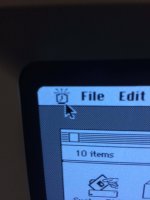
I've been tinkering with my SE 5010 for a bit and I noticed this popped up every time I booted it up, regardless of the disk used. Never seen this before, what is it? 
icon.jpg

This looks like a clock icon. It blinks every 2 seconds.

I did leave the PRAM battery inside this thing, something I don't do normally. But since this one was soldered and actually keeps date and time correctly for once, I left it in there. Plus it's one of those black Vartas that never go wrong.


 
It's the alarm clock! Open the related desk accessory and turn it off ;)

alarm-clock.png.a66ca932b40e9de6ca7044fabe4f230e.png


Last edited by a moderator:
Nevertheless, It would be wise to remove this pram battery since it isn't necessary to leave it installed to boot your mac, and unless you use it every day and want to keep up time and date, you'd probably forget it for a couple of months in a closet and have a bad surprise when you'll want to start it up again... :(

 
Last edited by a moderator:
How stupid of me. It is indeed the Alarm Clock. But it will do that at every startup, and it won't ring as a proper Alarm clock would. A PRAM reset is in order I think. 

I don't really want to remove that battery, as long as it works. It's usually the first thing I do when I get a 'new' compact mac, but I've never heard any horror stories with that Varta. It dates back to march of 1987 but it works better than ones made 10 years after. The one in my iMac was completely dead and was starting to leak.

Batteries don't like wet or cold environments. I keep my Macs in my apartment at a nice steady 24-25°C (because I live in a stupid low-energy house and even with the radiators turned off, it's like 24°C in January!). It's the only Mac I own that has a battery inside, so I'll just be more careful with this one.

 
Back
Top