

• Hello MLAers! We've re-enabled auto-approval for accounts. If you are still waiting on account approval, please check this thread for more information.

Norton Utilities Compilation ISO

Phipli

68040
Hey folks,

For my own convenience, I spent some time today sorting out an iso of a load of versions of Norton Utilities. The disk has versions of Norton Utilities 1, 2, 3 (several), 4, 5 and 6. They're pre-installed on the disk, the installers are on there, and I've put all the different versions of the benchmark tool "System Info" in a top level folder.

The CD is System 7.5.3 bootable, so if I've got it right, it should boot anything from a Plus to a 9600... although I've only physically tested it on a IIci.

I'm sure I've made a mistake somewhere on it, so feel free to feedback.

Get your very own copy here, burn it to a CD or stick it on your SCSI SD adapter of choice...
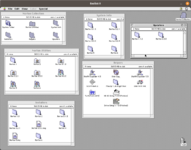
1687471461384.png
 
Hey folks,

For my own convenience, I spent some time today sorting out an iso of a load of versions of Norton Utilities. The disk has versions of Norton Utilities 1, 2, 3 (several), 4, 5 and 6. They're pre-installed on the disk, the installers are on there, and I've put all the different versions of the benchmark tool "System Info" in a top level folder.

The CD is System 7.5.3 bootable, so if I've got it right, it should boot anything from a Plus to a 9600... although I've only physically tested it on a IIci.

I'm sure I've made a mistake somewhere on it, so feel free to feedback.

Get your very own copy here, burn it to a CD or stick it on your SCSI SD adapter of choice...

View attachment 58360
This is really, really awesome !
 
Why? it was common wisdom back in the day to not install Norton Utile ties or it would negatively affect system performance.
 
Why? it was common wisdom back in the day to not install Norton Utile ties or it would negatively affect system performance.
Wasn't it some of the extras it came with that slowed stuff down, like FileSaver and DiskLight, as those required extensions and used up memory/CPU in the background? Those are optional though.

The main application itself is useful, it can fix corrupted volumes, and the benchmarking tool is useful as well.

@Phipli This is nice, thanks for taking the time to put it together.
 
This is a welcomed ISO - Thanks. For my early Macs, I found Norton Utilities to be a life saver. For OS9, though, I had problems with frequent reports of “crosslinked files,” which typically were video files. The attempt to “fix” this issue resulted in the total loss of the files. Ignoring the issue revealed no problems whatsoever with the video files. For OS9, I used Disk Light and System Info, and never regretted the purchase. For disk maintenance, I migrated to Disk Warrior 2.
 
Cracking stuff, thanks! Now every Mac can run Norton Disk Doctor for MAJOR ERRORS FOUND yet still work beautifully :) Seriously though, good work will burn.
 
Why? it was common wisdom back in the day to not install Norton Utile ties or it would negatively affect system performance.
Yeah, like Josh said, I never installed their System Extension stuff. BITD we used the benchmark and the recovery tools, often running from a CD (can't repair the disk you're running from).

Plus its emergency software. Disk Doctor can cause as much damage as it solves. Sometimes its necessary though. Like some medical procedures - you don't always survive, but... the alternative is worse.

But I mainly put it together for the benchmark tools to be in one place.
 
Cracking stuff, thanks! Now every Mac can run Norton Disk Doctor for MAJOR ERRORS FOUND yet still work beautifully :) Seriously though, good work will burn.
I always think Disk Doctor was actually a crazy cult guy with a placard:

"The end is nigh! Repent! Your bundle bit is set incorrectly!"
 
Yes, this is super helpful. FileSaver was a PITA for sure. However, Disk Doctor can be helpful in certain circumstances, such as a disk being unreadable due to file system corruption. If it won’t mount, I’ll give anything a try.

One warning: proceed with extreme caution with SCSI2SD based disks and partitions. It does not like how the SCSI2SD divides up the SD card, and “fixing” the disk can make it unusable.

Lastly, I accidentally erased a college paper 20-odd years ago on my iMac DV SE when OS X 10.0 killed my HD with the corruption bug caused by having partitions. Using Unerase, I was able to get the paper back. It helps in the correct circumstances.
 
One warning: proceed with extreme caution with SCSI2SD based disks and partitions. It does not like how the SCSI2SD divides up the SD card, and “fixing” the disk can make it unusable.
Good to know, I'm almost exclusively a spinning disk person so hadn't tried.

Plus, lets be honest, saving disk contents isn't as critical as when these machines were our primary computers, and backup space requirements are trivial, so I'm much more likely to just reformat a disk these days.
 
Good to know, I'm almost exclusively a spinning disk person so hadn't tried.

Plus, lets be honest, saving disk contents isn't as critical as when these machines were our primary computers, and backup space requirements are trivial, so I'm much more likely to just reformat a disk these days.

Absolutely agree. The only reason I’d try these days is because redoing a machine from OS installation to software installation is a huge waste of time. To that end, every so often I image the machines and back them up. This way, if it happens, restoration
Is simple.
 
Back
Top


