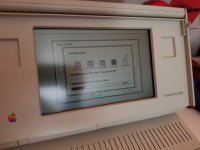
Hi all,
Got my portable board back, and put it all together and am having some error messages and funky stuff happening (After being recapped).
I am now starting to think that it is the "new" battery having of failed already and maybe be contributing.
With the portable plugged in and battery in, death chimes most of the time and error 01000A82 00001D02 comes up. If I press interrupt, then 03021300 00001FFA comes up. Then, if I press reset (After pressing interupt), 01000200 00001FBA comes up. On the seldom chance it makes a healthy chime, it goes to a blank screen with either a frozen or movable cursor in the top left corner, no floppy image.
???
Not really sure how to read error codes. Havent seen these ones posted either. Am I dealing with a dead battery symptom? Wouldnt it still boot with it being plugged in, or does having a run into the ground dead battery put too much strain and cause it not to boot? Is it something else??
Floppy drive unplugged, no hard drive installed, no cards installed. Non backlit. Recapped board by a pro, tested and confirmed working after recapped. Cleaned. No smoke smell or smoke visible, or excess heat anywhere.
Battery came with it when I bought it two years ago. Its a black 3D printed case. Have had it plugged in for a few hours now... Started out at 2.18 volts (Tested on digital multimeter at 20VDC) and after a few hours its at 2.71 and wont go any higher, which makes me think this battery is completely dead. Using stock power adapter that puts out correct voltage. Quite a difference between the needed 6V and 2.71.
Any ideas folks? First portable and first time ive ever had an issue like this with one of my macs.
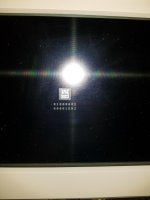
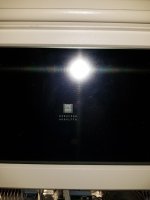
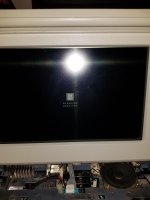
Got my portable board back, and put it all together and am having some error messages and funky stuff happening (After being recapped).
I am now starting to think that it is the "new" battery having of failed already and maybe be contributing.
With the portable plugged in and battery in, death chimes most of the time and error 01000A82 00001D02 comes up. If I press interrupt, then 03021300 00001FFA comes up. Then, if I press reset (After pressing interupt), 01000200 00001FBA comes up. On the seldom chance it makes a healthy chime, it goes to a blank screen with either a frozen or movable cursor in the top left corner, no floppy image.
???
Not really sure how to read error codes. Havent seen these ones posted either. Am I dealing with a dead battery symptom? Wouldnt it still boot with it being plugged in, or does having a run into the ground dead battery put too much strain and cause it not to boot? Is it something else??
Floppy drive unplugged, no hard drive installed, no cards installed. Non backlit. Recapped board by a pro, tested and confirmed working after recapped. Cleaned. No smoke smell or smoke visible, or excess heat anywhere.
Battery came with it when I bought it two years ago. Its a black 3D printed case. Have had it plugged in for a few hours now... Started out at 2.18 volts (Tested on digital multimeter at 20VDC) and after a few hours its at 2.71 and wont go any higher, which makes me think this battery is completely dead. Using stock power adapter that puts out correct voltage. Quite a difference between the needed 6V and 2.71.
Any ideas folks? First portable and first time ive ever had an issue like this with one of my macs.
Last edited by a moderator:








 p8AAOSwMsVXjEow:rk:1
 f:0
f:0