



Hi everyone, to build on my post over in the Conquest section here is my newly acquired Mac SE! It seemingly has had some upgrades like a 500MB HDD and 8MB of RAM, maybe some other stuff?
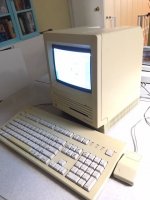
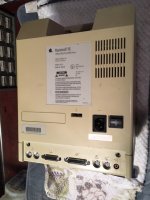
Condition is overall pretty good, and it boots and runs fine. The first time I powered it up the screen display was 100% perfect, no issues. Unfortunately, it's developed a weird video issue that seems to be getting worse each time I start it up so I'm trying to figure that out before I play around with it any more. It's not displaying certain pixels, and is especially apparent when there is a large block of black pixels present (especially on the shutdown screen). Here's an example:
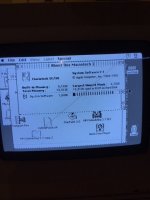
You can see it clearly on the RAM use bar next to System Software but it's all over the place sadly. Here's a video that will hopefully be helpful:
https://youtu.be/LWQh9xyfnew
I've looked at the repair guides pinned here but I'm not really sure what to even call this issue in order to diagnose it. Any advice on where to begin would be hugely appreciated, thanks!
Condition is overall pretty good, and it boots and runs fine. The first time I powered it up the screen display was 100% perfect, no issues. Unfortunately, it's developed a weird video issue that seems to be getting worse each time I start it up so I'm trying to figure that out before I play around with it any more. It's not displaying certain pixels, and is especially apparent when there is a large block of black pixels present (especially on the shutdown screen). Here's an example:
You can see it clearly on the RAM use bar next to System Software but it's all over the place sadly. Here's a video that will hopefully be helpful:
https://youtu.be/LWQh9xyfnew
I've looked at the repair guides pinned here but I'm not really sure what to even call this issue in order to diagnose it. Any advice on where to begin would be hugely appreciated, thanks!





